

 HELP
HELP


VERIFIED REVIEWS


About hiring a car with Enterprise in Tampa
Best Car Rental Deals

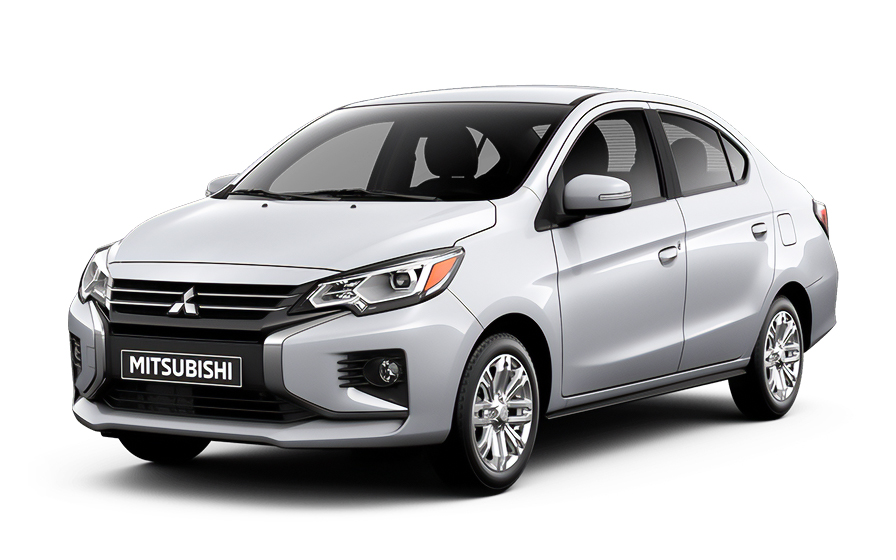
Mitsubishi Mirage | Automatic
SMALLor Small similar
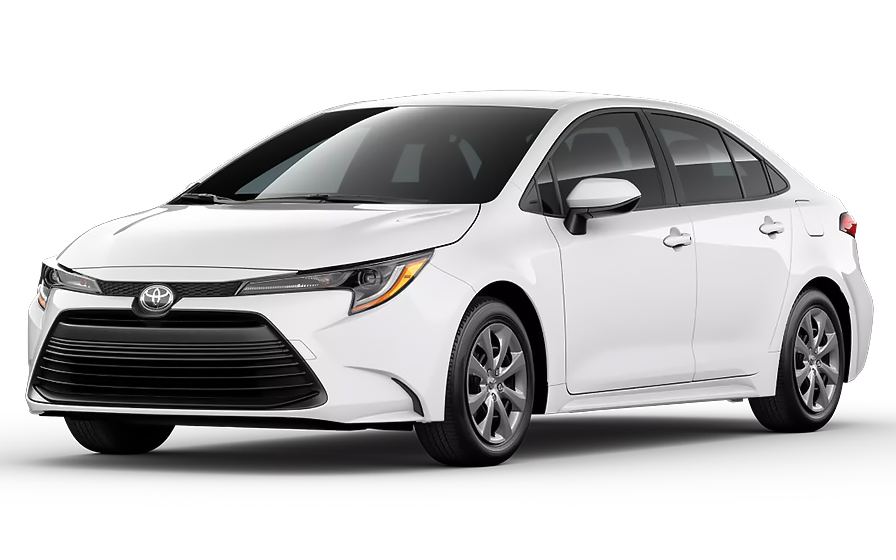
Toyota Corolla | Automatic
SEDANor Sedan similar

Jeep Wrangler Unlimited | Automatic
SUVor SUV similar

Chrysler Pacifica 7 Passengers | Automatic
MINIVANor Minivan similar
Frequently Asked Questions
What does my Hola Car Rentals booking with Enterprise in Tampa include that other companies don't offer?
Hola Car Rentals is the only premium partner of the top car hire brands operating in Tampa, giving you exclusive access to our All Inclusive+ rate. This rate includes benefits that no other company can match:
- Free liability coverage starting at US$ 300,000 in case of an accident (applies only to certain rates and itineraries)
- Toll cashback: recover up to 5% of the reservation's total value for toll charges incurred during your hire period
- Premium travel medical assistance providing up to US$ 150,000 in coverage for a maximum of 5 passengers in case of a medical emergency, excluding pre-existing conditions
- No Extra Charges© guarantee: if the counter charges you for something not listed on your confirmation and not an optional add-on you accepted, Hola Car Rentals will work to remove or reimburse the charge after verification
All of this comes at no extra cost, ensuring a fully protected car hire experience and peace of mind throughout your trip in Tampa.
Will I face unexpected charges at the Enterprise counter in Tampa when I book through Hola Car Rentals?
No. With Hola Car Rentals, all costs and charges for your booking in Tampa are clearly shown at the time of reservation and in your confirmation email, so you know exactly what you are paying before you arrive at the counter.
On top of that, every Hola Car Rentals booking includes the No Extra Charges© guarantee. This is a pricing guarantee (not insurance) that protects you if the counter in Tampa charges you for something that was not listed on your confirmation and was not an optional add-on you accepted. If that happens, Hola Car Rentals will work with the hire partner to remove or reimburse the charge after verification.
The only costs outside this guarantee are:
- Optional add-ons you choose at the counter (GPS, child seats, prepaid fuel)
- Usage-based charges (tolls, fuel shortfall, traffic fines)
How do I pick up my Enterprise hire car at Tampa International Airport?
At Tampa International Airport (TPA), the Enterprise counter is located at the on-site Rental Car Centre at 5405 Airport Service Rd, Tampa, GBP 33607. You do not need an external shuttle to reach it.
- After collecting your baggage, follow signs inside the terminal to the SkyConnect station.
- Board the free SkyConnect train, which runs continuously between the terminal and the Rental Car Centre.
- Exit the train and proceed directly to the Enterprise counter to complete paperwork.
- After signing the agreement, collect your vehicle from the assigned garage area within the same building.
Outside peak times, the full process from baggage claim to driving away typically takes 20 to 45 minutes. During busy periods such as weekends or holidays, allow up to 60 minutes or more due to counter queues. Using Enterprise online check-in before your arrival in Tampa can help reduce time at the counter.
What documents do I need to pick up my Enterprise hire car in Tampa?
To collect your Enterprise hire in Tampa, you must present the following physical documents at the counter. Digital copies are not accepted.
- A valid, original driver’s licence in the main driver’s name.
- A major credit card with the driver’s name printed on the card, used for the authorisation hold.
- A passport or valid government-issued photo ID.
- Your booking confirmation or printed voucher.
- Round-trip flight or cruise tickets (required for visitors travelling from abroad).
If your driver’s licence uses a non-Latin alphabet (for example, Arabic, Chinese, Japanese, or Cyrillic), an International Driving Permit (IDP) is mandatory alongside your original licence. For licences in other non-English scripts, an IDP is strongly recommended. The IDP is a translation only and cannot be used without the original licence.
Visitors arriving in Tampa from outside the United States should obtain their IDP in their home country before travelling, as it cannot be issued abroad.
Do I need an International Driving Permit to hire from Enterprise in Tampa?
It depends on your licence. Enterprise in Tampa follows standard U.S. rules for document requirements.
An IDP is mandatory if your driver’s licence uses a non-Latin alphabet, such as Arabic, Chinese, Japanese, or Cyrillic. In that case, you must carry both your original licence and the IDP at all times while driving in Tampa.
If your licence is in English or uses a Latin alphabet, an IDP is not strictly required, but it is recommended as a precaution since individual Enterprise counter agents may request one.
- The IDP is a translation booklet only. It is not a standalone licence and will not be accepted without your original licence.
- You must obtain your IDP in your home country before travelling. Organisations such as AAA in the United States do not issue IDPs to non-U.S. licence holders.
- All documents presented at the Enterprise counter in Tampa must be physical originals. Digital versions are not accepted.
How do tolls work when hiring from Enterprise in Tampa?
Tampa's toll roads, including the Selmon Expressway and regional expressways, are almost entirely cashless. Your Enterprise hire vehicle will include an electronic toll device or a plate-based billing system, so you will pass through toll gantries automatically.
At the Enterprise counter in Tampa, you will typically have two options:
- Unlimited toll package: Enterprise offers a TollPass programme at approximately US$4.95 per day when used. This covers your toll charges for that day without additional per-toll fees.
- Pay per use: If you decline the programme and drive through a toll, Enterprise will charge the toll amount plus administrative processing fees to your credit card, sometimes days or weeks after your hire ends.
Estimated daily toll costs in the Tampa area run approximately US$3 to US$10 depending on your route. If you plan to use your own visitor toll pass, inform the Enterprise agent at pickup so they can deactivate the vehicle's default device and prevent duplicate charges.
All bookings made through Hola Car Rentals include Tolls Cashback, which reimburses up to 5% of your total booking value for tolls paid during your Tampa hire. Submit your claim within 30 days of returning the vehicle.
Is there a young driver surcharge for under-25 renters at Enterprise in Tampa?
Yes, Enterprise in Tampa charges a young driver surcharge for renters between the ages of 21 and 24. The underage fee at Enterprise Tampa locations is GBP 25 per day in addition to the base hire rate.
Drivers under 21 are generally not permitted to hire from Enterprise in Tampa. Florida does not have the same exceptions as New York or Michigan, where hire companies are required by state law to hire to drivers aged 18 and older.
- The surcharge applies to the main driver and any additional driver under 25.
- Vehicle class restrictions also apply: categories such as full-size SUVs, premium, luxury, convertibles, and vans are typically reserved for renters aged 25 and older.
- Eligible classes for under-25 renters usually include economy, compact, intermediate, and compact SUV categories.
If you are between 21 and 24 and hiring from Enterprise in Tampa, Budget for this daily fee and confirm eligible vehicle classes when booking.
How does the Tolls Cashback benefit work for Enterprise hires in Tampa?
Every booking made through Hola Car Rentals, including Enterprise hires in Tampa, includes Tolls Cashback. This benefit reimburses up to 5% of your total booking value for tolls you pay during your hire period.
Tampa's toll roads such as the Selmon Expressway are cashless, so tolls will be charged automatically through your Enterprise vehicle's toll device or plate billing. You still pay those tolls normally, and then claim the cashback afterwards.
To claim your Tolls Cashback after your Tampa hire:
- Email [email protected] within 30 days of returning the vehicle.
- Use the subject line: Tolls Cashback, followed by your reservation confirmation number.
- Attach your Hola Car Rentals confirmation, the Enterprise hire agreement, and a toll invoice or statement showing charges paid.
Example: If your booking total is US$400, the maximum cashback is US$20. If you paid US$14 in Tampa tolls, you receive US$14 back. If you paid US$30, you receive US$20 (the cap). Refunds are processed to your original payment method within 7 to 10 working days after approval.
How do I add an additional driver to my Enterprise hire in Tampa?
Yes, you can add an additional driver to your Enterprise hire in Tampa, but the additional driver must be physically present at the counter at the time of pickup. They cannot be added remotely or after the vehicle has been collected.
- Enterprise in Tampa charges GBP 15 per day for each additional driver.
- The additional driver must present a valid driver’s licence and meet the same age and document requirements as the main driver.
- If the additional driver is under 25, the young driver surcharge of GBP 25 per day also applies to them.
- Both the main driver and the additional driver must sign the hire agreement at the Enterprise counter.
Only drivers listed on the hire agreement are covered by protections such as CDW/LDW and liability cover. If someone drives the Enterprise vehicle in Tampa without being named on the contract, those protections may be void and additional charges could apply.
Check your booking confirmation before arriving at the Tampa counter, as some Hola Car Rentals rate plans include one additional driver at no extra cost.
What credit card do I need for the security deposit at Enterprise in Tampa?
Yes, a physical major credit card in the main driver’s name is required at the Enterprise counter in Tampa for the authorisation hold. Debit cards, prepay cards, and virtual or digital-wallet-only cards are not accepted for this purpose.
- The card must have the driver’s name printed on it and must be presented physically at the counter.
- In the United States, Enterprise typically places a hold of approximately US$300 to US$400 on the card, though the exact amount varies by vehicle class and location.
- The hold reduces your available credit until it is released after you return the vehicle. Your bank controls the release timeline, which can take up to 15 working days.
- Even if you prepaid your booking, you must still present a physical credit card at the Tampa Enterprise counter for the deposit hold.
Before arriving in Tampa, notify your bank of your travel plans to prevent the authorisation from being flagged as suspicious. Bringing a backup credit card in your name is also recommended in case your primary card is declined.
What insurance cover do I need for my Enterprise hire in Tampa?
When hiring from Enterprise in Tampa, two main types of cover are worth understanding before you arrive at the counter.
Collision Damage Waiver (CDW) or Loss Damage Waiver (LDW) covers damage to the Enterprise hire vehicle itself from a collision, theft, or vandalism. A deductible may apply unless your confirmation explicitly states zero. CDW/LDW does not cover damage you cause to other vehicles or people.
Third-Party Liability (LIS/ALI/SLI) covers bodily injury and property damage you may cause to others while driving in Tampa. Florida does not universally require hire companies to include state-minimum liability in every hire, so confirming this cover is important.
- CDW/LDW and LIS/ALI/SLI are separate protections and should be considered together.
- Only drivers named on the Enterprise hire agreement in Tampa are covered.
- Prohibited uses such as off-road driving, DUI, or unauthorised drivers void cover.
Review your booking confirmation to see which covers are included in your selected rate plan before reaching the Enterprise counter in Tampa.
How does the fuel policy work for Enterprise hires in Tampa?
Enterprise hires in Tampa follow a Full-to-Full fuel policy by default. You receive the vehicle with a full tank and must return it full to avoid fuel charges.
- At pickup, check the fuel gauge with the Enterprise agent and confirm the starting level is recorded on the hire agreement.
- Take a photo of the dashboard showing the odometer and fuel gauge before leaving the Tampa location.
- Refuel within approximately 10 miles of the return location so the gauge does not drop before you arrive.
- Keep your final fuel receipt showing the date, time, and station address.
If you return the Enterprise vehicle in Tampa with less than a full tank, you may be charged for the fuel shortfall at the partner's refuelling rate, which is typically higher than the pump price, plus a refuelling service fee.
For after-hours returns at Tampa International Airport, leave your fuel receipt in the key drop envelope and keep a photo of the full gauge on your phone as documentation.
How do I return my Enterprise hire car at Tampa International Airport?
Returning your Enterprise hire at Tampa International Airport (TPA) is straightforward since the Rental Car Centre is on-site.
- Enter the main airport road and follow signs directing you south towards the Rental Car Centre, located near the Economy Parking Garage.
- Drive into the return area and an Enterprise agent will check the vehicle, note the mileage and fuel level, and close out your contract.
- After returning the keys, take the free SkyConnect train from the Rental Car Centre back to the terminal to reach your departure gate.
Before returning, refuel near the Tampa airport approach roads, such as along I-275, to comply with the Full-to-Full fuel policy and avoid refuelling charges.
After-hours key drop is available at the Rental Car Centre if your flight departs outside Enterprise's staffed hours. In that case, leave the keys in the designated drop box and keep a photo of the fuel gauge and odometer as documentation. Note that liability for the vehicle may remain with you until Enterprise formally checks it in the next working day.
Can I pick up my Enterprise hire in Tampa earlier than my scheduled time?
It may be possible to pick up your Enterprise hire in Tampa earlier than your scheduled time, but it is not guaranteed and depends on vehicle availability at the Tampa location on that day.
Early pickup at Enterprise in Tampa is handled on a case-by-case basis at the counter. If a vehicle in your reserved class is available when you arrive, the agent may allow an early pickup. However, this can reprice your hire since the billing period may start from the new pickup time.
- Contact the Enterprise Tampa location in advance to ask about early availability.
- Review your booking confirmation to understand how a time change might affect your rate.
- If you arrive significantly earlier than your scheduled time, the counter queue may also be shorter, which can help speed up the process.
Keep in mind that Enterprise in Tampa will generally hold your reservation for up to 24 hours past the original pickup time if you are delayed. If your delay exceeds 24 hours, contact support as soon as possible to avoid losing your reservation.
Does Travel Assistance apply to Enterprise hires in Tampa?
Travel Assistance is included with most Hola Car Rentals bookings, including Enterprise hires in Tampa. However, this benefit applies only to travellers who are not residents of the United States or Canada. U.S. and Canadian residents do not qualify for this coverage.
For eligible travellers, the assistance is provided by Terrawind Global Protection and covers situations that can arise during your Tampa trip, such as:
- Medical cover for accidents or non-pre-existing illnesses, for up to 5 passengers.
- Legal assistance in the event of a road accident.
- Compensation for baggage lost by the airline.
- Flight cancellation insurance.
This cover does not apply to damage to the Enterprise hire vehicle itself (that is handled by CDW/LDW) or to third-party liability (covered by LIS/ALI/SLI).
If you need assistance during your Enterprise hire in Tampa, contact Terrawind 24 hours a day, 7 days a week. Have your Hola Car Rentals confirmation number ready when you call. Check your booking confirmation for the exact cover limits and terms that apply to your reservation.

- Choosing a selection results in a full page refresh.
- Opens in a new window.
Suggested Currencies
- $ USD - United States Dollar
- € EUR - Euro
Other Countries
-
 Albania
-
 Algeria
-
 Andorra
-
 Angola
-
 Antigua & Barbuda
-
 Argentina
-
 Australia
-
 Austria
-
 Bahamas
-
 Bahrain
-
 Bangladesh
-
 Barbados
-
 Belgium
-
 Belize
-
 Benin
Benin
-
 Bermuda
-
 Bolivia
-
 Bosnia & Herzegovina
-
 Botswana
-
 Brazil
-
 British Virgin Islands
-
 Bulgaria
-
 Burkina Faso
-
 Burundi
-
 Cameroon
-
 Canada
-
 Cape Verde
-
 Cayman Islands
-
 Central African Republic
-
 Chad
Chad
-
 Chile
Chile
-
 Colombia
-
 Comoros
-
 Congo - Brazzaville
-
 Congo - Kinshasa
-
 Costa Rica
-
 Côte d’Ivoire
-
 Croatia
-
 Curaçao
-
 Cyprus
-
 Czechia
-
 Denmark
-
 Djibouti
-
 Dominica
-
 Dominican Republic
-
 Ecuador
-
 Egypt
Egypt
-
 El Salvador
-
 Equatorial Guinea
-
 Eritrea
-
 Estonia
-
 Eswatini
-
 Ethiopia
-
 Finland
-
 France
-
 Gabon
Gabon
-
 Gambia
-
 Germany
-
 Ghana
Ghana
-
 Greece
-
 Grenada
-
 Guatemala
-
 Guinea
-
 Guinea-Bissau
-
 Guyana
-
 Haiti
Haiti
-
 Honduras
-
 Hong Kong SAR
-
 Hungary
-
 Iceland
-
 India
India
-
 Iraq
Iraq
-
 Ireland
-
 Israel
-
 Italy
Italy
-
 Jamaica
-
 Japan
Japan
-
 Jordan
-
 Kenya
Kenya
-
 Kuwait
-
 Latvia
-
 Lebanon
-
 Lesotho
-
 Liberia
-
 Libya
Libya
-
 Liechtenstein
-
 Lithuania
-
 Luxembourg
-
 Madagascar
-
 Malawi
-
 Mali
Mali
-
 Malta
Malta
-
 Mauritania
-
 Mauritius
-
 Mexico
-
 Moldova
-
 Monaco
-
 Montenegro
-
 Morocco
-
 Mozambique
-
 Namibia
-
 Netherlands
-
 New Zealand
-
 Nicaragua
-
 Niger
Niger
-
 Nigeria
-
 Norway
-
 Oman
Oman
-
 Palestinian Territories
-
 Panama
-
 Paraguay
-
 Peru
Peru
-
 Philippines
-
 Poland
-
 Portugal
-
 Qatar
Qatar
-
 Romania
-
 Russia
-
 Rwanda
-
 San Marino
-
 São Tomé & Príncipe
-
 Saudi Arabia
-
 Senegal
-
 Serbia
-
 Seychelles
-
 Sierra Leone
-
 Singapore
-
 Sint Maarten
-
 Slovakia
-
 Slovenia
-
 Somalia
-
 South Africa
-
 South Korea
-
 South Sudan
-
 Spain
Spain
-
 St. Lucia
-
 St. Vincent & Grenadines
-
 Sudan
Sudan
-
 Sweden
-
 Switzerland
-
 Taiwan
-
 Tanzania
-
 Togo
Togo
-
 Trinidad & Tobago
-
 Tunisia
-
 Türkiye
-
 Turks & Caicos Islands
-
 Uganda
-
 Ukraine
-
 United Arab Emirates
-
 United Kingdom
-
 United States
-
 Uruguay
-
 Vatican City
-
 Venezuela
-
 Yemen
Yemen
-
 Zambia
-
 Zimbabwe
Driving license from:
-
Albania
-
Algeria
-
Andorra
-
Angola
-
Antigua & Barbuda
-
Argentina
-
Australia
-
Austria
-
Bahamas
-
Bahrain
-
Bangladesh
-
Barbados
-
Belgium
-
Belize
-
Benin
-
Bermuda
-
Bolivia
-
Bosnia & Herzegovina
-
Botswana
-
Brazil
-
British Virgin Islands
-
Bulgaria
-
Burkina Faso
-
Burundi
-
Cameroon
-
Canada
-
Cape Verde
-
Cayman Islands
-
Central African Republic
-
Chad
-
Chile
-
Colombia
-
Comoros
-
Congo - Brazzaville
-
Congo - Kinshasa
-
Costa Rica
-
Côte d’Ivoire
-
Croatia
-
Curaçao
-
Cyprus
-
Czechia
-
Denmark
-
Djibouti
-
Dominica
-
Dominican Republic
-
Ecuador
-
Egypt
-
El Salvador
-
Equatorial Guinea
-
Eritrea
-
Estonia
-
Eswatini
-
Ethiopia
-
Finland
-
France
-
Gabon
-
Gambia
-
Germany
-
Ghana
-
Greece
-
Grenada
-
Guatemala
-
Guinea
-
Guinea-Bissau
-
Guyana
-
Haiti
-
Honduras
-
Hong Kong SAR
-
Hungary
-
Iceland
-
India
-
Iraq
-
Ireland
-
Israel
-
Italy
-
Jamaica
-
Japan
-
Jordan
-
Kenya
-
Kuwait
-
Latvia
-
Lebanon
-
Lesotho
-
Liberia
-
Libya
-
Liechtenstein
-
Lithuania
-
Luxembourg
-
Madagascar
-
Malawi
-
Mali
-
Malta
-
Mauritania
-
Mauritius
-
Mexico
-
Moldova
-
Monaco
-
Montenegro
-
Morocco
-
Mozambique
-
Namibia
-
Netherlands
-
New Zealand
-
Nicaragua
-
Niger
-
Nigeria
-
Norway
-
Oman
-
Palestinian Territories
-
Panama
-
Paraguay
-
Peru
-
Philippines
-
Poland
-
Portugal
-
Qatar
-
Romania
-
Russia
-
Rwanda
-
San Marino
-
São Tomé & Príncipe
-
Saudi Arabia
-
Senegal
-
Serbia
-
Seychelles
-
Sierra Leone
-
Singapore
-
Sint Maarten
-
Slovakia
-
Slovenia
-
Somalia
-
South Africa
-
South Korea
-
South Sudan
-
Spain
-
St. Lucia
-
St. Vincent & Grenadines
-
Sudan
-
Sweden
-
Switzerland
-
Taiwan
-
Tanzania
-
Togo
-
Trinidad & Tobago
-
Tunisia
-
Türkiye
-
Turks & Caicos Islands
-
Uganda
-
Ukraine
-
United Arab Emirates
-
United Kingdom
-
United States
-
Uruguay
-
Vatican City
-
Venezuela
-
Yemen
-
Zambia
-
Zimbabwe