


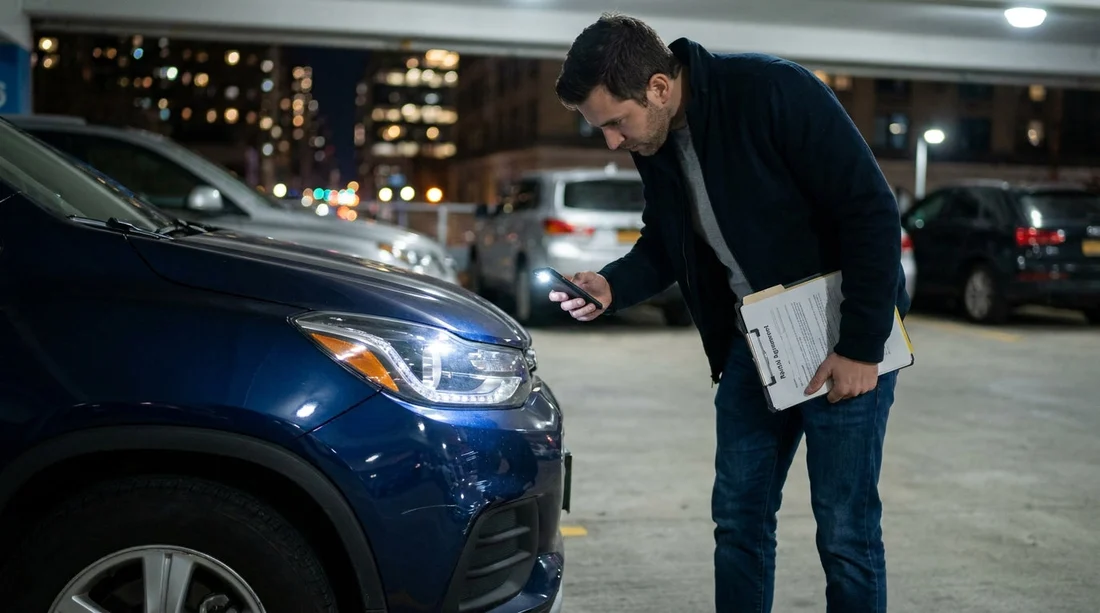
Quick Summary:
- Ask staff to move the car under brighter lights before inspection.
- Film a slow 360-degree walkaround with flash and spoken timestamps.
- Photograph every panel close-up, including wheels, glass, roof, and bumpers.
- Get damage notes added to paperwork, then keep copies and emails.
Picking up a car hire in New York after dark can feel rushed, especially at busy airport car parks and dimly lit garages. The problem is simple: if you cannot see existing scuffs, cracks, or dents clearly, you may struggle to prove they were there before you drove off. The solution is also simple: create a repeatable, counter-ready record that includes clear images, a verifiable time, and written confirmation.
This checklist is designed for low visibility. It focuses on what to capture, how to capture it, and how to tie your images to your rental paperwork so it is easy to present later if a dispute arises.
Before you reach the car, set up your phone for evidence
Do these steps at the counter, or while walking to the vehicle, so you do not waste time in the car park.
1) Clean lens, charge, storage, and settings. Wipe your camera lens, enable flash, and confirm you have enough battery and storage for a short video plus 30 to 50 photos. If your phone supports it, enable location tagging for photos. Avoid filters or portrait mode, they can blur edges that matter for scratches.
2) Make the time easy to prove. Take a screenshot of your lock screen showing the time and date, then take a photo of that screenshot displayed on your phone using a second device if you have one. If you only have one device, take a photo of a nearby digital clock or kiosk that clearly shows the date and time. This helps anchor your later images to the pick-up moment.
3) Start a single note titled with the contract number. Create a note with the rental agreement number, car make and model, registration plate, mileage, fuel or charge level, and the pick-up location. This text record helps you stay organised when you upload photos or speak to an agent.
If you are collecting near JFK, the process and lighting conditions can vary by garage. Hola Car Rentals pages like car rental New York JFK and budget car hire New York JFK are useful for understanding the pick-up context and planning a few extra minutes for inspection.
At the counter, ask for light and time to inspect
When visibility is poor, the most effective step is to improve it. Before you accept keys, ask the agent what your options are if you find damage outside. Then ask for one of the following, in this order:
Move the car to better lighting. Request the vehicle be pulled into a brighter bay, near an entrance, or under a working lamp. A short relocation can reveal bumper scuffs, wheel rash, and mirror cracks that are otherwise invisible.
Permission to use your phone flash. Some indoor areas discourage flash for safety or staff comfort, but most will allow it for documenting condition. If flash is restricted, increase screen brightness and use continuous video light mode if available.
Time window for reporting. If they insist you leave quickly, ask what their policy is for reporting damage discovered within the first 10 to 30 minutes. Then document that policy in your note, including the staff member’s name if they provide it.
The night-time walkaround, video first, then photos
Start with a single, slow video. Video is harder to cherry-pick and it captures context, like lighting conditions and where the car was parked.
Step 1, record a 360 video with audio. Stand about two metres from the car, turn on flash or video light, and walk around the vehicle slowly. As you pass each corner, say out loud: the date and time, the location, and what you are filming. Then move closer and film each panel again at a shallow angle so scratches catch the light.
Step 2, photograph by zones. After the video, take still photos because they show fine detail. Use this order so you do not miss areas.
Front. Number plate, bumper corners, grille, bonnet edge, headlights and fog lights. Take close-ups of chips and any cracked plastic.
Driver side. Front wing, both doors, side skirts, mirror housing, door handles. Photograph reflections at an angle, they make dents more visible.
Rear. Boot or tailgate, rear bumper corners, tail lights, reverse camera area, exhaust surround. Rear bumper scuffs are common and often blamed on the last driver.
Passenger side. Repeat the driver side series. Include fuel door area and any scraping near the rear wheel arch.
Roof and windscreen. If you cannot reach the roofline, step back and angle the camera up with flash. Capture windscreen chips, A-pillars, and sunroof glass if present.
Wheels and tyres. Photograph each wheel straight on, then from a 45 degree angle to show kerb rash. Capture tyre sidewalls for gouges or bubbles.
Interior. Seats, dashboard, infotainment screen, steering wheel, headliner, carpets, boot lining. Document stains, tears, warning lights, and missing accessories.
Paperwork, timestamps, and getting damage acknowledged
Photos alone help, but the strongest record connects images to the rental agreement and the vehicle identifiers.
Photograph the identifiers. Take clear photos of the registration plate, the VIN plate (often on the driver door jamb or windscreen), and the mileage and fuel or battery level. These prove the specific vehicle you received.
Compare with the condition report. Most car hire agreements include a diagram or digital condition report. If it is on paper, photograph every page. If it is on a screen, ask for it to be emailed and screenshot the screen showing any marked damage.
Add missing damage immediately. If you find unmarked damage, go back to the desk before you exit the lot. Be calm and precise. Point to your photo, describe the location, and ask them to add it to the report. If they refuse to amend, ask for a note on the contract such as “customer reported scratch rear bumper right, noted at pick-up”, then photograph the amended text.
Send yourself a time-stamped email. Attach a few key photos and write a short email to yourself summarising what you found, including the contract number and pick-up time. It creates an additional timestamped record that is difficult to dispute later.
If you are picking up from the Newark area and crossing into New York, the same documentation approach applies. See relevant Hola Car Rentals pages such as car hire Newark EWR and Thrifty car hire Newark EWR for location context and to plan enough time for inspection.
What to do if you discover damage only after leaving
Sometimes you only spot a scrape when you reach a brighter street. If that happens, pull over safely as soon as possible, take a new set of photos under the better light, and reference your earlier video that shows the pick-up time. Then contact the rental desk using the method they specify, and keep a record of what you sent and when. The key is to show you acted promptly and transparently.
FAQ
What is the single best way to document pre-existing damage at night?
Record a slow 360-degree video with flash and spoken date, time, and location, then take close-up photos of every issue. Video plus stills covers both context and detail.
Which areas are most often missed in poor lighting?
Lower bumper edges, wheel rims, mirror housings, roofline scratches, and windscreen chips are easy to miss. These areas sit in shadow or require a steep viewing angle.
Should I insist the agent marks every scratch on the condition report?
Yes, for anything clearly visible or larger than a minor surface mark. If they will not mark it, ask for a written note on the agreement and photograph that note.
How many photos are enough for a New York night pick-up?
Aim for one full walkaround video plus 30 to 50 photos, including identifiers, wheels, glass, and interior. More is fine if you stay organised by panel and corner.
What if I feel rushed at the car park exit?
Do the video first, it is the fastest complete record. If you must move the car, stop in a brighter, safe area nearby, finish photos, and report anything unmarked immediately.





























































































