


Quick Summary:
- Choose newer car classes and verify camera wording in the vehicle description.
- Add a written request in booking notes, and save the confirmation screenshot.
- Call the location to confirm how they label camera-equipped models.
- At the counter, check the VIN or model year before signing.
A rear-view camera is one of the most useful day-to-day safety features in modern vehicles, especially when driving unfamiliar roads, reversing in busy car parks, or manoeuvring around hotel drop-offs in Florida. The challenge with car hire is that you often book a class of vehicle, not a specific make and model, so the feature set can vary even within the same category. The good news is that you can reduce uncertainty by checking the car class details, adding clear notes to your booking, and confirming at the counter before you commit.
This guide explains a practical, step-by-step approach to confirming a rear-view camera when arranging car hire in Florida. It focuses on what you can verify online, what you should document, and what to inspect in person so you do not rely on assumptions.
Why a rear-view camera is not always guaranteed
Many travellers assume a camera is standard, because most new cars sold in the US include one. While that is often true, rental fleets can include slightly older vehicles, trims without certain options, or different infotainment systems depending on supply. Also, listings may describe general features for a class, rather than every individual vehicle. That is why you should treat “rear-view camera included” as something to confirm, not infer.
If you are collecting from a major airport location, fleets are usually newer and turn over faster, but that still does not guarantee the specific feature unless it is stated. For example, when comparing options around Orlando International, it helps to read the class descriptions carefully on pages such as car hire at Orlando MCO rather than relying on a generic expectation.
Step 1: Use car class as your first filter
Start by filtering vehicle classes where a camera is most likely. In practice, the probability increases with newer model years, higher trims, and categories that commonly include modern infotainment.
Compact, intermediate, and standard newer models, particularly when the listing references a touchscreen, Apple CarPlay, Android Auto, or driver assistance features. Those systems frequently integrate a camera feed.
Full-size, premium, and SUV categories, where cameras are common due to larger vehicle size and higher specification.
Minivans and passenger vans, which often include cameras because they are designed for family use and easier parking. If you are considering larger vehicles near South Florida airports, the broader category details on van rental in Fort Lauderdale FLL can help you compare what is typically offered in that segment.
What to avoid: the cheapest economy classes and older “manager’s special” style categories can be more variable. You can still find cameras there, but it becomes less predictable.
Step 2: Read the listing wording like a contract
When you view a car hire option, look for explicit, feature-level wording. The most helpful phrases include “rear-view camera”, “backup camera”, “reversing camera”, or “camera for parking”. If none of these are mentioned, the camera might still exist, but you should treat it as unconfirmed.
Also check whether the page is describing the exact car shown in the image. Many booking screens display a representative photo. If the copy says “or similar”, you should focus on the written features list and not the photo.
Pay attention to any exclusions or disclaimers such as “features may vary by vehicle”. That language is a cue to tighten your confirmation process, rather than a reason to ignore the issue.
If you are comparing different suppliers for Miami, you may see variations in how they present class details. Reviewing a supplier-specific page like Budget car hire in Florida MIA can help you spot whether one operator lists equipment more explicitly than another.
Step 3: Add a clear note and keep evidence
If the booking flow allows special requests or notes, use it. Keep the note short, specific, and unambiguous. For example: “Please allocate a vehicle with a rear-view (reversing) camera.” Avoid vague wording like “safety features” because it is hard to action.
Save proof. Take a screenshot or download the confirmation page showing your note. This is not about arguing later, it is about giving the counter agent something concrete to work with.
Check the confirmation email. If the note is not reflected, add it again via any “manage booking” area, or call the location. Notes do not always transfer perfectly between systems, so redundancy helps.
Step 4: Confirm directly with the pick-up location
Calling the pick-up location can be surprisingly effective, especially for airport branches with large fleets. Your goal is not to ask them to promise a specific model, but to confirm what is realistic for the class you chose and what language they use internally.
Ask three practical questions. Do vehicles in this class consistently have a rear-view camera, how can you identify camera-equipped vehicles at the counter, and if the allocated vehicle lacks a camera, what are your options?
If you are collecting in Miami, cross-checking the broader location information on car rental Florida MIA can help you plan for queue times and reduce pressure at the counter, which makes it easier to do careful checks.
Step 5: Know what you can verify before signing
Many travellers only discover the camera situation after leaving the car park. Instead, build a two-minute inspection into your handover routine, before you sign or before you exit, depending on how the location operates.
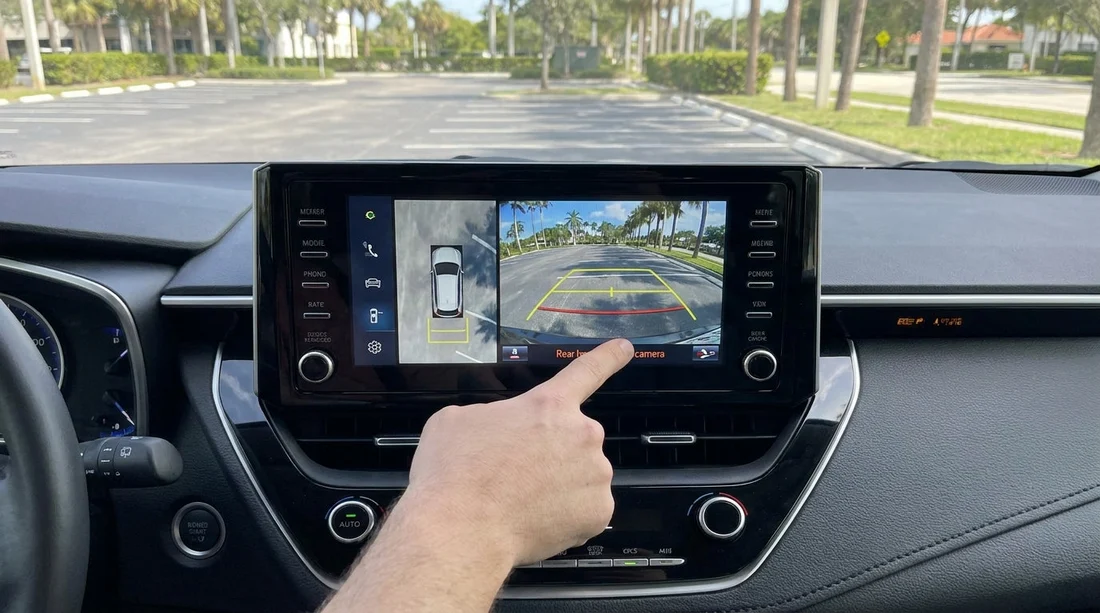
The centre display. Start the vehicle and shift into reverse with your foot on the brake. A rear-view camera should display an image, often with coloured guidelines. If the screen stays on audio, navigation, or a blank interface, ask the agent to verify whether the camera is present or disabled.
Look for the lens. Many cars have a small camera lens near the boot latch or within the tailgate handle area. While this is not foolproof, it is a fast clue.
Settings menu. Some systems allow camera toggles or parking assist settings. If the camera exists but does not display, it might be an infotainment fault. In that case, request a swap before you leave.
Step 6: Use counter checks to avoid last-minute surprises
When you reach the counter, be calm and specific. Mention your request and ask them to confirm the allocated car has a rear-view camera before finalising paperwork. If the agent is unsure, ask whether they can check the vehicle in the bay or adjust the allocation.
If the location is busy, you may be offered an alternative vehicle in the same class. This can solve the issue quickly, but you should still do the reverse-gear display check yourself.
If you are offered an upgrade, make sure you understand whether there is any additional cost, and keep the conversation focused on the feature you need rather than accepting a different class without clarity.
Step 7: Have a back-up plan if a camera is essential
If a rear-view camera is essential for your trip, for example due to confidence, mobility considerations, or frequent reversing in tight spaces, build redundancy into your plan. Choose a class where cameras are highly standard, pick up earlier when possible, and allow time for a swap if the first allocation does not meet your requirement.
If your schedule includes Tampa, comparing vehicle categories in advance on National car hire Tampa TPA can help you choose a class where modern safety tech is more consistently included.
FAQ
Do rental companies in Florida guarantee a rear-view camera if it is not listed? Usually not. If it is not stated in the features, treat it as unconfirmed and verify through notes and counter checks.
Is a rear-view camera the same as parking sensors? No. Sensors provide audible or visual distance warnings, while a rear-view camera shows live video behind the vehicle.
What wording should I look for when arranging car hire? Look for “rear-view camera”, “backup camera”, or “reversing camera” in the included features, not just in the vehicle image.
Can I check for a camera before leaving the airport car park? Yes. Start the car, keep your foot on the brake, shift into reverse, and confirm the camera image appears on the screen.
What should I do if the allocated car does not have a camera? Ask the counter or bay staff to swap within the same class, or discuss alternative classes, before you accept the vehicle.

























































































