


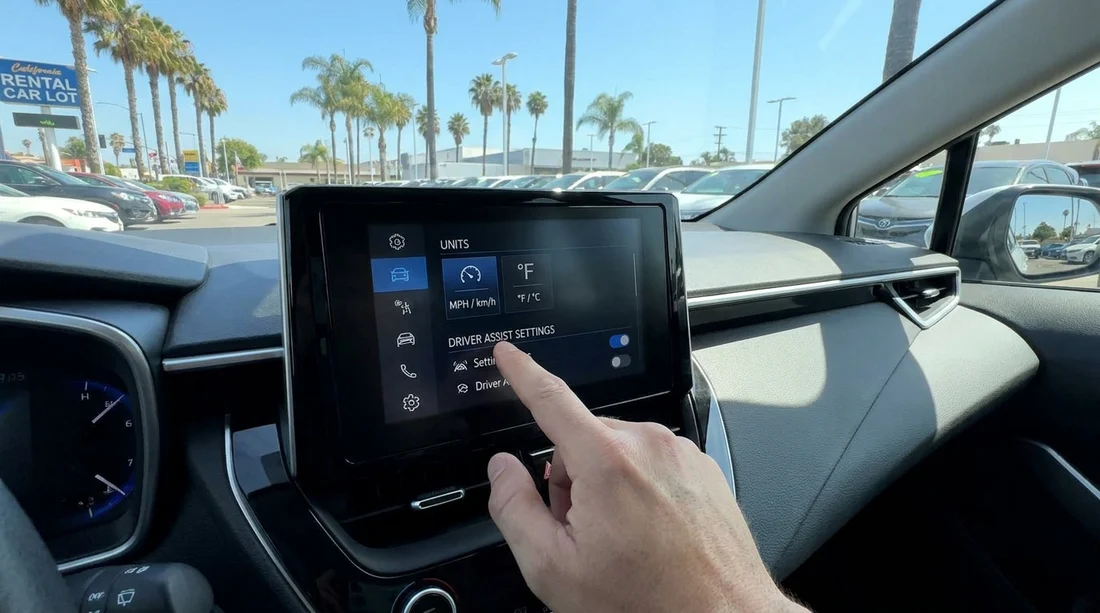
Quick Summary:
- Switch instrument units to mph and confirm any speed limit display.
- Set cabin temperature to Fahrenheit and check auto climate behaviour.
- Test headlights, wipers, and high beams before pulling into traffic.
- Review lane assist, cruise control, and parking sensors, then adjust alerts.
Picking up a car hire in California can feel deceptively simple until you roll out of the car park and realise the speed readout, climate controls, or driver aids are not set how you expect. A two minute pre-drive check helps you avoid fumbling for menus at the first junction, and it reduces the risk of accidental high beams, overly loud safety chimes, or confusing cruise control behaviour.
Use the checklist below while stationary, ideally in the pick-up bay or a quiet corner of the car park. The exact steps vary by make and model, but the same core settings appear across most US rentals.
If you are collecting near the Bay Area, the pick-up flow can be busy at San Francisco SFO locations, so doing these checks before you join airport traffic is particularly helpful. Similar logic applies if you are collecting in Silicon Valley via San Jose SJC, where multi-lane roads appear quickly after leaving the terminal.
1) Set mph and speed related displays
In California you drive in miles per hour, so your first job is making sure the car’s primary speed display is set to mph. Many cars show mph and km/h together, but some imported models or previous renters may have flipped the main units.
Where to look: start with the instrument cluster settings menu, the infotainment “Units” menu, or steering wheel buttons labelled “Menu”, “Settings”, or a small icon that looks like a page list.
Speed units: mph should be the main unit, not km/h. If it only offers “US” versus “Metric”, choose “US”.
Speed limit sign display: if the car shows a detected speed limit, make sure it reads in mph and matches roadside signs. Camera-based recognition can be wrong, so treat it as a prompt, not a rule.
Trip and fuel economy units: miles, and mpg. This matters when comparing the car’s range estimate to your route.
2) Set temperature units and climate controls
US cars usually default to Fahrenheit, but previous users can switch to Celsius. Set the unit, then make the climate behaviour predictable.
Temperature units: in climate settings or general settings, pick Fahrenheit. If the car only offers “C” and “F” on the climate screen, tap until “F” appears.
Auto mode: if the car has “AUTO”, decide whether you want it on. Auto is convenient, but it can ramp the fan loudly or direct air to the windscreen unexpectedly.
Front and rear demist: locate both buttons. In coastal parts of California, windows can fog quickly when you first leave an air-conditioned terminal.
Recirculation: learn the icon. Recirculation can help in traffic, but leaving it on for long periods may cause fogging.
3) Lights, indicators, and wipers, make the basics muscle memory
Before you join traffic, physically practise the controls. In California you will often merge quickly, and you do not want your first attempt at headlights or wipers to be at 65 mph in spray from a lorry.
Headlights: check whether the switch is on “AUTO”, “ON”, or “OFF”. Auto is usually fine, but confirm the daytime running lights behaviour and how to turn full headlights on if needed.
High beams: practise the high beam action. In many cars it is a push or pull on the indicator stalk, and it is easy to trigger by mistake.
Wipers and washers: test a single wipe and find the washer function. If the car has rain-sensing wipers, learn how to adjust sensitivity so it does not wipe a dry screen.
If you are starting a longer drive inland from Sacramento SMF, the conditions can change from sunshine to glare, dust, or sudden rain. Familiarity with wipers and lights makes those transitions calmer.
4) Driver aids, decide what you want on, and set the alerts
Modern rentals commonly include lane keeping assist, forward collision warnings, adaptive cruise control, blind spot monitoring, and parking sensors. These systems can be helpful, but they can also surprise you if their sensitivity is set high, or if you misunderstand what “assist” really means.
Lane keeping and lane departure: find out whether it nudges the steering wheel, vibrates, beeps, or all three. If the steering input feels too strong for your comfort, look for settings like “assist”, “warning only”, “early/normal/late”, or “low/medium/high”. In California, wide lanes and older road markings can make some systems behave inconsistently, so you want predictable feedback.
Adaptive cruise control: check whether standard cruise is available, or whether adaptive is the default. Practise setting it while stationary by reading the steering wheel buttons, and set the following distance to a sensible middle setting. Do not rely on it in heavy stop-start traffic until you understand how it brakes and resumes.
Automatic emergency braking and forward collision alerts: these are normally best left on. If the warning chime is startling, reduce the alert volume if the menu allows, rather than disabling the system.
Blind spot monitoring: confirm whether the warning is a mirror light, a sound, or a steering correction. Remember it is an aid, not a substitute for shoulder checks.
5) Navigation, phone, and audio, set up without distraction
This is not strictly about mph or driver aids, but it prevents the most common first-mile distraction, fiddling with Bluetooth while trying to follow signs.
Phone pairing: connect Bluetooth, or plug in for CarPlay or Android Auto. Confirm calls route through the car speakers.
Volume levels: set media volume and navigation prompt volume. Some cars store separate volumes, and the first spoken direction can be shockingly loud.
If you are travelling with more luggage or a larger group, a bigger vehicle can mean different mirror and sensor behaviour. When comparing options like van hire at San Jose SJC, it is worth budgeting an extra minute at pick-up to set mirrors, camera views, and parking alerts to your preference.
6) Final two minute safety check before you drive
Once the settings are done, run a quick wrap-up so you do not have to stop again immediately.
Seat, steering wheel, mirrors: adjust for a relaxed bend in your arms and clear mirror sightlines. If there is a memory button, save your position.
Doors and fuel: confirm all doors are closed and the fuel level matches your paperwork. Take a quick photo of the gauge and any warning lights that remain on.
Tyre pressure and warning lights: if a tyre pressure light is on, ask the desk before leaving. Do the same for any “service” or “inspection” messages that look unusual.
Parking brake and gear selector: confirm how to release the parking brake, and how to select Drive and Reverse. Electronic shifters can be unintuitive.
FAQ
Q: Why does my rental in California show km/h on the dashboard?
A: A previous driver may have switched units, or the car was imported. In the settings menu, choose “US” units or switch the speed display to mph, then verify trip units change to miles.
Q: Should I turn lane keeping assist off in a car hire?
A: If it distracts you, switch it to “warning only” or reduce sensitivity rather than fully disabling safety features. Keep both hands on the wheel, because lane systems can miss faded markings.
Q: My climate control shows Celsius, where do I change it?
A: Look under Settings, Units, or Climate settings on the infotainment screen. Some cars also let you toggle C/F by pressing and holding a climate button.
Q: What is the quickest way to check headlights are set correctly before leaving?
A: With the engine on, rotate the headlight switch through OFF, AUTO, and ON, and watch the dashboard headlight indicator. Practise the high beam motion on the stalk once.
Q: The parking sensors keep beeping in the garage, can I quieten them?
A: Many cars let you lower the parking alert volume in settings, or temporarily mute sensors with a “P” or cone icon button. Remember to re-enable them for street parking.































































































