


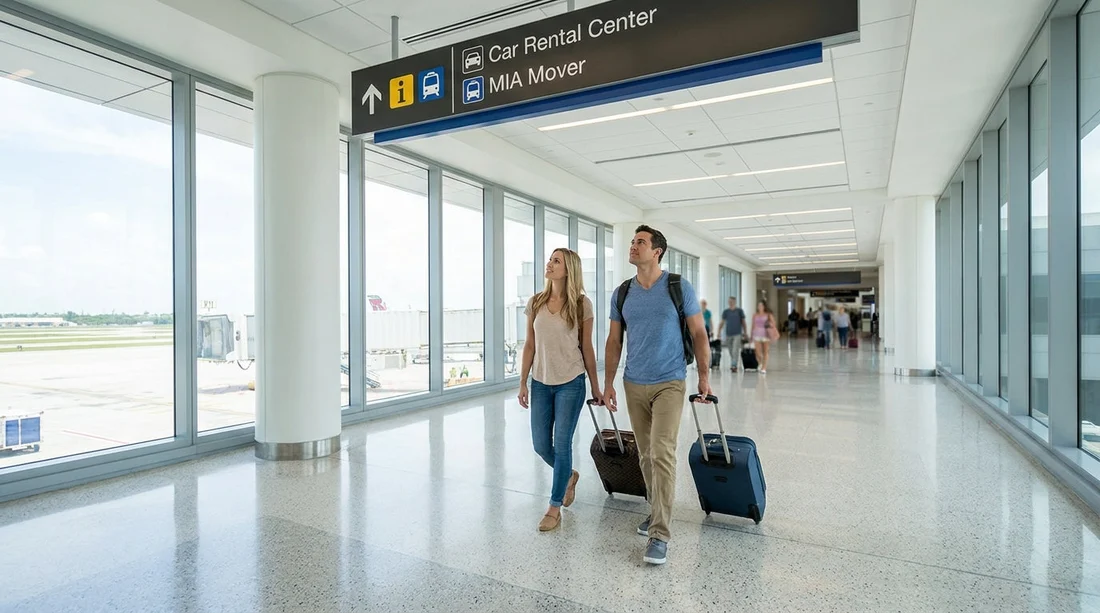
Quick Summary:
- Follow “Rental Car Center” signs from Terminal D to the MIA Mover.
- Ride the free MIA Mover to the Rental Car Center in about 3 minutes.
- Allow 15 to 25 minutes total from gate to car hire desks.
- Use moving walkways, stay airside until ready, then head to ground transport.
If you land at Miami International Airport (MIA) in Terminal D, the quickest way to reach the car hire centre is to follow the airport’s dedicated wayfinding for the Rental Car Center and take the free automated people mover called the MIA Mover. Terminal D is part of the North Terminal complex, and the route is designed for arriving passengers with luggage, with lifts, escalators, and moving walkways along the way.
The key is to think in two stages. First, get yourself from your arrival level in Terminal D to the MIA Mover station by following the “Rental Car Center” and “Ground Transportation” signs. Second, take the MIA Mover across to the Miami Airport Rental Car Center, where you will find the car hire desks, garage pick-up areas, and signposted exits for the main roads.
Step-by-step: Terminal D to the MIA Mover
Step 1, orient yourself after arrival. When you arrive into Terminal D, you may be on a concourse level depending on your gate. If you are connecting from another area of MIA, check overhead signs first. What you want to see is “Rental Car Center” and, often alongside it, “MIA Mover” or “Ground Transportation”. These signs are consistent throughout the airport and are the fastest way to stay on the right path.
Step 2, follow signs towards Ground Transportation. Keep walking in the direction of baggage claim and exits, even if you are not collecting luggage. If you are collecting checked bags, do that first, then continue following “Rental Car Center” signs. Expect long corridors, moving walkways, and a steady flow of other travellers doing the same route.
Step 3, aim for the MIA Mover station access. The MIA Mover station is connected to the terminal area by a dedicated walkway. You should see clear overhead signage for “MIA Mover” and “Rental Car Center”. If you reach the curbside pick-up area and cannot see MIA Mover signs, stop and look for the nearest bank of lifts or escalators and re-check the overhead wayfinding. The people mover is not a bus, it is an elevated train-like system, so you are looking for a station entrance rather than a kerb.
Wayfinding tip: At MIA, “Rental Car Center” is the wording to prioritise. “Car hire” may be used in travel guides, but on the airport signs the destination is typically “Rental Car Center”, and the transport system is “MIA Mover”.
Riding the MIA Mover to the Rental Car Center
Step 4, enter the MIA Mover station and go to the platform. The MIA Mover is free and runs frequently throughout the day. Follow platform signage and stay with your luggage. The system is designed for passengers, so you will find lifts, escalators, and wide gates where needed.
Step 5, take the MIA Mover to the Rental Car Center. The ride itself is short, roughly three minutes, but you should budget extra time for waiting and walking. Trains are frequent, so the wait is usually brief. Stay alert for announcements and signs indicating you are arriving at the Rental Car Center.
Step 6, exit into the Rental Car Center building. Once you step off, follow signs for “Car Rental” or specific brands. The centre is a large multi-level facility, so use the overhead directory boards to locate the correct bank of counters or the relevant floor for pick-up. If you are using Hola Car Rentals to compare options, you can review airport-focused information on Miami Airport car hire and general listings on car hire in Miami.
How long does it take from Terminal D to the car hire centre?
Most travellers should plan for 15 to 25 minutes from Terminal D to reaching the car hire desks, assuming normal passenger volumes and a typical walk. The MIA Mover ride is only a few minutes, but the overall journey time depends on where your gate is in Terminal D, whether you are collecting checked luggage, and how busy the walkways are.
As a practical breakdown, allow 5 to 12 minutes to walk from the terminal area to the MIA Mover station access, 0 to 5 minutes waiting, about 3 minutes on the MIA Mover, then another 3 to 8 minutes inside the Rental Car Center to reach your company’s desk and the correct floor for vehicle pick-up.
Key tips to make the route quicker and less stressful
Use the airport wording, not app wording. If your navigation app talks about “car hire centre”, translate that to “Rental Car Center” when following MIA signage. This avoids second-guessing at junctions.
Keep essentials accessible before you leave the terminal. Have your driving licence, payment method, and booking details easy to reach. This reduces rummaging once you get to the busy counter area.
Stay with the main flow of passengers. The majority of people heading to car hire will follow the same corridor and moving walkways. If you find yourself alone in a quieter area with fewer signs, pause and backtrack to the last clear “Rental Car Center” marker.
Know what you need after pick-up. If you are planning to drive into central neighbourhoods, it can help to choose a vehicle that suits city parking and traffic. For example, if you are heading towards Brickell or Downtown, you might compare locations such as Dollar car hire in Brickell or National in Downtown Miami. If your destination is west of the airport with larger roads and shopping areas, an option like SUV rental in Doral may suit your plans.
What happens once you arrive at the Miami Rental Car Center?
The Rental Car Center is a consolidated hub. That means many major rental brands operate in the same building, with a shared layout. You will typically do three things: find your company’s desk (or follow instructions for shuttle pick-up if required), complete the paperwork, then proceed to the garage level for your vehicle.
Pay close attention to the signs for your brand and the lift banks to the correct floor. Once you are at the vehicle area, you will usually select or be assigned a car, inspect it, then follow exit signs to leave the facility. If you are new to driving in Miami, take a moment to set your sat nav before you pull out, and note that the first few minutes can be busy as multiple lanes merge towards the exit.
Common mistakes from Terminal D, and how to avoid them
Mistake 1, heading to the wrong transport mode. Miami has several ground transport options, including ride-share and shuttles, but the quickest dedicated route to the car hire centre is the MIA Mover. If you see signs for taxis or ride-share and you still need the Rental Car Center, keep looking for “MIA Mover”.
Mistake 2, assuming the car hire desks are in Terminal D. At MIA, the consolidated facility is not inside Terminal D. You must leave the terminal area and take the people mover.
Mistake 3, underestimating walking time. The MIA Mover ride is short, but the walk from Terminal D can feel longer with luggage. If you are travelling with children or have reduced mobility, add extra time and use lifts rather than stairs to keep the journey steady.
FAQ
Q: Is the MIA Mover free from Terminal D to the car hire centre?
A: Yes. The MIA Mover is a free automated people mover that connects the terminal area to the Rental Car Center.
Q: Do I need to go outside to reach the Rental Car Center from Terminal D?
A: You mainly use indoor corridors and the MIA Mover system. You may pass near curbside areas, but you do not need an outdoor shuttle bus.
Q: How do I find the right counters once I arrive at the Rental Car Center?
A: Follow the overhead directories and brand signs inside the building, then use lifts or escalators to reach the correct desk area.
Q: How much time should I allow from arriving at Terminal D to reaching the car hire desks?
A: A realistic estimate is 15 to 25 minutes, depending on gate location, baggage collection, and passenger volumes.
Q: What should I do if I cannot see “MIA Mover” signs in Terminal D?
A: Look for the nearest overhead wayfinding boards and follow “Rental Car Center” or “Ground Transportation”, then re-check for “MIA Mover” at the next junction.































































































