


Quick Summary:
- Follow “Rental Car Shuttle” signs from baggage claim to the bus stop.
- Use your confirmation to note company, row, bay number, and vehicle class.
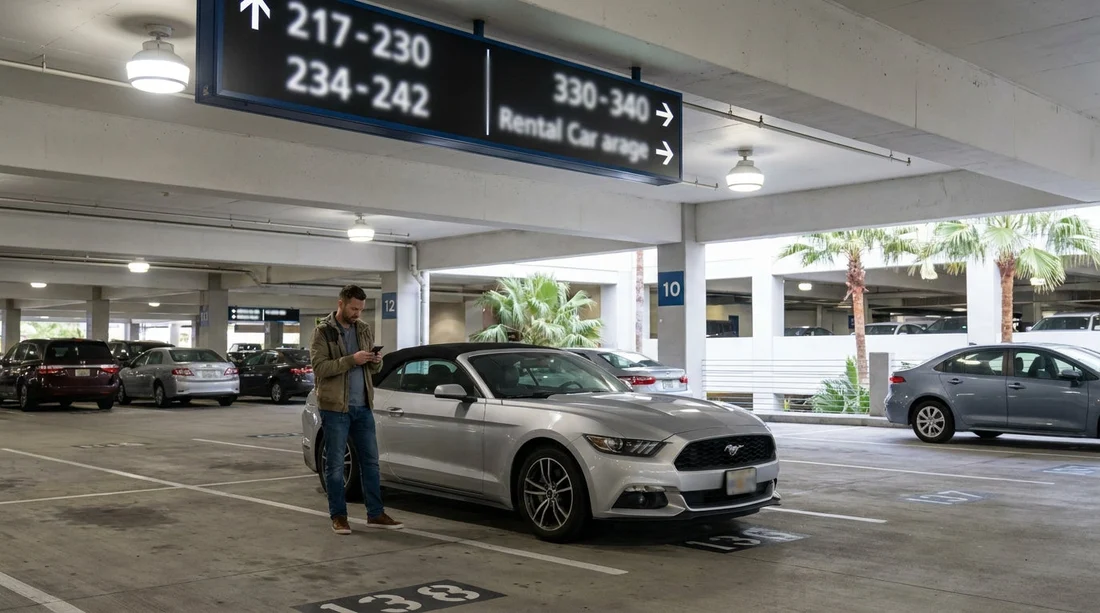
- At the centre, check overhead aisle signs to reach the correct bay.
- Match the licence plate and vehicle make to your assigned space.
Landing at Harry Reid International Airport (LAS) is exciting, but the first practical challenge is often simple, finding the right car hire bay and the exact vehicle you are meant to drive away in. The good news is that the LAS set-up is designed for fast flow, with consistent signage from the terminal to the car hire centre, and clear bay numbering once you arrive.
This guide walks you through the typical airport-to-centre journey, what to look for on signs, and the checks that help you confirm you are standing next to the correct vehicle, even if it is busy or you are arriving late.
If you are comparing options before you travel, Hola Car Rentals has location pages for LAS airport car rental and broader Las Vegas car rental information, but the steps below focus on the on-the-ground pickup process.
Step 1: From arrivals to the correct shuttle pick-up point
After you land, follow the standard passenger flow to baggage claim. The rental car operation at LAS uses shuttles to a dedicated car hire centre, so you will not usually walk directly to parking bays from the terminal.
Once you have your bags, look for overhead airport signs that read “Rental Car Shuttle”. These signs are typically placed at decision points, near exits and corridor junctions. If you are unsure, airport staff can point you to the right door for the shuttle area.
Outside, you will see marked bus stops and lane signage for rental shuttles. If multiple buses are present, check the destination text on the bus and any nearby wayfinding boards. At busy times, it can be tempting to board the first shuttle you see, but it is worth taking a few seconds to confirm it is for the Rental Car Center and not for a hotel, employee transport, or off-airport parking.
Step 2: On the shuttle, prepare the details that help you find your bay
The shuttle ride is the ideal time to get organised. Finding your vehicle quickly is easier when you already know the key identifiers before you step off the bus.
Have your reservation confirmation available on your phone, or a printed copy, and note the following:
Your rental company name. The car hire centre hosts multiple brands, and the first navigation step is reaching the right counters and garage area for your provider.
Vehicle class. For example, compact, intermediate, SUV, or minivan. Vehicle class is often tied to a particular aisle or zone, especially for self-serve pick-up.
Assigned bay, aisle, or stall number. Some providers assign a bay number at the counter or via the app, while others direct you to choose any vehicle in a class-specific aisle.
Pick-up instructions. Many companies give simple directions like “Proceed to Level X, Row Y”. Knowing this language helps you match it to overhead signs at the garage.
If your trip needs extra space, it can help to know where larger vehicles are typically staged. For context on larger options, see minivan rental at LAS, which can influence the aisle you will be directed to.
Step 3: Entering the car hire centre, follow the building wayfinding
When you arrive at the car hire centre, you will step into a busy, airport-style facility designed to funnel travellers through check-in and out to the garages. Expect clear directional signage for each brand, plus general signs for “Customer Service”, “Restrooms”, and “Returns”.
Your immediate goal is to align with your company’s branding and signs. If you need to visit the counter, head there first, since counter staff can confirm whether you have an assigned bay number, whether you are eligible to go straight to the garage, and which level and aisle apply.
Different brands and rates can affect the process. Some travellers check in at a staffed desk, while others use self-service kiosks or an app that assigns a stall. If you are using a major provider, it can help to read up on their typical pick-up flow ahead of time. For example, Hola’s pages on Budget car rental at LAS and Alamo car hire at LAS can give you an idea of what to expect at the centre.
Step 4: Understanding bay numbers, aisles, and zones
Once you are directed to the garage, you will usually see large overhead signs showing lane letters or numbers, plus smaller signs that narrow down to rows and individual bays. The exact layout can vary by provider and floor, but the logic is consistent, you move from general to specific.
Start with the biggest sign you can see. Look for aisle identifiers suspended from the ceiling, or mounted at the end of each lane. These are designed to be readable from a distance.
Match the wording on your instructions. If your paperwork says “Row B” and the overhead signs show “B”, you are in the right direction. If it says “Level 2”, confirm you are on that level before hunting for a stall number.
Use bay numbering to stop at the correct block. Bay numbers typically increase in a predictable direction. If your bay is 162 and you are standing next to 110, you should keep moving forward in the direction the numbers are rising.
Do not assume all bays are yours to choose from. Even if you see open stalls, some may be staged for other vehicle categories, loyalty tiers, or upcoming reservations.
Step 5: Confirm you have found the right vehicle, not just the right bay
Reaching the correct bay is only half the job. You also need to confirm the car itself matches your assigned reservation or selection rules. This matters because multiple vehicles can be parked close together, and some may look very similar.
Check the stall or hangtag details. Many providers place a printed slip on the windscreen, or show a barcode and stall number, and it may include the vehicle class and stock number. Compare this with what the counter or app provided.
Match the licence plate if you have it. Some check-in flows give the licence plate number, or at least a partial. Matching it is the fastest way to avoid taking the wrong vehicle.
Confirm make, model, and colour. If you were assigned a specific vehicle, confirm the make and model. If you were told to choose any in an aisle, ensure it is within the correct class or category for your booking.
Double-check the fuel and mileage display on the dash. Before leaving the bay, quickly note the fuel level and mileage, and ensure they align with your paperwork. If anything differs, it is easier to resolve while you are still in the garage area.
Step 6: If you cannot find your bay, use a simple troubleshooting loop
Even with good signs, issues happen, the bay may be temporarily empty, your assignment may have updated, or you may be on the wrong level.
Re-check the level and aisle. Most “missing car” situations are simply being one floor off, or one aisle over. Compare your instructions to the nearest large overhead signs.
Refresh your app or messages. Some companies update bay assignments in real time. If your bay number changed after you left the counter, your original note may be outdated.
Look for a roaming attendant. Staff in the garage can usually confirm where your class is staged, or radio to locate the vehicle. Describe the bay number you were given and your vehicle class.
Return to the counter only after checking signage again. Going back inside can cost time if the solution is a simple aisle correction. If you do return, bring your confirmation and any updated assignment details.
FAQ
Do I always get a specific bay number at the LAS car hire centre? Not always. Some providers assign a specific bay or stall, while others direct you to choose any car within a designated aisle for your booked class.
What signs should I follow from baggage claim to reach the shuttle? Follow airport wayfinding that says “Rental Car Shuttle”. It leads you out to marked bus stops for shuttles to the dedicated car hire centre.
How can I make sure I do not take the wrong vehicle? Confirm the bay number, then match the vehicle details, especially licence plate if provided, plus make and model. Check any windscreen tag or printed slip against your paperwork.
What if my assigned bay is empty when I get there? First confirm you are on the correct level and aisle, then refresh any app-based assignment. If it is still empty, speak to a garage attendant who can locate or reassign a vehicle.
Should I check the car before leaving the garage? Yes. Photograph existing damage, confirm fuel level and mileage against your agreement, and ensure the key works properly before driving to the exit gate.






























































































