


Quick Summary:
- Mount low on the windscreen corners, never in your direct line.
- Choose a centred dash mount that avoids vents, airbags, and controls.
- Avoid any placement that obstructs your view or encourages fiddling.
- Set up sat nav while parked before leaving the car hire location.
When you pick up car hire in Florida, it is tempting to stick your phone holder wherever it fits and pull away. The legal and practical issue is not just the mount itself, it is whether the phone and bracket obstruct your view, interfere with safe operation, or create a hazard around airbags. Florida rules are framed largely around obstruction and safe driving, rather than a single statewide measurement that suits every vehicle. That means your mounting choice should be conservative, consistent, and easy to defend if questioned.
This guide explains the safest, most widely accepted places to mount a phone holder in a Florida rental car, plus how to set up navigation before you leave the forecourt.
What Florida law is really concerned about
Florida’s key practical standard for windscreen and dashboard mounting is obstruction. If an object materially blocks the driver’s view of the road, it can contribute to a stop or citation, even if the item is not specifically named in a statute. Phone holders are usually treated like any other item attached to the windscreen or placed on the dashboard. The safest approach is to keep the holder out of the primary viewing area, keep it low, and keep it away from anything you need to see or reach quickly.
Another major concern is distracted driving. Florida bans texting while driving as a primary offence, which means an officer can stop a driver solely for texting. Set your route before moving off, and use voice guidance wherever possible.
If you are collecting a vehicle at car hire at Orlando MCO, do your phone setup in the pick-up bay or car park, not at the kerbside exit where you feel rushed. The same applies if you are starting in a dense area like car hire in Miami Beach, where traffic and pedestrians make the first few minutes particularly demanding.
Where you can mount a phone holder on the windscreen
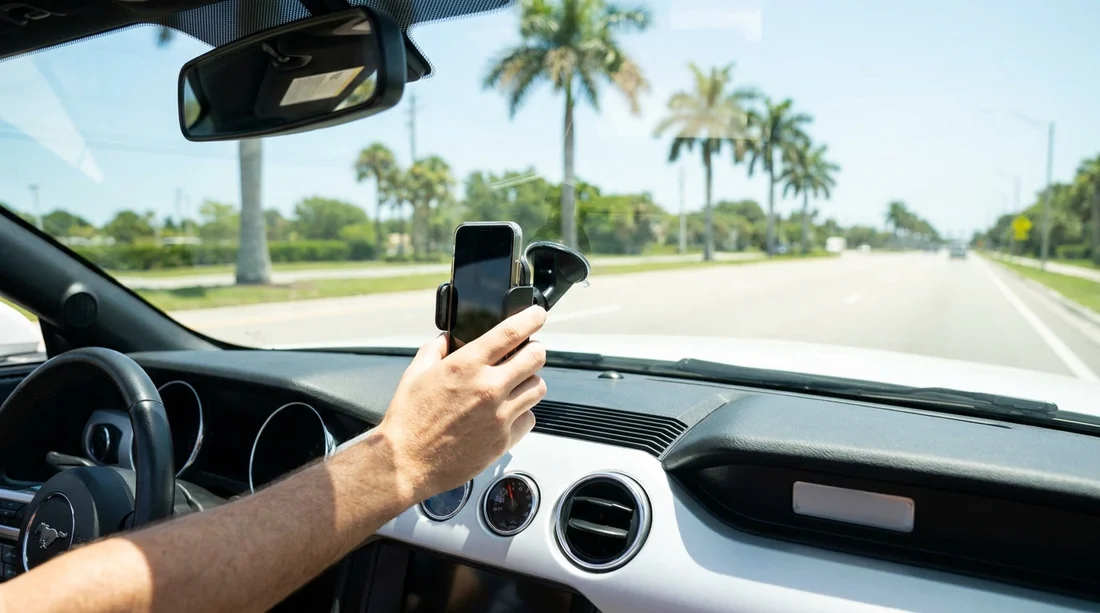
In practice, the most defensible windscreen locations are low and to the side, so the phone sits outside your normal forward field of view. Aim for the lower left corner (near the A-pillar) or lower right corner, depending on which hand you use and what the dashboard layout allows. Keeping it low also helps ensure the device does not block traffic lights, pedestrians, or your ability to scan junctions.
Avoid placing the holder in the middle of the windscreen, even if it feels convenient. A central mount tends to sit directly in the zone you use for hazard perception, and it can obscure vehicles, cyclists, or signage at precisely the wrong moment.
If your rental car has a tinted band at the top of the windscreen, do not treat that as a safe mounting zone. The issue is still obstruction, plus a high mount encourages longer glances away from the road. A low corner mount is usually the best compromise between legality, visibility, and reach.
Where you can mount on the dashboard
Dashboard mounts can be excellent for Florida car hire because they keep the windscreen clearer. The safest dashboard location is typically centred, low, and close to the infotainment area, so the phone sits near the line of sight you already use for speed and vehicle information. However, you must keep clear of airbags, vents, and controls.
Do not mount on top of the passenger-side dashboard where the airbag deploys. In many cars, the passenger airbag door is on the upper dash. A mount there can become a projectile in a crash, and can also interfere with deployment.
Also consider what you need to operate in Florida heat. If you block an air vent with a mount, you may reduce air conditioning flow, and the phone can overheat quickly. If you are using a vent clip, choose a vent that does not compromise demisting and does not direct freezing air straight into a phone camera module.
Airbags, sensors, and why rental cars change the rules
Rental vehicles vary widely. A compact car, a minivan, and a large SUV can have very different dash shapes, airbag locations, and screen layouts. For example, if you are travelling with family and luggage and choose a minivan rental in Brickell, you may find a broader dashboard and more storage areas, but also larger airbag zones and different vent positions.
Many modern cars also have driver-assistance sensors and camera modules near the mirror, and some have windscreen coatings that reduce suction performance. If a suction mount fails and drops into the footwell, it becomes a distraction and can interfere with pedals. That is another reason to pick a low, stable location and test it while still parked.
Best practice: set up sat nav legally before you leave
Even with a perfect mount, the way you set up navigation matters. Before you exit the car hire area, take a minute to do these steps while stationary: attach the holder firmly, connect charging, open your navigation app, enter the destination, and start guidance. Then lock the phone or leave it on the navigation screen, and rely on voice prompts.
If your rental has Apple CarPlay or Android Auto, it may be safer to run navigation through the car display, reducing the need to touch the phone at all. If you must change the route, pull over somewhere safe and park.
Common mounting mistakes that can get you stopped
The most common problem is obstruction, not the device itself. A mount that blocks any part of your view through the windscreen can be considered unsafe. Avoid large tablet style holders, and avoid positioning that obscures your view of pedestrians at crossings or vehicles approaching from the side.
Finally, do not ignore the car’s own controls. If the phone blocks hazard lights, demister buttons, or the gear selector area, it is not a good location. In a rental, you also want to avoid adhesives that can damage trim. Prefer suction or a non-slip pad designed not to leave residue, and remove it before you return the vehicle.
Choosing the right option for your trip in Florida
For travellers comparing providers, vehicle types, or pickup points, Hola Car Rentals location pages can help you plan ahead, such as car hire in Florida (MIA) or Thrifty car hire at Fort Lauderdale (FLL). Regardless of where you collect the keys, the safest legal habit is consistent: mount low, do not obstruct, and set everything up before the wheels roll.
FAQ
Can I mount a phone holder on the windscreen in Florida?
Yes, in practice you can, but you should place it so it does not obstruct your view. A low corner position is usually the safest choice for visibility and compliance.
Is it safer to mount on the dashboard instead of the windscreen?
Often yes, because it keeps the windscreen clearer. Just make sure the holder does not interfere with airbags, vents, or essential controls.
Where should I avoid mounting a phone holder in a rental car?
Avoid the centre of the windscreen, high near the mirror, and any dashboard area covering airbag panels. Also avoid blocking demisters, hazard lights, or the gear selector area.
Do I need to set up sat nav before driving away from car hire?
You should. Enter your destination, start guidance, and connect charging while parked. This reduces distracted driving risk and helps you leave smoothly.
What if the suction mount keeps falling off in Florida heat?
Clean and dry the glass, then try a lower position away from textured areas. If it still fails, switch to a dashboard or vent mount that stays secure without adhesives.




























































































