


Quick Summary:
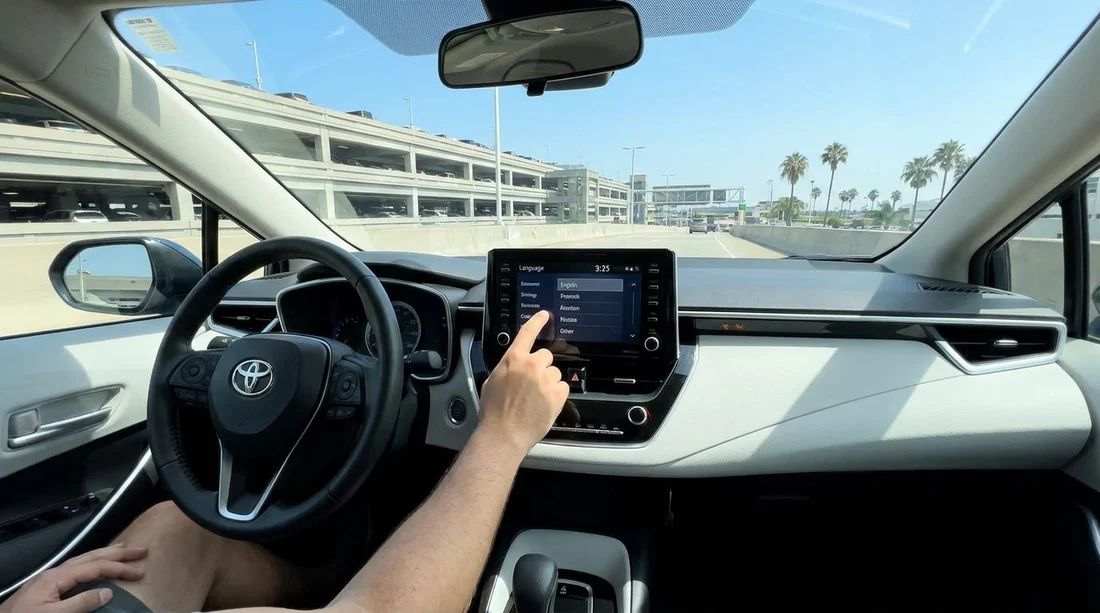
- Open Settings or Setup, then Language, and select English.
- Switch units to miles, Fahrenheit, and mpg for US driving.
- Set the clock to Pacific Time and confirm 12-hour display.
- Pair your phone, confirm navigation voice language, and save your profile.
Picking up a car hire at LAX can feel fast paced, especially after a long flight and a shuttle to the rental centre. Before you leave the car park and join Los Angeles traffic, take two minutes to set the dashboard language to English and confirm a few other key in car settings. These checks reduce distractions, help you follow prompts correctly, and make it easier to read speed and fuel information on unfamiliar roads.
Most modern rentals have two places where language can appear, the instrument cluster behind the steering wheel, and the infotainment screen in the centre. Changing one does not always change the other, so it is worth checking both while you are stationary with the vehicle in Park.
If you are arranging a car hire at the airport, Hola Car Rentals provides LAX focused options and guidance via Los Angeles LAX airport car rental, and California wide availability through California car rental from LAX. The steps below are brand agnostic so you can use them in most vehicles you collect.
Before you start, do a quick safety set up
Do the language change while parked, engine on or in accessory mode, with the handbrake engaged. If the car has a start button, press it without pressing the brake to enter accessory mode, or start the engine if the battery level seems low. Keep the driver door closed if the car chimes constantly, and take a moment to adjust the seat and mirrors first so you can comfortably see the screens you are changing.
Look for these common control types, because they determine where menus live. Some cars use a touchscreen with a physical home button. Others use a rotary controller, often near the gear selector. Many also have steering wheel buttons to navigate the instrument cluster menu. You may need to use both, one for infotainment language and another for the driver display language.
Change the infotainment system language to English
Start with the centre screen, because it usually controls navigation voice, media, and system prompts. The most common path is Settings, then General, then Language. Some vehicles label it Setup instead of Settings. If the screen is not in English, look for a gear icon, or a menu entry that resembles “system” or “general”.
Once you find Language, choose English. You may see multiple options such as English (US) and English (UK). Either is fine for readability, but English (US) may default to US units and date formats, which can reduce further changes. Confirm if the system asks to restart, some infotainment units go blank for 10 to 30 seconds while applying the new setting.
If you cannot find Language quickly, use a search function within Settings, if available, or press the Home button and look for a tile labelled Settings.
Change the instrument cluster language (driver display)
The instrument cluster is the screen behind the steering wheel, sometimes combined with analogue dials. It may show warnings, driver assistance messages, and trip information. Even if the infotainment is in English, cluster messages can remain in another language.
Use the steering wheel arrow keys and an OK or Select button to enter the cluster menu. Look for Settings, Vehicle Settings, or Display Settings. Then find Language. Select English and confirm. In some cars the cluster language is tied to a driver profile, so if you later switch profile, the language may change again. If you see Guest, Driver 1, or similar, set your preferred profile before changing language and then save it.
Set units, miles per hour, temperature, and fuel consumption
After language, the next most important change for driving in Los Angeles is units. In the US you will usually want miles, mph, and Fahrenheit. Many rentals coming from international fleets, or cars previously used by overseas visitors, may be set to kilometres or Celsius.
In Settings, look for Units, Measurement, or Regional. Set distance and speed to miles and mph. Set temperature to Fahrenheit. Fuel economy may show as mpg. Pick the one you understand instantly.
Do not rely only on the main screen. Some vehicles let you change units separately for the cluster and infotainment. After setting, glance at the speedometer. If it is digital, confirm it reads mph. If it is analogue, mph may be larger numbers on the outer ring, with km/h smaller inside.
Adjust the clock and date for Pacific Time
A wrong clock is more than an annoyance, it can cause confusion when you are planning hotel check in times, timed parking, or meeting schedules. In Settings, find Time and Date. Switch the time zone to Pacific Time if it is listed. Many systems can set time automatically from GPS or from your phone. If you see an “Auto time” toggle, enable it, then confirm it shows the correct local time.
Choose 12 hour or 24 hour display based on your preference. In the US, 12 hour time is common, but either is fine as long as you can read it quickly.
Set navigation language, voice guidance, and map preferences
If your car includes built in navigation, check that the voice guidance language matches the dashboard language. There is often a separate Voice or Navigation settings area where you can pick voice language, volume, and guidance frequency.
For travellers who prefer UK English terminology and familiar settings labels, Hola Car Rentals also maintains LAX pages such as car hire Los Angeles LAX, which can help you compare vehicle types and what to expect at pick up.
Check display brightness and driver assistance alerts
Los Angeles sun can wash out screens. Before you drive, turn up display brightness, then confirm auto brightness is enabled if available. If the car has a manual instrument dimmer wheel, set it so you can read the cluster clearly in daylight but not be dazzled at night.
If your car is an SUV, menu layouts can vary by trim level and screen size. If you are picking a larger vehicle, you may find it helpful to compare options via SUV rental at Los Angeles LAX or the UK page SUV hire Los Angeles LAX, then apply the same settings checklist when you collect the keys.
Pair your phone and confirm audio language prompts
Pairing your phone while parked is safer than doing it on the road. Enable Bluetooth on your phone, then open Phone or Connections on the car screen. Pair, approve the pairing code, and allow contacts if you want hands free calling. If you use Apple CarPlay or Android Auto, connect your cable or follow the wireless prompts. Once connected, confirm that navigation instructions, Siri or Google Assistant prompts, and any read aloud messages are in English.
Also set the audio source default. Some vehicles default to radio at a high volume. Lower it now so you do not get a surprise blast when you start driving.
Save settings to a profile and do a final confirmation
Many vehicles support a driver profile called Guest or Driver 1. If you can, save your settings so they persist after the engine is switched off. Look for a Profile icon or Users menu. Save language, units, time, and display preferences to that profile. In many rentals, Guest mode is safest.
Before you leave the bay, do a final check. Cluster messages read in English, speed is mph, temperature is Fahrenheit, and the clock is correct. Then set your first destination while still parked, whether it is your hotel, a fuel stop, or the exit route from the LAX rental facility.
FAQ
Why is the screen still not in English after I changed the setting? Some cars store language separately for the infotainment and the instrument cluster. Change language in both areas, then restart the car or the screen if prompted.
What if the Language menu is locked or greyed out? Ensure the vehicle is in Park with the handbrake on. A few systems restrict settings while moving, and some require the engine to be on rather than accessory mode.
Should I pick English (US) or English (UK) on a Los Angeles rental? Choose whichever you read fastest. English (US) may default to miles and Fahrenheit, which matches US road signage and weather.
How do I quickly confirm the car is showing mph, not km/h? Check the digital speed readout, or the analogue dial layout. In the US, mph is usually the larger scale, and the units setting should show miles.
Will my settings stay saved for the whole rental? Often yes, if you save them to a driver profile. If the car resets after ignition off, simply repeat the language and units steps before departing again.




























































































