


Quick Summary:
- Ask how tolls are billed, and whether a toll programme applies.
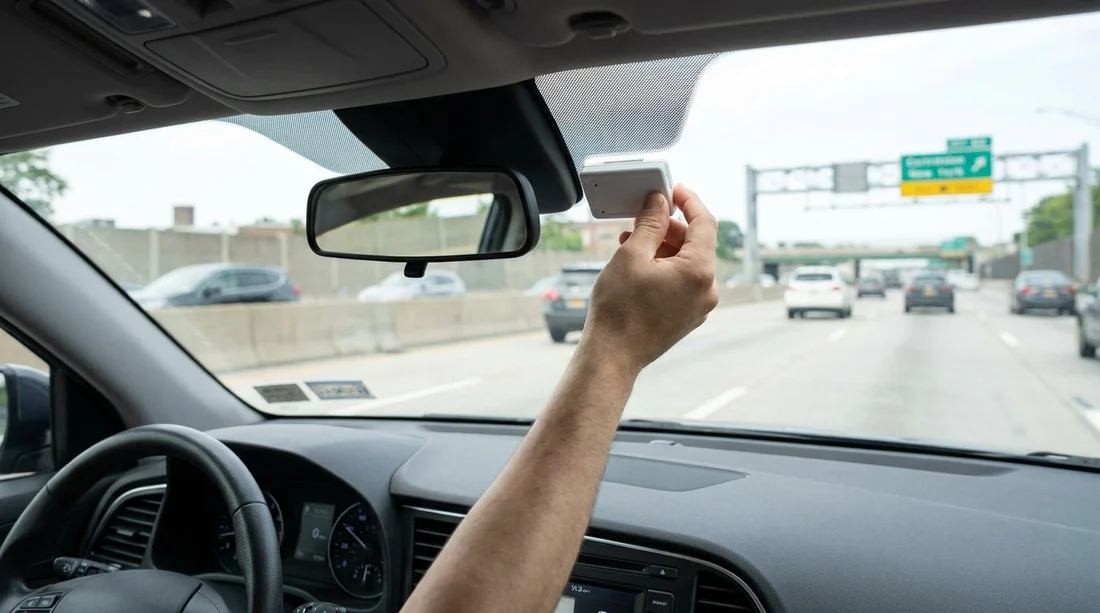
- Find the transponder near the mirror and check mounting condition.
- Confirm any switch is set to ON or Tolls, not OFF.
- Keep receipts or emails showing toll terms, to dispute double charges.
In New York, toll roads, bridges, and tunnels typically use cashless tolling, so your rental car’s E‑ZPass set-up matters before you even leave the car park. The main risk is not getting a ticket, it is being billed twice, once through the rental company’s toll programme and again via a personal E‑ZPass account or a separate plate-billed toll record. A quick, methodical check at the counter and in the vehicle helps you confirm whether the transponder is active and how charges will be handled.
This guide focuses on practical checks for car hire in New York, including what to ask at the desk, where to look for the device, how to read typical settings, and what agreement notes reduce billing surprises. If you are collecting near JFK, see location context and collection tips on car rental airport New York JFK and car hire New York JFK.
Why “active” matters, and what “active” can mean
When people ask whether an E‑ZPass transponder is active, they often mean one of three things: the device is physically present and readable, the rental company’s toll programme is enabled for your agreement, and the vehicle is configured to use the device rather than plate billing. You can have a transponder in the car that is not being used, or a toll programme enabled with no visible device because tolls are billed by number plate in some fleets.
In New York, using your own E‑ZPass with a rental vehicle can be permitted by your personal account rules, but it can also create conflicts with the rental company’s programme. The safest approach is to decide which method you will use, then confirm the car is set up to match that decision before you drive off.
Counter checks, confirm toll programme and avoid double-billing
Start with the paperwork and the agent’s explanation. Ask for the exact name of the toll option on your agreement and how charges appear. Look for terms like “toll pass”, “e-tolls”, “cashless tolling”, “convenience fee”, “admin fee”, “daily maximum”, or “per-day usage fee”. These terms tell you whether the rental company will automatically process tolls when the car passes through a gantry.
Next, confirm whether the vehicle has a physical transponder, or whether tolls are captured via licence plate. If a device is used, ask the agent to note the transponder number on your agreement or provide it in the checkout email. If tolls are plate-based, ask how to prevent your personal E‑ZPass being charged for the same trip, because plate reads can still post even if you did not intend to use them.
If you are collecting from an airport location and then heading towards New Jersey crossings, it is worth understanding which toll regime you will meet first and how the rental programme works across state lines. Collection notes can vary at EWR versus JFK, and you can compare airport pick-up expectations via car hire New Jersey EWR.
In-car checks, where to find the transponder and what to look for
Before leaving the pick-up area, sit in the driver’s seat and scan the windscreen area. The most common location is high on the windscreen near the rear-view mirror, either mounted directly to the glass or placed in a bracket. Some rental fleets use an integrated unit behind a tinted patch near the mirror, so it may look like a small box rather than the classic white E‑ZPass tag.
Mounting and orientation: It should be firmly attached and facing the correct direction, not loose in a glove box. A transponder lying flat in the cabin may not read reliably, which can trigger plate billing and fees.
Indicator lights or beeps: Some tags flash when they are read at a toll point, but you will not see that until you drive through. If the unit has a test button, press it and look for a brief light or status signal. If there is no response, it may be a dead battery or a disabled unit.
Switch or slider position: Certain rental units have an “ON/OFF” or “TOLL/NO TOLL” switch. If you intend to use the rental programme, make sure it is set to ON. If you intend to use your personal E‑ZPass, you may be instructed to set it to OFF and keep your own device properly mounted, but only do this if the rental company confirms it is acceptable and explains how their billing is prevented.
Vehicle information sticker: Some cars have a small sticker near the windscreen or dashboard describing toll device use, including whether it is active automatically. Take a photo for your records, along with the agreement.
Check the agreement notes against the device you see
The key anti double-billing check is consistency: the agreement’s toll option and the in-car set-up should match. If your paperwork says a toll programme is enabled, but you cannot find a transponder or any tolling instructions, return to the desk or exit booth staff and ask for clarification. Likewise, if you find a transponder with an ON/OFF switch but your agreement says you declined toll services, resolve it immediately.
If you are doing car hire that includes driving to New Jersey and need a larger vehicle, note that SUV fleets can have slightly different transponder placements or integrated systems. It can help to be aware of typical vehicle configurations when collecting through SUV hire New Jersey EWR.
What to do if you plan to use the rental toll programme
If you prefer a simpler approach, using the rental company’s toll programme can be straightforward, as long as you understand the pricing. Confirm whether you pay a daily usage fee only on days you incur tolls, and whether there is a cap. Then confirm the device is present or the car is set for plate billing, and that you do not have your own E‑ZPass mounted at the same time.
If you are picking up with a specific brand partner through Hola Car Rentals, policies can vary by supplier. It is useful to compare supplier notes before arrival, for example Payless car rental New York JFK may present toll options differently from other desks, even when the roads and toll points are identical.
How to document your checks in two minutes
A fast way to protect yourself is to document the set-up before leaving the lot. Take a clear photo of the windscreen area showing the transponder (or showing that none is present), plus a photo of any switch position. Then take a photo of the rental agreement section covering tolls, including any selected options and fees. If you later see unexpected toll charges, these images make it easier to explain what you were told and what was installed.
If something seems inconsistent, do not wait until after you cross a bridge. Walk back to the counter or call the location while you are still on-site. It is far easier to swap vehicles or correct the agreement before tolls post to the system.
FAQ
How do I know the E‑ZPass transponder in my New York rental car is active? Confirm the toll programme on your agreement, then locate the unit near the rear-view mirror and check it is mounted correctly and set to ON if a switch exists.
Where is the E‑ZPass transponder usually located in a rental car? Most are mounted high on the windscreen near the mirror, sometimes behind a tinted patch. Less commonly, the system is integrated and not easily removable.
What should I do if the transponder is missing or looks inactive? Return to the counter before leaving and ask for a replacement vehicle or written confirmation of plate-billing rules, including any toll fees and how charges will appear.
How long do toll charges take to show up after I return the car? It varies, but charges can post days or weeks later due to processing delays. Keep your agreement and photos until you have reviewed the final receipt.

























































































