


Quick Summary:
- Confirm the exact EV make, model, and trim in your booking.
- Use the listed model to check whether it uses NACS or CCS.
- Call the pickup desk to confirm the inlet type and adapters.
- Set up key charging apps and payments before you collect.
Electric car hire in Texas is getting easier, but the charging connector question still trips up travellers. In simple terms, most non Tesla EVs historically use CCS, while Tesla vehicles use NACS. Texas also has a dense mix of charging networks, so knowing the connector type before you land helps you choose the right apps, plan stops, and set expectations for speed and availability.
This guide focuses on what you can do before arriving at the counter. The goal is to identify whether the electric rental car you will receive is likely to have a NACS (Tesla style) inlet or a CCS inlet, and what you should prepare either way.
Start with what the booking actually guarantees
Many rentals are sold by category, not a specific vehicle, so the booking may say “electric” or list an example model. For connector certainty, you want the exact make and model, ideally the trim or battery variant too. If your confirmation only shows a category, assume you might receive different models on the day, possibly with different charging ecosystems.
If you are arranging car hire around Dallas Fort Worth, it can help to review the pickup location information and then contact the branch to ask what EVs are commonly on that lot. Hola Car Rentals has local landing pages that make it easier to check airport context, such as car hire at Dallas DFW Airport.
The same idea applies elsewhere in the state. If you are landing farther south, compare what fleets are typically seen at that airport and plan questions accordingly using pages like car hire at San Antonio SAT and car rental at Austin AUS.
How to confirm connector type before you arrive
1) Identify the likely model from the booking and supplier. If the booking lists “Tesla Model 3 or similar”, you can treat it as NACS in practice, because Teslas in North America use NACS. If it lists a Hyundai Ioniq 5, Kia EV6, VW ID.4, Chevrolet Bolt EUV, or Ford Mustang Mach E, expect CCS. If it says “Polestar 2”, expect CCS. If it says “Tesla Model Y”, expect NACS.
2) Use the model year and market clues. Some brands are in transition toward NACS in future model years, but many rental fleets still have earlier CCS vehicles. Unless you have a confirmed newer vehicle that shipped with NACS, it is safer to assume non Tesla equals CCS. Where uncertainty remains, treat it as a question for the rental desk rather than a guess.
3) Contact the pickup desk with specific questions. Instead of asking “Is it NACS or CCS?”, ask questions staff can answer quickly: “Does the car have the Tesla style inlet?” and “Is there a CCS to NACS or NACS to CCS adapter in the vehicle?” Also ask, “Is DC fast charging enabled on this vehicle?” Those prompts reduce confusion, especially if the person you reach is not an EV enthusiast.
4) Request the charging instructions sheet if available. Some locations keep a one page guide in the glovebox or at the desk. If they can email or read it out, it may mention where to charge, what networks are recommended, and any account steps. That one document often reveals whether they intend you to use Superchargers or CCS stations.
What to prepare on your phone for each connector
Apps matter as much as plugs. Even if you can physically connect, you still need to start and pay for the session. Preparation before pickup avoids standing in a car park in Texas heat trying to verify email logins.
If your rental is NACS (typically Tesla): Install the Tesla app and set up payment. Some rentals let you pay for Supercharging through the car, others require an account flow, and some add fees after the fact. Confirm at the desk how charging costs are handled and whether the car is tied to a corporate account.
If your rental is CCS: Install at least two major CCS network apps you are likely to encounter on your route. In Texas, Electrify America and EVgo are common on intercity corridors, with ChargePoint appearing often in cities, hotels, and car parks. Also install a mapping app you prefer, but remember you may not be allowed to use card payment if the station requires in app activation.
For both: Make sure your phone has a reliable payment method saved, and enable location services for chargers nearby. If you are travelling internationally, ensure your phone plan supports data, because many chargers assume you can authenticate online.
How to spot the connector type quickly at pickup
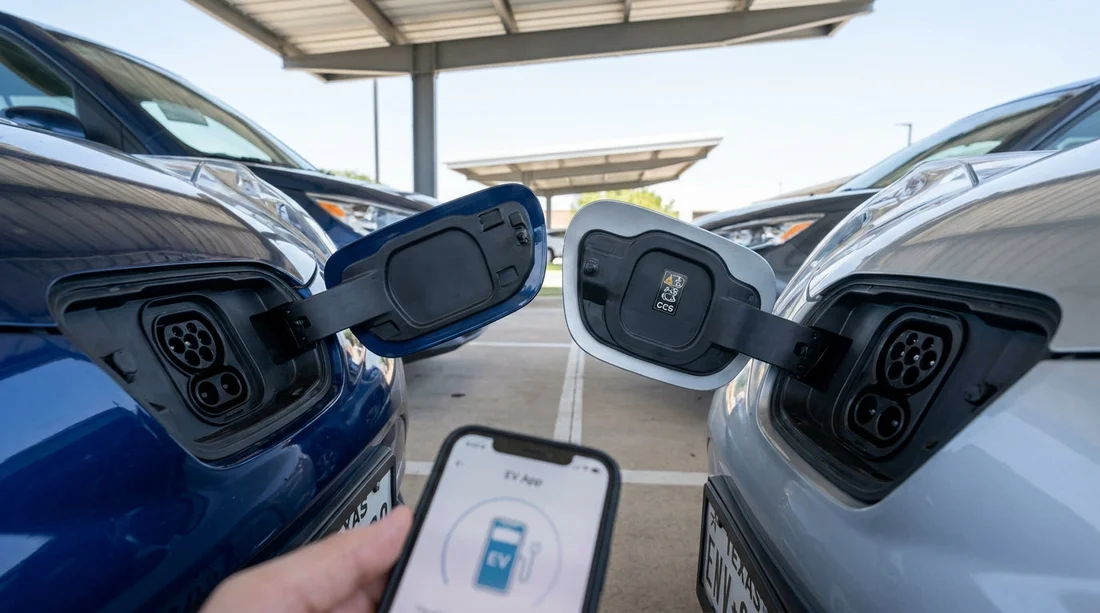
If you only find out at the car, you can still confirm in seconds. Open the charge port door and look at the inlet shape.
NACS inlet: A compact, oval opening with two main pin areas in one port. It looks simpler and smaller than CCS.
CCS inlet: A J1772 style top section with two large DC pins below, making the port taller overall. It clearly has a two part look.
If the desk is busy, you can do this check while you photograph the car for your records. If the connector is not what you planned for, return to the desk and ask if another EV is available in the same category with the connector you need.
Texas route planning, set expectations before you drive off
Texas distances can be long, so connector type influences how relaxed your journey feels. NACS with Supercharger access can simplify highway stops. CCS can also work well, but you may need more flexibility if a station is full, offline, or slower than expected.
Before leaving the airport, set your first charging stop as a backup, not your last possible option. Aim to keep a buffer, especially if heading out of metro areas. If your trip involves a bigger car category, pages like SUV rental in Fort Worth DFW can help you think through luggage space versus efficiency.
In Austin, you can sometimes get clearer guidance by checking the supplier context first, for example Thrifty car rental at Austin AUS, then calling the location to ask what EVs are currently common.
What to ask the desk, a short script
Use this script to avoid back and forth. “Can you confirm the exact make and model I am receiving today? Does it have the Tesla style NACS inlet or the CCS inlet? Is any charging adapter included? How are charging costs billed, through my app, the vehicle, or after return? Finally, is the car set up for DC fast charging?”
Those five questions cover connector, equipment, payment, and capability. They also show you are prepared, which often prompts staff to give more accurate details.
FAQ
How can I tell NACS vs CCS from the listing during car hire? Look for the exact model name. Tesla models in Texas use NACS, while most other EVs listed by make and model use CCS. If only a category is shown, confirm with the desk.
Do I need to bring my own charging cable or adapter? Usually no for DC fast charging, because the station provides the cable. For slower AC charging, some cars include a portable cable, but it varies, so confirm what is supplied.
Can a CCS rental use Tesla Superchargers in Texas? Not always. Even with an adapter, access depends on the network and vehicle compatibility. Plan primarily around CCS fast chargers unless the rental company confirms Supercharger access.
Which apps should I install before picking up the car? Install Tesla if the vehicle is NACS or a Tesla. For CCS, install Electrify America, EVgo, and ChargePoint, then ensure payment and logins are ready before arrival.
What if I arrive and the connector type is different from what I expected? Check the charge port immediately at pickup. If it does not match your plan, ask the desk whether another EV is available in your category or adjust your charging plan and apps before leaving.

























































































