


Quick Summary:
- Most Texas rentals allow personal mounts and chargers if they cause no damage.
- Avoid suction marks, adhesive pads, and cable pulls on fragile trims.
- At pick-up, test USB and 12V ports before leaving.
- Choose vent, cupholder, or dash-grip mounts that remove cleanly.
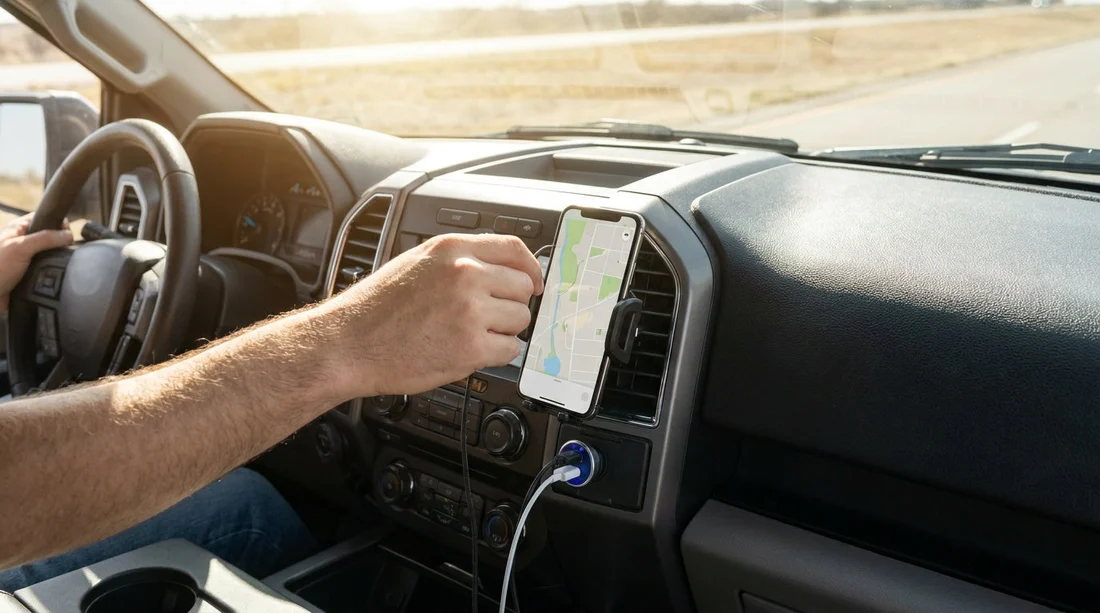
Yes, in most cases you can use your own phone mount and USB charger in a rental car in Texas, as long as you do not modify the vehicle, leave residue, or cause wear. Rental agreements typically focus on returning the car in the same condition, so the practical rule is simple, your accessories are fine if they are removable and non-marking. The main risks are cosmetic marks on dashboards or windscreens, broken vent slats, and strained ports or cables that get snagged when you exit.
This matters for car hire because modern rentals vary widely, some have integrated wireless charging, some have only a single USB-A port, and some rely on a 12V socket. If you arrive with the right mount and charger, you get safer navigation and fewer distractions, but you also need to avoid anything that could be classed as damage on return.
What is usually allowed in a Texas rental car
Most rental providers will allow temporary, personal accessories that do not require tools and do not leave a trace. That includes basic vent mounts, cupholder mounts, and standard USB chargers that plug into a USB port or 12V socket. The vehicle is still the rental company’s property, so anything that involves sticking, screwing, prying trim, or rerouting cables under panels can cross the line from normal use into alteration.
If you are arranging car hire for arrivals into North Texas, you might collect near major hubs like Dallas DFW car rental or Fort Worth DFW car rental. In both cases, you may receive anything from a compact sedan to an SUV, so pack a mount that adapts to different interior layouts and does not rely on adhesives.
Phone mounts, safest options and what to avoid
The safest mounts for rentals are the ones that grip rather than stick. A vent mount that uses a padded clamp is usually low risk if you do not overtighten, and if the vent slats are sturdy. A cupholder mount is even safer for the interior because it does not touch delicate trim, although it can be less ideal for visibility depending on the car. A dashboard friction mount that sits on top of the dash can work, but make sure the base is clean and soft, and never leave it in direct sun for long periods if it begins to soften.
What to avoid in a rental car is anything that can leave a mark. Suction mounts can leave circular impressions on windscreens and can pull on tinted film or aftermarket coatings. Adhesive pads, gel pads, and magnetic plates that stick to the dash often leave residue, lift surface coatings, or create a lighter patch where the sun fades the surrounding area. Also avoid mounts that wedge into seams with hard plastic tabs, they can crease trim or scratch gloss panels.
Be cautious with vent mounts in newer vehicles because some vents are thin and integrated into a single wide trim piece. If you feel flexing, stop and switch to a cupholder option. And never attach a mount to an airbag cover area, such as the top of the dashboard on the passenger side or the A-pillar trims, because it can become a hazard and may leave marks when removed.
USB chargers, power limits, and cable strain
Using your own charger is normally fine, but choose the right type. A compact 12V USB charger with a low-profile body reduces the chance of being kicked or snagged. For USB ports built into the car, use a good quality cable and avoid forcing connectors. If a port feels loose, do not keep wiggling it, switch to another port or the 12V socket.
Cable strain is the most common accidental damage in car hire. A long cable draped across the centre console can catch on a gear selector, cupholders, or your bag. When you step out, it can yank the phone, the mount, or the port. To prevent this, route the cable so it has slack at the phone, then tuck excess length into the console storage rather than looping it around controls. If passengers are using rear USB ports, remind them not to leave cables hanging where feet can snag them.
Also watch the charger’s power output. Some vehicles will not like very high draw accessories, and some USB ports are data-only or limited to low amperage. If you see charging cycling on and off, stop and change ports or cables. Avoid plugging in multiple splitters and accessories that add heat and leverage to the socket.
How to check power ports at pick-up
A quick check at pick-up saves hassle later. Before leaving the lot, locate all charging points, front USB, rear USB, USB-C if present, and the 12V socket. Plug in your cable and confirm your phone shows stable charging for at least 20 to 30 seconds. If the vehicle has Apple CarPlay or Android Auto and you plan to use it, confirm the correct port supports it, because not all USB ports do.
Do a simple physical check too. Ports should feel firm, not pushed in, and the 12V socket should grip the charger snugly. If a socket is loose, mention it immediately so it can be noted. This is especially useful when picking up at busy terminals such as Houston IAH car rental, where quick turnarounds can mean small issues are missed.
Minimising marks, residue, and wear
Even removable accessories can leave traces if you are not careful. Clean the contact areas first with a dry microfibre cloth, dust acts like grit and can create faint scratches. If you must use suction, lightly dampen the suction cup with water only, then remove it by releasing the tab rather than pulling. Do not use cleaners, oils, or alcohol wipes on rental interior surfaces unless you are certain they are safe, as they can discolour plastics.
Heat is another factor in Texas. A mount that seems fine in the morning can soften in midday sun, especially on dark dashboards. If you park outside, remove the mount and place it in the glove box or door pocket. The same goes for cables, leaving them stretched and hot can warp connectors and increase the risk of a sudden snag.
When you return the car, take two minutes to restore it to baseline. Remove the mount gently, unplug chargers, and check the windscreen and dash for any rings or smears. If there is a suction ring, a light wipe with a clean dry cloth is usually enough. If you are hiring something larger for a family trip, consider options like minivan hire in Houston IAH or van hire in Fort Worth DFW, and keep the same careful approach to marks and cables. Leaving a visible mark can raise questions during inspection, even if it would have cleaned off easily.
FAQ
Can I use a suction phone mount on the windscreen in a Texas rental car? Usually yes, but it is riskier than other types. Suction can leave rings or pull on films, so a vent or cupholder mount is generally safer for car hire.
Will I be charged if my mount leaves a mark? You may be if the mark is treated as damage or needs detailing. Reduce risk by using non-adhesive mounts and wiping contact areas clean before return.
Is it OK to plug a 12V USB charger into the rental car? Yes, a standard 12V USB charger is typically fine. Choose a low-profile charger, avoid heavy splitters, and stop using a socket that feels loose.
How do I check the USB ports work before I leave the rental lot? Plug in your own cable and confirm steady charging for 20 to 30 seconds. If you need CarPlay or Android Auto, test that the correct port supports it.
What is the safest setup to avoid cable strain and broken vents? Use a padded vent mount only if the slats feel sturdy, otherwise use a cupholder mount. Keep cables short, tucked away, and with slack at the phone.

























































































