


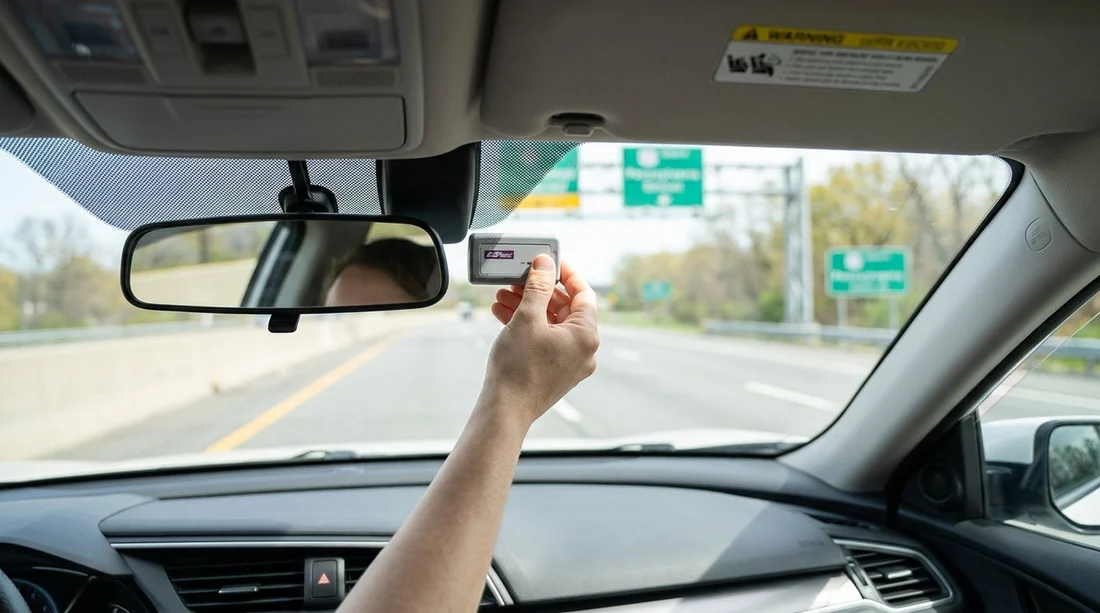
Quick Summary:
- Mount the tag behind the rear-view mirror, centred, clear of tint.
- Keep the transponder flat, firmly attached, and not blocked by sensors.
- At pick-up, match plate number and transponder ID on paperwork.
- Disable duplicate toll products, and avoid mixing cashless tolling with your tag.
When you use your own E‑ZPass with a car hire in Pennsylvania, correct mounting is the difference between smooth toll billing and a messy mix of missed reads, video tolls, and surprise administrative fees. Most problems come from one of three issues, the tag is in the wrong place, the windscreen blocks it, or the rental’s toll programme is still active and charges on top of your account.
This guide focuses on practical steps you can take before you leave the car park, so tolls bill correctly and you minimise disputes later. If you are arranging a Philadelphia pick-up, start with the car details shown on your confirmation, then re-check everything at the counter. Hola Car Rentals pages for local options can help you compare suppliers and policies, including Philadelphia Airport car rental and Philadelphia car rental.
Where to mount an E‑ZPass tag in a rental car
In Pennsylvania, E‑ZPass transponders are designed to be read through the front windscreen. The most reliable position is high on the windscreen, near the centreline of the vehicle, directly behind and slightly below the rear-view mirror. This location reduces interference, keeps the tag within the toll gantry’s read zone, and avoids most of the metallic coatings found around the edges of some windscreens.
Follow these placement rules:
1) Put it high, centred, and level. Aim for the area behind the mirror, with the tag’s face pointing forward and the unit parallel to the glass. A tilted or dangling transponder can reduce read reliability at speed.
2) Avoid the dotted “frit” band and sensor clusters. Many cars have a black dotted area around the mirror mount and an electronics cluster for lane assist, rain sensors, or cameras. Place the tag so it does not sit directly over bulky housings, and do not wedge it behind plastic covers.
3) Keep it away from tinted or heated windscreen sections. Some vehicles have metallised tint strips, heated elements, or special acoustic glass. If you notice a “solar” or “infrared reflective” windscreen, the best read zone is usually the clear area behind the mirror. If reads are consistently missed, move the tag slightly lower in the same centre area rather than to the far corners.
4) Do not place it on the dashboard. Dashboard placement may appear convenient, but it increases the chance of misreads and can trigger video tolling. It can also become a projectile in a sudden stop.
5) Use firm mounting, but do not damage the rental. If you have your own Velcro strips, use a small piece that can be removed cleanly. If the car already has a transponder bracket or a dedicated “toll tag” zone, use it, but still prioritise the centred, high position.
Pre-pick-up checks to avoid misreads and double charging
Before you accept keys, treat tolling like fuel and insurance, confirm what is active, what you are using, and what will be billed. The goal is to ensure only one method charges for tolls, either your personal E‑ZPass account or the rental company’s toll product, not both.
Check 1, ask whether the vehicle is enrolled in a toll programme. Many rental fleets in Pennsylvania support cashless tolling via plate billing or a built-in transponder. If that programme remains active while you use your own E‑ZPass, you can be billed twice, once by your E‑ZPass read and again by the rental’s back-office system that matches tolls to the plate.
Check 2, get the plate number before leaving the counter. Confirm the registration plate on the vehicle matches what the contract shows. If your E‑ZPass account allows you to add a “rental” vehicle temporarily, enter the exact plate and the date range. This reduces the risk that a missed transponder read is treated as an unlinked plate toll.
Check 3, note any transponder already in the car. If the windscreen already has a toll tag from the rental company, ask how to prevent it charging if you are using your own. Some systems have a shielded pouch, switch position, or a policy that you must opt out at the desk. Do not remove a rental transponder from the car, but do ensure it will not be read alongside yours.
Check 4, confirm how “video tolling” is handled. If the tag is not read, the system may bill by plate. Video tolling can lead to additional fees or higher toll rates. Ask what fees apply if a toll is billed to the rental contract, even if you also have E‑ZPass.
Check 5, review your E‑ZPass account status. Low balance, an expired card, or a transponder flagged as inactive can all force tolls into video processing. Before travel, verify the tag is active and funded. If your account supports it, enable alerts for low balance and for plate toll activity during your rental window.
Common Pennsylvania toll scenarios and how to prevent billing surprises
Pennsylvania drivers often encounter tolled facilities such as the Pennsylvania Turnpike, plus tolled bridges around regional routes. Most gantries are designed for high-speed reads, but real-world rental situations create edge cases.
Scenario A, your tag reads, but the rental still charges. This is usually an enrolment issue. The car’s plate is linked to the rental toll product, and their system bills any trip on that plate regardless of whether your tag also read. Prevention comes from opting out where possible, or ensuring the rental programme is not activated for your contract. If you are choosing between suppliers, you can review provider-specific pages like Enterprise car hire Philadelphia PHL and Thrifty car hire Philadelphia PHL to compare what to ask about at the desk.
Scenario B, missed reads lead to plate tolls. Causes include low placement, a tag stuck in a tinted strip, or a transponder that is inactive. Correct the mount, confirm the tag is not blocked by the mirror housing, and ensure your account has the rental plate added for the dates you are travelling.
Scenario C, you switch cars mid-rental. If you are given a replacement vehicle, repeat all checks. Update the plate on your E‑ZPass account immediately and remove your tag from the old car before returning it. Many duplicate toll complaints happen after a swap, when the account still lists the previous plate.
Scenario D, you drive through tolls right after pick-up. If you leave PHL and hit a toll facility quickly, mounting errors will show up immediately. If possible, mount the tag before exiting the rental area, not at the first red light.
FAQ
Q: Where exactly should I place an E‑ZPass tag on the windscreen?
A: Place it high and centred, directly behind the rear-view mirror, flat against the glass and clear of heavy tint or sensor housings.
Q: Can I use my personal E‑ZPass with a car hire in Pennsylvania?
A: Yes, but confirm the rental’s toll programme is not charging at the same time, and add the rental plate to your E‑ZPass account if your plan supports it.
Q: The rental car already has a toll transponder, what should I do?
A: Do not remove it. Ask the desk how to prevent it billing if you plan to use your own tag, because two active systems can cause double charges.
Q: What causes E‑ZPass misreads most often in rental cars?
A: Low or angled placement, mounting over tinted or coated glass, an inactive or low-balance account, or interference from keeping another tag near the windscreen.
Q: How can I prove I mounted the transponder correctly if billed twice?
A: Take a photo of the tag position and the plate at pick-up, then keep your rental agreement and E‑ZPass transaction log for the full date range.





























































































