


Quick Summary:
- Follow “MIA Mover” signs from arrivals to the central terminal connector.
- Use the moving walkways, then take the MIA Mover to the Rental Car Centre.
- Allow 10 to 20 minutes from gate area to rental car counters.
- For inter-terminal arrivals, first follow “Baggage Claim” then “MIA Mover”.
Miami International Airport (MIA) is busy, spread out, and signposted in a way that makes sense once you know the key phrase: “MIA Mover”. If you are arriving for car hire in Miami, your goal is not to look for individual rental brands in the terminals. Instead, you walk to the MIA Mover station, then ride this automated people-mover to the Miami Intermodal Center, where the Rental Car Centre counters are located.
This guide focuses on the quickest, most straightforward walking route from Miami Airport arrivals to the MIA Mover, plus the signs that matter most. The directions below work whether you have checked luggage or only hand baggage, because the route is driven by airport wayfinding rather than airline or gate specifics.
What the MIA Mover is, and why you need it
The MIA Mover is an elevated, automated train that connects the main airport terminal area to the Miami Intermodal Center. The Rental Car Centre is inside that complex, so taking the MIA Mover is the standard route for car hire at Miami Airport.
It helps to separate the journey into two parts: the walk inside the terminal to the MIA Mover station, and the short ride across to the Rental Car Centre. Once you reach the station, you are essentially on the final approach.
If you are comparing options for car hire in Miami, you may want to start with a general overview of providers and pick-up logistics at car rental Florida MIA.
Quickest walking route from arrivals to the MIA Mover station
After you land, follow signs for “Arrivals” and “Baggage Claim”. At MIA, the MIA Mover is accessed from the terminal area, and the airport’s most consistent signposting flow is: Gates, then Arrivals, then Baggage Claim, then Ground Transportation, then MIA Mover.
Step 1: Get to the arrivals and baggage claim level. From the gate corridor, take escalators or lifts down, following “Arrivals” or “Baggage Claim”. Even if you do not have checked luggage, going via the baggage claim direction usually puts you on the most direct path to ground transportation options and the MIA Mover signs.
Step 2: Look for “Ground Transportation” and “MIA Mover”. Once you are on the arrivals side near baggage claim, scan overhead signs. You are aiming for the wording “MIA Mover” specifically. Do not rely solely on “Rental Cars” as a label, because the airport routes most passengers via the MIA Mover first.
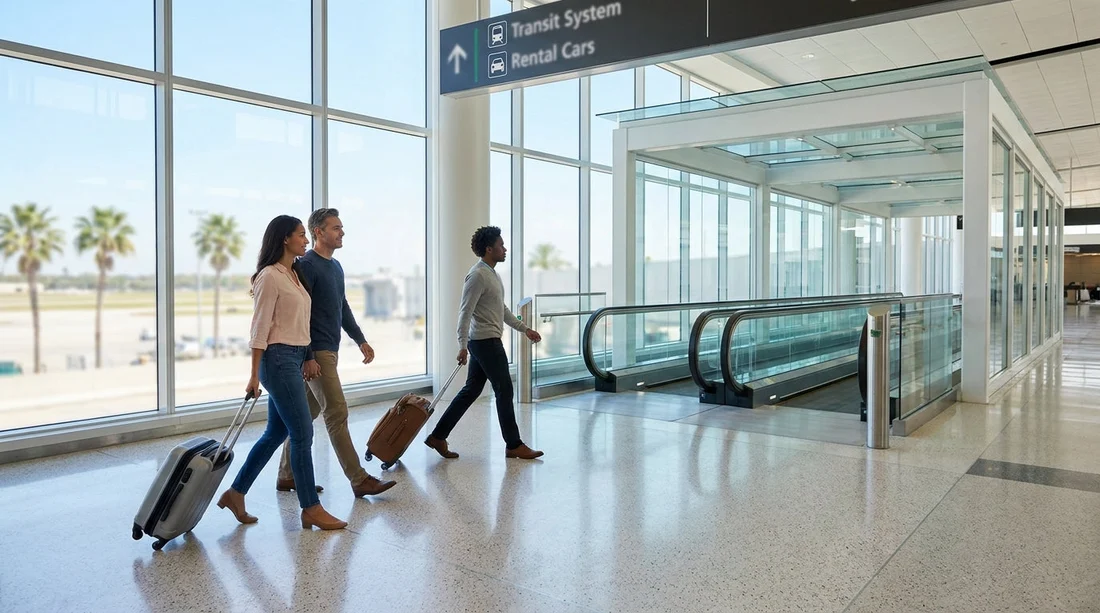
Step 3: Walk towards the central connector and moving walkways. The route commonly leads through internal corridors with moving walkways. Keep following “MIA Mover” at every junction. If you see signage for “Miami Intermodal Center”, that is also aligned with the MIA Mover route.
Step 4: Enter the MIA Mover station area. You will eventually reach a more open station entrance with clear MIA Mover branding. From here, you go up to the platform level if needed, then board the next train. Trains run frequently, so waiting time is typically short.
A good way to reduce stress is to decide in advance which type of vehicle you need. For larger groups, you can explore van options in the area, for example van hire Miami Beach, then focus purely on getting to the Rental Car Centre smoothly.
Key signs to follow, and the ones to ignore
MIA has a lot of visual information competing for your attention. These are the signs that usually matter most when you are heading for car hire in Miami via the MIA Mover:
Prioritise “MIA Mover”. This is your primary navigation term. Follow it even if you also see “Ground Transportation”. The MIA Mover is the connector that takes you to the Rental Car Centre building.
Use “Baggage Claim” to get oriented. From arrivals, baggage claim directions tend to lead you to the correct level and the correct side of the terminal complex, where ground transport routes are easiest to find.
Trust repeated overhead wayfinding. The best signs are overhead, repeated at intervals, with arrows. If you only see a single wall sign, keep going until you confirm with another overhead sign.
Do not hunt for a specific rental brand inside the terminal. Most major rental counters are not located in the arrivals hall itself. The brands are typically represented at the Rental Car Centre after you take the MIA Mover. If you have already chosen a brand through Hola Car Rentals, you can review location details like Hertz car hire Miami MIA to understand the pick-up point context, but the terminal walking route stays the same.
How long it takes, realistically
Timing depends on where you arrive, how long it takes to exit the gate area, and whether you collect bags. As a practical planning range:
Gate to MIA Mover station: often around 10 to 15 minutes of walking, longer if your gate is far or the terminal is crowded.
MIA Mover ride: typically a few minutes, plus short waits for the next train.
Total to rental counters: many travellers reach the Rental Car Centre in about 15 to 25 minutes after leaving the gate area, excluding baggage collection time.
If you are travelling during peak holiday periods, factor in extra time for congestion at escalators, corridor pinch points, and the station entrance.
Terminal tips that make the walk faster
Keep your group together before you start walking. The departures and arrivals flows can split around corridor entrances. Decide that everyone follows the same overhead sign, especially when stepping onto moving walkways.
Use lifts if you have heavy luggage. Escalators can slow you down if you are managing multiple cases. Lifts are usually clearly marked near the same vertical circulation points.
Do not exit to the kerb unless you mean to. If you step outside to the pick-up lanes, you may have to re-enter and backtrack to find the MIA Mover route. Stay indoors and follow the internal “MIA Mover” signs.
If you feel turned around, reset to “Baggage Claim”. At MIA, baggage claim is the most reliable anchor point for orientation from arrivals. Once you find baggage claim signage again, you can re-locate “Ground Transportation” and “MIA Mover” confidently.
What happens after you arrive at the Rental Car Centre
When you exit the MIA Mover at the Miami Intermodal Center, follow signs for the Rental Car Centre. You will find rental counters grouped together, with clear brand signage. After completing the paperwork and any deposit requirements, you will be directed to the pick-up area for your vehicle.
If you are comparing providers for airport pick-up, you can see a specific brand page such as Payless car rental Miami MIA, then match the counter name to the signage once you arrive. The practical advantage is that you are looking for a single counter bank in one building, rather than navigating multiple terminal desks.
Common mistakes travellers make, and how to avoid them
Mistake: Following “Taxi” or “Ride App” signs first. These routes often pull you towards kerbside areas and can add backtracking. Unless you plan to use a taxi, keep your focus on “MIA Mover”.
Mistake: Expecting rental counters in the arrivals hall. At some airports you can walk straight to a counter in the terminal. At Miami, the standard process is MIA Mover to the Rental Car Centre, so commit to that flow early.
Mistake: Underestimating the distance. The walk can feel longer after a flight. Wearing comfortable shoes and using the moving walkways can make a noticeable difference.
Mistake: Not accounting for bags and family needs. If you have prams, mobility needs, or multiple suitcases, plan for lifts and slightly slower walking. The route is accessible, but pacing matters.
FAQ
Do I need to leave the terminal to reach the MIA Mover? No. You can follow indoor signs from arrivals and baggage claim to the MIA Mover station without going outside.
What exact signs should I follow from Miami Airport arrivals? Follow “Baggage Claim” first, then “Ground Transportation”, then “MIA Mover”. If you see “Miami Intermodal Center”, that also points the right way.
How long does it take from arrivals to the Rental Car Centre? Many travellers take about 15 to 25 minutes from leaving the gate area to reaching the rental counters, plus any time spent at baggage claim.
Is the route to the MIA Mover suitable with lots of luggage? Yes. Use lifts instead of escalators, and take advantage of moving walkways where available to reduce effort.
What if I accidentally go outside to the kerbside area? Re-enter the terminal and look for “Baggage Claim”, then follow the “MIA Mover” signs again. This usually gets you back on the quickest route.





























































































