


Quick Summary:
- Use your voucher supplier name and desk notes as the main guide.
- Follow Rental Car Center signs, then check the exact brand name.
- Join the queue sign that matches your supplier, not the shortest.
- Confirm the booking system with your reference number before check-in.
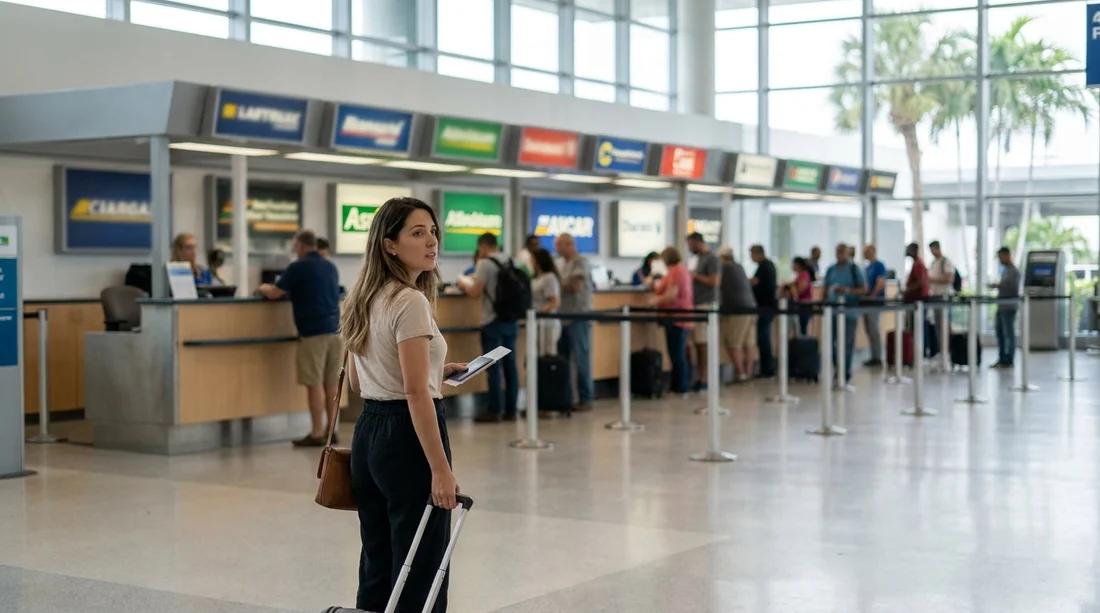
At Miami International Airport (MIA), it is common to arrive at the Rental Car Center and find multiple brands operating side by side, sometimes even processing customers at shared counters. This can be confusing when your voucher says one name, the physical sign shows another, and several queues look similar. The key is to treat your voucher as the source of truth, then use on-site signage and a couple of quick checks to match it to the right desk brand and queue.
If you arranged car hire through Hola Car Rentals, your confirmation usually shows the operating supplier, any partner brand name, and a booking or contract reference. Those details are what counter staff use to pull up your reservation, even when the desk area is shared.
Before you travel, it helps to save your confirmation offline, screenshot the voucher page that shows the supplier name, and note the pick-up location as “MIA Rental Car Center”. If you want a quick overview of pick-up basics at the airport, see Miami MIA car rental.
Why counters are shared at MIA
MIA’s car rental operations are consolidated in the Rental Car Center, served by the MIA Mover. Because many brands use common facilities, you may see a cluster of desks where staff from different brands sit behind adjacent stations, or where a single service area handles several sister brands. Brands that are part of the same group can also direct customers to one desk, even when the voucher shows a different trading name.
This does not mean your booking has disappeared or that you are in the wrong place. It simply means you must match three things: the supplier name on your voucher, the on-site brand signage, and the queue label.
Step 1: Read your voucher like a checklist
Open your voucher and look for these items, in this order:
Supplier (operating brand). This is the desk you should approach. It may be different from the website you used to compare prices. If your voucher indicates a well-known supplier, look for that supplier’s logo and name on the overhead signs at the desks.
Pick-up address. At MIA it typically references the Rental Car Center. If it mentions a terminal counter, you may still be routed to the Rental Car Center, but the voucher location text will clarify it. The location detail matters because MIA has clear wayfinding for the Rental Car Center and separate signs for off-airport shuttles.
Reservation or contract number. This is essential when you are unsure which of several shared counters should process you. Staff can identify the correct system by the reference format and immediately direct you to the right position.
Any brand family note. Sometimes the voucher includes wording that the rental is “fulfilled by” another brand. Treat “fulfilled by” as your desk instruction.
If you are comparing how different suppliers operate at MIA, you can also review brand-specific information such as Hertz car hire in Florida (MIA) or National Car Rental in Florida (MIA), then cross-check with the name on your voucher.
Step 2: Follow the right signs, then slow down at the desk area
From baggage claim, you will typically follow signs for the MIA Mover and “Rental Car Center”. Once you arrive, you will see large overhead signs listing rental brands and directions to counters. The mistake many travellers make is rushing to the first counter they recognise by logo, instead of checking the exact voucher supplier name.
When you reach the desk hall, pause and do a quick scan for two kinds of signage:
Overhead brand signs above the counters. These usually show the main brand names, not necessarily the partner brand that may appear on your voucher.
Queue stanchion signs at the start of each line. These signs are more precise for shared operations, sometimes listing multiple brands that are processed together.
If your voucher supplier is not obvious, pick the queue sign that lists your brand, or the sign that lists the “fulfilled by” brand on your voucher. If you still cannot find it, go to the nearest information point or a counter staff member at the edge of the desk area and ask which queue handles your voucher brand.
Step 3: Match the voucher brand to the correct queue
At shared counters, there may be several lines that look interchangeable. Join the queue that matches your supplier, even if another line is shorter. A shorter queue for the wrong brand can cost more time if you reach the front and are redirected.
Use this practical matching method:
If the voucher brand is on a queue sign, join that queue and keep the voucher open to the supplier details page.
If the voucher shows a partner brand, join the queue for the operating brand named as the fulfilment provider.
If the voucher only shows a broker style name, look for the operating supplier name near “Rental Company”, “Supplier”, or “Pick-up instructions”. That operating supplier is what matters at the desk.
If multiple brands are listed together, confirm the staff member is logged into the correct system by giving your reservation number before you hand over documents.
Step 4: Use one sentence to confirm you are in the right place
A quick confirmation early prevents wasted time. When you reach the front, say: “My voucher is with [supplier name], can you pull it up with this reference number?” If they hesitate or say the booking is under another brand, ask which desk position or queue handles that brand at this counter cluster.
Counter teams are used to this and will redirect you quickly. The important part is to confirm before your ID and payment card are processed, because starting the check-in on the wrong system can create delays.
What to do if you still cannot locate your brand
If you cannot find your supplier on any overhead or queue signage, do not guess. Instead:
Check the pick-up instructions on your voucher for any notes about shared service desks or fulfilment brands.
Ask a staff member at the desk hall entrance which counter processes your supplier. Give the supplier name and reference number.
Confirm you are at the Rental Car Center, not an off-airport shuttle pick-up. The Rental Car Center hosts the major brands, while some smaller suppliers use shuttles from designated areas.
If your plans change and you need a non-airport pick-up point, it can help to understand other Miami-area locations such as car hire at Downtown Miami or car hire in Doral, as vouchers will specify different addresses and desk instructions for those.
Tips to avoid delays once you reach the correct desk
Have documents ready. Present your driving licence, passport, and the payment card in the driver’s name that matches the booking requirements. If additional drivers are listed, have their licences available too.
Keep the voucher accessible. If the desk is shared, staff might ask you to confirm the supplier, vehicle category, or inclusions such as pre-paid fuel options.
Double-check the location on the agreement. Ensure the pick-up location printed on the rental agreement matches MIA, especially if you were redirected within a shared counter area.
Ask where to collect the car. At MIA, desks are separate from the vehicle pick-up floors. Confirm which lift or escalator to use, and which row range or zone your car will be in.
FAQ
How do I know which desk brand to use if several share one counter?
Use the supplier name and any “fulfilled by” note on your voucher, then join the queue sign that lists that brand. If unsure, give staff your reference number and ask which system processes it.
My voucher brand is not on the overhead signs, what should I do?
Check the voucher for an operating supplier or fulfilment brand, then look for that name on queue stanchion signs. If it still does not appear, ask a staff member in the desk hall to direct you using your reference.
Should I join the shortest queue at MIA?
No. Join the queue for your voucher’s operating supplier. The shortest line for a different brand often results in being redirected, which usually takes longer overall.
What information helps staff find my booking fastest?
Your reservation or contract number, the supplier name shown on the voucher, and the lead driver’s surname. Having the voucher screenshot ready can prevent mistakes at shared desks.
Can a shared counter change my supplier when I arrive?
A shared counter may process multiple affiliated brands, but your agreement should still reflect the operating supplier handling the rental. If the paperwork shows a different location or unexpected terms, ask for clarification before signing.





























































































