


Quick Summary:
- Ask staff to confirm a rear-view camera on the vehicle spec sheet.
- Start the car, select Reverse, and verify a live rear image.
- Check guidelines respond to steering and warning beeps trigger near obstacles.
- Inspect lens, screen brightness, and mirrors before leaving the rental bay.
Reversing cameras are common in newer fleets, but they are not guaranteed on every trim level, even within the same model name. In Orlando, where you might leave the airport straight into busy car parks, hotel drop-off zones, and theme park garages, it is worth checking the camera properly before you drive away. This counter checklist focuses on what you can confirm in a few minutes, without specialist tools, so you do not discover a missing feature at your first tight parking manoeuvre.
If you are collecting at the airport, it helps to think of the pick-up process as two steps. First, confirm the feature on the booking category or vehicle allocation. Second, verify it works on the exact vehicle you have been handed. At Orlando International Airport, the handover often moves quickly, so you will be best served by having a short, repeatable routine.
For context on typical collection points and the handover environment, you can review Hola Car Rentals’ Orlando airport pages such as car hire airport Orlando MCO and car rental Orlando MCO. You do not need any extra paperwork to run the checks below, but it helps to know where you can safely stop and test the car before joining traffic.
Counter checklist: confirm the camera is included on your allocation
1) Use the words staff recognise. At the counter, ask whether the allocated vehicle has “rear-view camera” or “backup camera” as a listed feature. If you say “parking camera” some staff may interpret it as sensors only. If they can show you a printed or on-screen vehicle spec line, look for wording that clearly indicates a camera rather than “parking aid”.
2) Confirm it is on this car, not just the category. A “SUV” or “minivan” category can include several trims. If the agent cannot guarantee it, ask whether they can note your request on the agreement, or check the specific registration or bay assignment. The goal is not a promise, it is clarity before you walk to the garage.
3) Know which vehicle types usually include cameras. Larger family vehicles and newer fleets more often have integrated screens and cameras. If you are weighing up vehicle size for luggage and visibility, it can help to compare categories such as SUV rental Disney Orlando MCO or minivan hire Disney Orlando MCO. Even then, you should still test the camera on the exact vehicle, because a screen can exist without an active rear camera feed.
At the car: the five-step “Reverse test” before leaving the bay
Step 1, power on safely. Sit in the driver’s seat, close the door, and fasten the belt. Press the brake and start the vehicle. Make sure the parking brake is applied if fitted and that you are stationary, especially in a multi-storey garage.
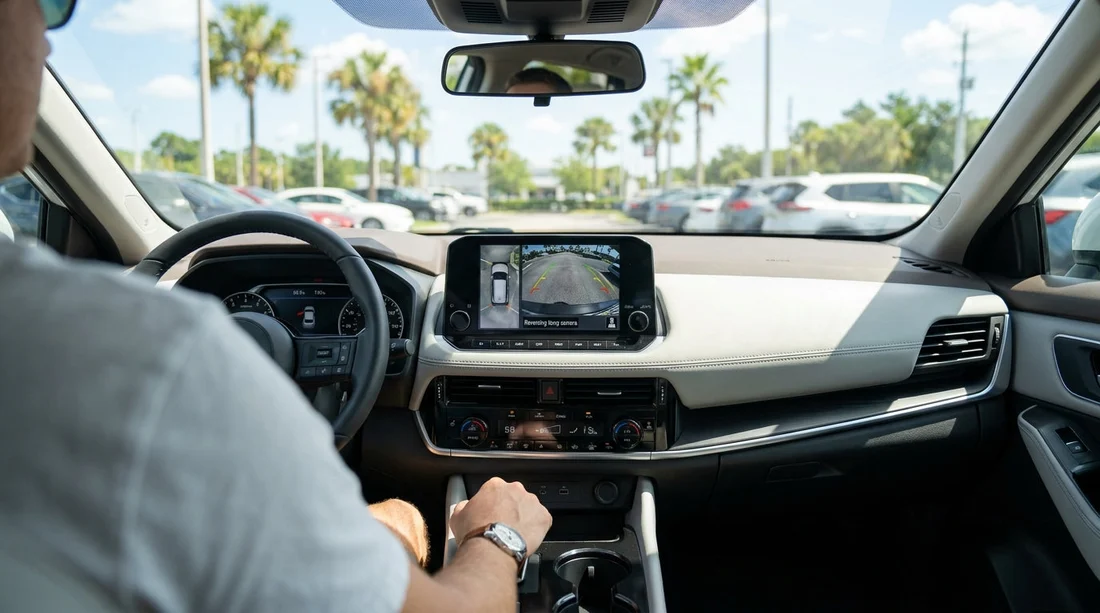
Step 2, put it in Reverse and look for a live image. With your foot firmly on the brake, select Reverse. A genuine reversing camera should show a live rear view on the centre screen or, less commonly, in the rear-view mirror display. A static image, a blank screen, or a message like “camera unavailable” is a red flag.
Step 3, check the view is actually behind you. Some systems can show a split view or a 360 surround view. Confirm you are seeing the rear camera feed, not a top-down graphic alone. You should see real objects behind the car move if someone walks past. If the image is delayed, heavily distorted, or frozen, treat it as not working.
Step 4, verify guidance lines and steering response. Turn the steering wheel left and right while still holding the brake. On many systems, the coloured guidelines will curve to indicate the projected path. If the lines do not move, it may still be a camera, but it might be a basic system. What matters most is that the image is clear and reliable.
Step 5, test the audible parking aid if present. If the car has rear sensors, you may hear beeps as you approach an obstacle. You can test gently by reversing very slowly towards a pillar or kerb line with plenty of space and full control, but do not rely on this alone. Sensors are not the same as a camera, and a camera can be present without sensors.
What to check on the screen settings (so it is usable in Florida light)
In Orlando’s bright daylight, a camera can work but still be hard to use if the screen is dim or set to a night theme. Before you pull out, take 30 seconds to check the basics.
Brightness and contrast. Find the display settings and increase brightness if needed. If the car has an auto day/night mode, check it switches correctly when you turn headlights on and off.
Camera view options. Some vehicles allow you to toggle between standard, wide, and top-down views. Choose the view that gives you the clearest edges of the parking bay lines and low obstacles.
Volume for warnings. If the vehicle provides parking warning chimes through the audio system, ensure the volume is audible. A muted system can make sensors effectively useless in a noisy garage.
Physical walkaround: camera lens, bumper area, and rear visibility
A camera image is only as good as the lens and its mounting. Do a quick exterior check while you inspect for existing marks.
Locate the lens. It is often above the number plate, near the boot handle, or integrated into the tailgate trim. If you cannot find a lens at all, the “camera” you saw may have been a parking graphic rather than a real feed.
Check for dirt, water spots, or protective film. A dusty lens can turn a sharp image into a blur, especially under garage lighting. If there is a removable protective film left from detailing, it can cause glare. Ask staff for a microfibre wipe if needed, and do not scratch the lens.
How to ask for a swap without slowing down your exit
If the camera is missing or not working, it is easier to resolve before you leave the garage complex. Take a photo of the screen in Reverse showing the issue, then return to the kiosk or counter and explain what you observed in one sentence: no live image, error message, or unusable display. Keep your request focused on function, not model preference.
If you are picking up from a branded partner fleet, the process can vary slightly by desk and bay assignment. Pages like Hertz car rental Orlando MCO can help you anticipate where handovers happen and how quickly you can return for adjustments, especially at peak arrival times.
Final “before you drive off” visibility checklist
Even with a working camera, you should set up your driving position and mirrors. Cameras help with low obstacles and tight spaces, but they do not eliminate blind spots and they can misjudge distance, especially with wide-angle lenses.
Seat and mirror setup. Adjust mirrors to reduce blind spots, not just to see the side of the car. If the vehicle has blind-spot monitoring lights, check they illuminate briefly on start-up.
Know when the camera activates. Some vehicles only show the camera feed in Reverse, others can show it at low speed or via a button. Knowing this prevents distraction when you are manoeuvring in Orlando traffic.
FAQ
Does every car hire vehicle in Orlando come with a reversing camera? No. Many newer cars do, but fitment can vary by model year and trim. Always confirm on your allocated vehicle and then test it in Reverse.
How can I tell the difference between a real camera and a parking sensor graphic? A real camera shows live video with moving objects and real scenery. A sensor-only system usually shows a coloured arc or top-down graphic without any video image.
What should I do if the camera works but the image is blurry? Check the exterior lens for dirt or water spotting and wipe gently if possible. If it remains blurry or distorted, report it before leaving and request another vehicle.
Can I rely on the reversing camera alone for parking in Orlando garages? No. Use the camera alongside mirrors, shoulder checks, and slow controlled movement. Cameras can hide objects at the edges and distort distance due to wide-angle lenses.
Is it reasonable to ask for a different vehicle if the camera is missing? Yes, if a reversing camera is important for your parking confidence and safety. Raise it immediately at the facility so staff can check availability and options.





























































































