


Quick Summary:
- Texas bans texting while driving, and local rules can be stricter.
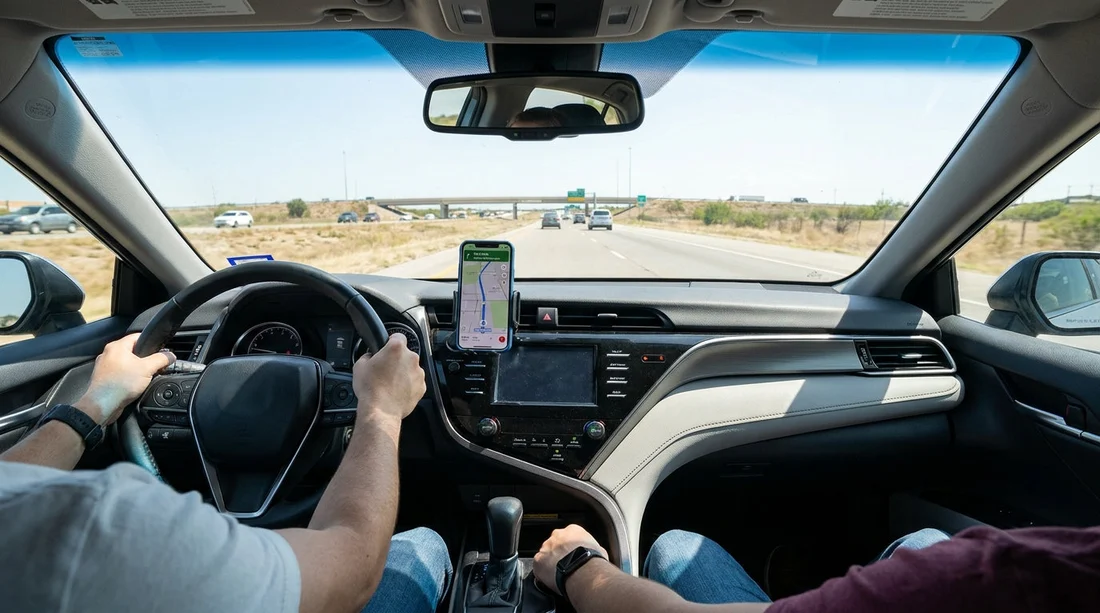
- A secure phone mount supports hands-free sat nav use and safety.
- Set destination, audio, and Do Not Disturb before leaving the lot.
- Pack a mount, charger, and cable so maps work immediately.
If you are picking up a car hire in Texas and plan to use sat nav on your phone, a common question is whether you must have a phone mount to stay legal. Texas does not have one single statewide rule that says you must mount your phone to use navigation, but the legal risk usually comes from how you handle the device, not whether it is clipped to the dash.
Across Texas, texting while driving is prohibited, and many cities and counties have their own hands-free restrictions. That means you can be legal in one place and face tighter rules a few miles later, especially in busy metro areas. Using a mount is not only a practical way to keep your phone visible, it also helps you avoid the behaviours that get drivers cited, such as holding the phone, typing, or repeatedly tapping the screen.
Where this matters most is right after you collect your rental vehicle. You want navigation running, audio prompts working, and your phone secure before you roll away. For travellers arriving at major hubs, it can help to sort these details out while still parked at the airport rental area, for example when collecting keys near Austin Airport or starting a journey from Dallas DFW.
Texas hands-free rules, what they really mean for navigation
At a statewide level, the headline rule is that you cannot text while driving. That includes reading, writing, or sending electronic messages. Using a navigation app is not the same as texting, but the way you interact with the app can still create trouble if it looks like you are composing a message, or if your driving is affected.
The biggest practical issue for visitors is that local ordinances can be stricter than the statewide baseline. Some Texas cities restrict handheld phone use more broadly. Because local rules can change, the safest approach in any car hire is to assume you should not be holding the phone at all once the vehicle is in motion. A mount makes that approach easy to follow.
Another point worth remembering is that distracted driving can still be cited even if a specific phone rule is not triggered. If an officer believes your attention was on the screen and not the road, you can still end up with an unpleasant stop. So the goal is to minimise interaction, keep the screen stable, and rely on voice guidance.
So, do you need a phone mount to use sat nav legally?
In most cases, you are not legally required by Texas state law to have a phone mount just to use sat nav. You could set your phone in a cup holder and listen to audio directions. However, that can quickly become unsafe and impractical because the phone slides, overheats, or becomes hard to glance at without taking your eyes off the road for too long.
A mount becomes the legal helper because it reduces the temptation to pick the phone up. If you need to re-route, answer an incoming call, or zoom the map, having the phone held securely means you can keep both hands available and use voice controls or a quick single tap only when it is safe. If your local area has a hands-free rule that prohibits handheld use, a mount is one of the simplest ways to comply.
It is also useful in Texas specifically because driving speeds are often higher than visitors expect, and junctions can be complex. Missing an exit in Houston, Dallas, or around San Antonio can put you into multi-lane interchanges where you do not want to be fumbling with a phone. If your trip begins near San Antonio Airport, you will likely be on fast roads within minutes.
Set up navigation before you drive off, a practical checklist
The simplest way to stay within hands-free expectations is to treat navigation set-up like adjusting mirrors, do it before you move. Use this sequence while still parked in a safe, legal space at the rental facility.
1) Mount placement first. Fit the mount where it does not block your view of the road, airbags, or essential controls. Avoid placing it over or near an airbag panel, including many dashboard and A-pillar areas.
2) Connect power. Navigation drains battery, especially with bright screens and data use. Plug in your charger before starting the route so you are not reaching for cables in traffic. Bring a 12V charger as back-up if you can.
3) Choose the right audio. Set voice guidance to play through the car speakers if possible. If your rental supports Apple CarPlay or Android Auto, use it, because it reduces on-screen interaction and can put larger prompts on the dash display.
4) Enter the destination and lock it in. Type the address, choose the correct result, and start the route while parked. If you expect stops, add them now.
5) Reduce distractions on your phone. Turn on Do Not Disturb while driving, silence unnecessary notifications, and keep interaction to a minimum once moving.
6) Plan a safe pull-over option. Decide in advance that if you must change anything, you will pull into a parking lot or another safe place where stopping is permitted.
What to pack for safer sat nav in a Texas rental
For car hire, a small navigation kit can make the first hour of driving far smoother.
A reliable phone mount. Suction mounts work well on many windscreens, but some rental cars have textured dashboards or steep windscreens that make certain suction cups unreliable. A vent mount is more universal, but choose one that grips firmly and supports your phone weight.
Charging gear that matches your devices. Bring a cable you know works. If your phone uses USB-C and the car only has USB-A ports, you may need the right cable or adaptor.
A back-up navigation option. Download maps offline, or keep key addresses written down. In some areas, especially when crossing long distances, coverage can drop. If you are driving from Dallas to smaller towns after collecting a vehicle near Thrifty at Dallas DFW, an offline map can prevent last-minute swerves caused by a frozen screen.
Sunglasses and a simple dash strategy. Glare makes screens harder to read, which leads to longer glances away from the road. Keep the dashboard clear so the mount does not compete with other items.
Common mistakes that lead to tickets or close calls
Starting the route while rolling. Even creeping out of the car park while typing an address can be viewed as careless. Set everything before releasing the brake.
Holding the phone at junctions. Drivers often pick up the phone just for a second at lights. In places with hands-free ordinances, that is exactly the behaviour targeted.
Mounting where an airbag deploys. If an airbag goes off, the phone and mount can become a projectile. Keep away from airbag panels and deployment zones.
Over-reliance on visual prompts. Use spoken directions. If you miss a turn, let the app re-route rather than trying to correct last second.
FAQ
Is it illegal to use Google Maps or Apple Maps while driving in Texas? Using navigation is not automatically illegal statewide, but texting is prohibited and many cities restrict handheld phone use. Set your route before moving and avoid holding the phone.
Do I have to use a phone mount in a Texas rental car? There is generally no statewide requirement to use a mount, but a mount helps you stay hands-free and reduces the risk of violating local handheld restrictions.
Can I touch my phone screen to adjust the route while driving? The safest legal approach is to avoid interacting with the phone while the vehicle is moving. If you must change something, pull over somewhere safe and stop first.
Will my rental car in Texas include a sat nav unit or phone mount? Many rentals rely on Apple CarPlay or Android Auto rather than built-in sat nav, and phone mounts are typically not included. Bringing a compact mount and charger is wise.





























































































