


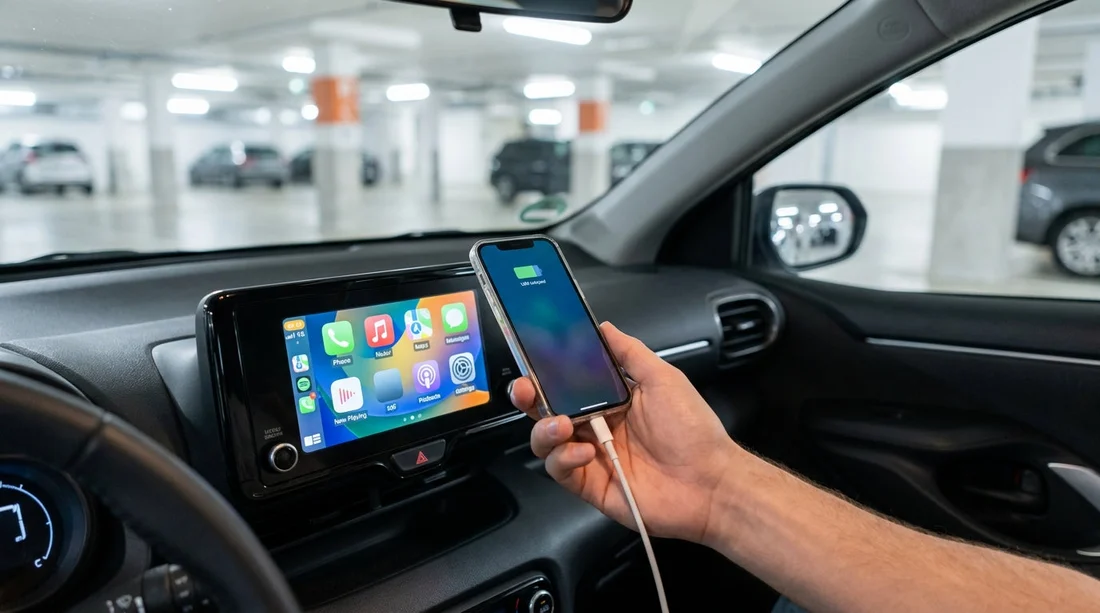
Quick Summary:
- Bring a data-capable cable, rental cables are rarely provided or reliable.
- Check the car’s ports, USB-A, USB-C, or both, before leaving.
- Test CarPlay at collection, confirm it appears on the infotainment screen.
- Pack a 12V charger and spare cable in case ports fail.
If you are planning car hire in New York and you rely on Apple CarPlay for maps, music, and calls, it is sensible to bring your own USB cable. Many rental cars do not include a cable, and even when a cable is left in the vehicle it may be damaged, charge-only, or the wrong connector for your iPhone. The good news is that a quick check at the counter, plus the right cable in your bag, usually prevents the common “why won’t CarPlay connect?” moment in the car park.
CarPlay can work either wired or wirelessly, depending on the vehicle. With wired CarPlay, the cable is not optional, it is the connection. With wireless CarPlay, you can often connect without a cable, but you may still want one for charging, especially when using navigation all day around Manhattan, Brooklyn, and the wider tri-state area.
Common in-car connection types you will see in New York rentals
In 2026-model-year fleets you will typically see at least one USB port up front, but the type varies. Knowing what you are looking at helps you pack correctly for car hire in New York.
USB-A is the older rectangular port. It is still common in many sedans and compact SUVs. If your iPhone cable ends in USB-A, it will fit these ports.
USB-C is the smaller, oval, reversible port. Newer vehicles increasingly use USB-C. If you only carry a USB-A to Lightning cable, you may not be able to plug in at all.
Mixed ports are very common, for example one USB-A and one USB-C in the centre console, or a USB-C up front with USB-A ports in the rear. Do not assume the rear ports support CarPlay, many are power-only.
12V socket (cigarette lighter style) is not for CarPlay directly, but it is a solid backup for charging. A simple 12V USB charger can keep your phone powered even if the infotainment USB port is picky.
Wireless CarPlay may appear in some trims, but it is not guaranteed. Even when available, the system may require a first-time wired pairing, or the Bluetooth profile may need resetting between renters.
Which cable should you pack for Apple CarPlay?
For most travellers, the safest option is to pack a high-quality, data-capable cable that matches your phone and covers the likely port type.
If you have an iPhone with a Lightning port, bring USB-C to Lightning. If you expect older vehicles, also pack a USB-A to Lightning as a backup.
If you have an iPhone 15 or later with USB-C, bring a USB-C to USB-C cable. If you expect older vehicles, adding a USB-A to USB-C cable or a small adapter can save you.
Make sure the cable is designed for data transfer, not just charging. Some cheap or promotional cables power the phone but will not pass data reliably, which means no CarPlay even though the battery icon shows charging.
What to pack for car hire in New York, beyond the cable
A simple “connectivity kit” makes CarPlay far less stressful, particularly if you are collecting from a busy airport location where you want to get moving quickly.
1) A 12V USB charger. Choose one with at least 20W output if you have a USB-C iPhone, or a multi-port unit if two people will charge. This protects you if the infotainment USB port is charge-only or loose.
2) A short spare cable. A second cable is helpful if the first one fails, or if you want to leave one in a day bag for walking around New York.
3) A small USB-A to USB-C adapter (or vice versa). This can bridge the gap if your cable end does not match the port. Keep it simple and reputable, unreliable adapters can cause intermittent disconnects.
Counter and car-park checks before you drive away
The fastest way to avoid issues is to do a two-minute test while you are still near the rental counter or attendants. This is particularly useful after a long flight, when you are collecting from major hubs such as JFK or Newark.
First, identify the correct USB port. Many cars have multiple ports, but only one supports CarPlay. Look for a small phone or “USB” icon near the port, or check the infotainment screen prompts.
Second, start the car and connect your phone with your cable. Unlock your iPhone, then watch for the permission prompt that asks to allow CarPlay while the phone is locked. Tap allow. If you miss this, CarPlay may not show up later.
Third, confirm CarPlay appears as an app tile or switches the home screen automatically. If it does not, check the vehicle’s settings for “Apple CarPlay” under connections, projection, or smartphone integration.
If you are organising car hire at New York JFK and want minimal delays, doing this test in the pick-up area helps you avoid troubleshooting later in traffic.
Why CarPlay sometimes fails in rental cars
Even with the right cable, there are a few repeat causes of failure in rental fleets.
Charge-only USB ports are common, especially in rear seats. They will power the phone but never start CarPlay.
Worn ports happen when thousands of renters plug and unplug daily. If the cable feels loose or disconnects when you hit a bump, try a different port or gently support the cable so it is not under tension.
Previous pairing history can confuse wireless systems. If the car shows other devices, delete them from the infotainment Bluetooth list, then pair again.
VPN or restrictions on the phone can interfere. If your iPhone is managed by work, certain profiles may block CarPlay. Test before you leave the airport so you can switch to another navigation plan.
Choosing a vehicle for better connectivity
If CarPlay matters to you, it is worth knowing that connectivity can vary by class and model year. Larger, newer SUVs and premium trims are more likely to have USB-C ports or more stable infotainment systems. If you are landing in New Jersey and crossing into New York, an SUV can also be convenient for luggage and comfort, see options like SUV rental near Newark EWR.
Provider fleets also vary. When comparing options for car hire, it can help to check the listing notes for “Apple CarPlay” or “Bluetooth”, and then treat that as “possible” rather than “guaranteed” until you test it on collection. If you are browsing specific provider pages, you might look at Hertz car hire at New York JFK or Dollar car hire at Newark EWR to compare typical fleet categories.
Practical plan B if you cannot get CarPlay working
If CarPlay refuses to cooperate, you can still have a smooth drive in New York with a quick fallback plan. Use Bluetooth audio for calls and music, and run maps on your phone screen. Keep your phone charged via the 12V socket, and consider downloading offline maps for areas where signal may be patchy, such as certain tunnels or parking structures.
If you are collecting at car rental at JFK airport, it is also smart to set your first destination before leaving the airport roads. That way, even if you need to use the phone directly, you are not trying to type while navigating complex exits.
FAQ
Q: Do I need to bring my own USB cable for Apple CarPlay with car hire in New York?
A: Yes, it is recommended. Rental cars rarely include a reliable data cable, and the port type can vary between USB-A and USB-C.
Q: Will any iPhone charging cable work for CarPlay?
A: Not always. Some cables are charge-only or poorly shielded, which can cause CarPlay to fail or disconnect. Use a known data-capable cable.
Q: How can I tell which USB port supports CarPlay?
A: Try the front console ports first and look for a phone or “USB” icon. Rear-seat USB ports in rentals are commonly power-only.
Q: What should I check at the counter before leaving?
A: Start the car, plug in, unlock your iPhone, accept the CarPlay permission prompt, and confirm the CarPlay screen appears before you drive away.
Q: If the car has wireless CarPlay, do I still need a cable?
A: It is still useful for charging and for first-time pairing in some cars. A cable also helps if wireless pairing has issues from previous renters.































































































