


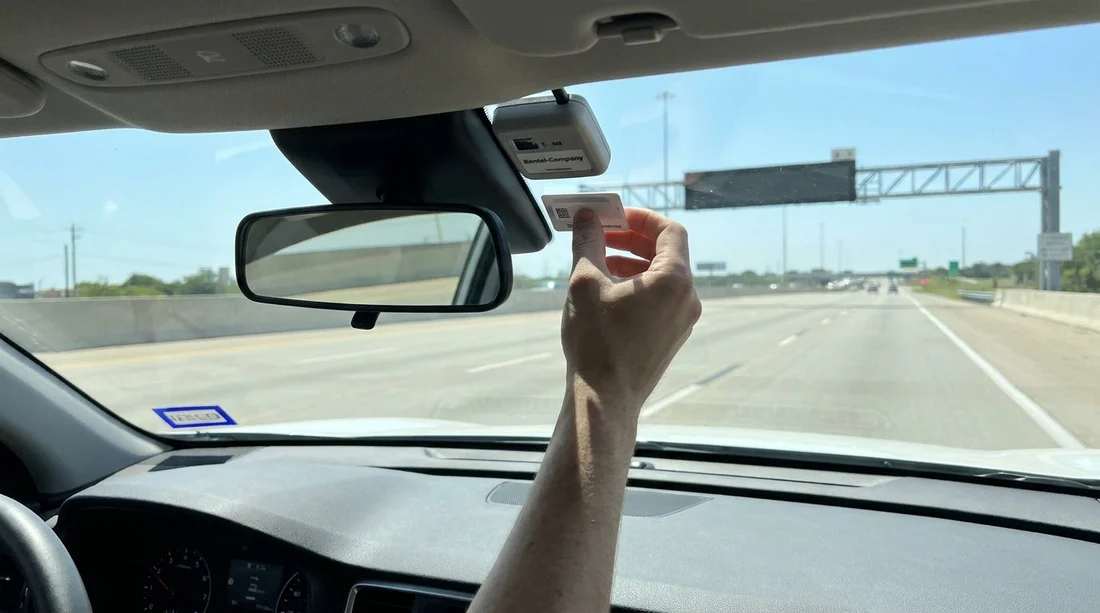
Quick Summary:
- Ask the counter to opt out of the rental toll programme.
- Add the rental plate to your toll account before using roads.
- Mount one tag correctly, and remove it when returning the car.
- Review receipts and toll statements later to spot duplicate charges.
Yes, you can often use your own toll tag in Texas on a rental car, but only if you prevent the rental company’s toll programme from charging the same trips. Texas toll roads are largely cashless, so rentals are commonly set up with a “toll pass” option, or they bill tolls later using the car’s licence plate. If your personal tag is also detected, you can end up paying twice, once through your toll account and again via the rental’s toll system plus extra fees.
This matters across major Texas metro areas where tolling is routine, such as Houston, Dallas Fort Worth, Austin, and San Antonio. Whether you are arriving through Houston IAH car rental desks or collecting near Dallas DFW car hire locations, the same rule applies: decide which billing method you will use, then make sure the other is fully switched off.
How tolling works on Texas rental cars
Texas toll facilities typically charge either by transponder (tag) or by “pay by mail” using automated number plate recognition. Rental companies sit in the middle. If they receive toll invoices for the rental vehicle, they pass those costs to the renter, often adding an administration fee and sometimes a daily toll programme charge if you opted in.
Double billing happens when (a) your personal tag is charged, and (b) the rental company still gets billed by plate or has its own tag active. That is why the pick-up conversation and your account settings matter more than the road you choose.
What to confirm at pick-up to avoid duplicate toll charges
The best time to prevent double billing is before you drive away. Staff can explain how that specific fleet and brand handles tolls, and what can be disabled. Use clear, specific questions that get you a yes or no answer.
Confirm whether the vehicle has an active toll device. Ask if there is a transponder, sticker, or built-in toll unit in the windscreen area. If there is, ask whether it can be deactivated for your rental, or whether you must keep it in a “shielded” state according to their rules. Do not remove or tamper with any device.
Ask how they bill if you do nothing. Some rentals default to plate billing, with fees. Others require enrolment for a toll programme. You need to know the baseline, because plate billing can still happen even if you never opted into anything at the counter.
State your plan plainly. Say you will use your personal toll tag and you want the rental toll programme fully opted out for the entire rental. Ask the agent to note it on your agreement. If you are collecting through a partner page like Budget car hire Texas IAH, the operating rental desk still controls toll settings, so the confirmation step remains essential.
Ask about “pay by plate” fees. Even if you use your tag, if the rental later gets a plate invoice, you could see extra admin fees. Ask what happens if a toll is mistakenly billed to the rental and whether they will waive fees when you provide proof your tag was charged.
Check the paperwork before you sign. Look for toll programme line items, daily charges, “toll pass” enrolment, or wording that authorises plate-billed tolls plus admin fees. If something is unclear, get it clarified at the counter. It is much harder to reverse after return.
How to use your toll tag correctly in a rental car
Even if the rental programme is opted out, poor tag placement can lead to plate billing. Follow your tag issuer’s mounting guidance. Usually that means mounting on the windscreen in the recommended zone, not holding it by hand or leaving it loose in the cabin.
Add the rental vehicle plate to your toll account if allowed. As soon as you have the registration plate number, add it in the app or online portal and set start and end dates if the system supports that. Remove the plate after you return the car. This step is especially helpful if a toll point fails to read the tag and falls back to plate matching.
Use only one tag in the car. Multiple tags can cause misreads. If you have more than one transponder at home, leave the others behind.
Remove your tag at return. This prevents your account from being charged for the next renter’s tolls. It also reduces confusion if you later dispute charges.
Common double-billing scenarios in Texas and how to handle them
Your tag was charged, but the rental also billed you. This can happen if the rental’s plate invoice arrived later. Gather the toll transaction detail from your toll account showing date, time, and location, then contact the rental billing department and request removal of the duplicate toll and any admin fees.
You opted out, but a daily toll programme fee still appears. This is usually an agreement issue. Review the signed paperwork and itemised receipt. If the paperwork contradicts what you were told, escalate with the written note or any counter annotation you obtained at pick-up.
Is it ever better to use the rental toll programme?
Sometimes, yes. If you do not have a personal tag, or you are unsure whether your tag is funded and active, the rental programme can be simpler, despite fees. It can also help visitors who will drive in heavy toll corridors and want predictable processing. This comes up often for one-way itineraries between cities, for example starting near Houston and finishing near San Antonio, where users might compare options such as car hire San Antonio SAT and decide a single rental toll solution is easier than managing an account update mid-trip.
If you do have a working tag and you regularly drive Texas toll roads, using your own tag can be the cheaper and cleaner option, provided you complete the opt-out and vehicle plate steps.
A quick pick-up checklist for Texas car hire tolls
Before leaving the lot, confirm: you are not enrolled in a rental toll programme unless you want it, the car does not have an active in-vehicle tag that will be billed separately, your personal tag is mounted correctly, and your toll account is updated with the rental’s plate where possible. These small steps are the most reliable way to avoid paying twice.
FAQ
Can I use my TxTag, TollTag, or EZ TAG in a Texas rental car? Usually yes, if it is active and mounted properly. To avoid double billing, opt out of the rental toll programme and add the rental plate to your account if your issuer allows it.
What should I say at the rental counter to prevent duplicate toll charges? Ask whether the vehicle has an active toll device and whether the rental will bill tolls by plate. Then request to opt out of any toll programme because you will use your own tag, and have it noted on the agreement.
Do I need to add the rental car’s licence plate to my toll account? It is strongly recommended. If a toll point fails to read your tag, the toll may be matched by plate. Having the plate listed can help ensure the charge goes to your account, not to the rental company.
What if I get charged twice anyway? Compare your toll account transactions with the rental invoice. If the same toll is billed twice, contact the rental billing team with dated toll records and request the duplicate charge and any admin fee be removed.
Should I remove my toll tag when I return the car? Yes. Take it with you so your account is not charged for tolls incurred by the next renter, and so your future statements remain easy to reconcile.































































































