


Quick Summary:
- Check your voucher for supplier name, pickup wording, terminal, and hours.
- Follow “Rental Cars” signs to the consolidated facility or shuttle.
- Match the voucher supplier to overhead boards and grouped brand signage.
- Ask staff which desk handles your supplier, especially late at night.
Newark Liberty International Airport is a common gateway for trips that include New York, and it is also an airport where car hire counters can be consolidated or shared. That can be confusing if you are expecting a dedicated Hola desk. The key is to treat Hola as the booking provider and use your voucher to identify the on-site rental company that will actually hand over the vehicle. Once you know the operating brand name and where that brand is staffed, finding the correct counter becomes straightforward.
This guide walks you through a practical, step-by-step approach at Newark, focusing on shared desks, signage cues, and the exact voucher details that matter most.
Step 1: Confirm what “shared counter” means for your booking
At major airports, multiple rental brands may be served from one counter bank, or one agent may handle several brands during quieter hours. A “shared counter” can mean any of these.
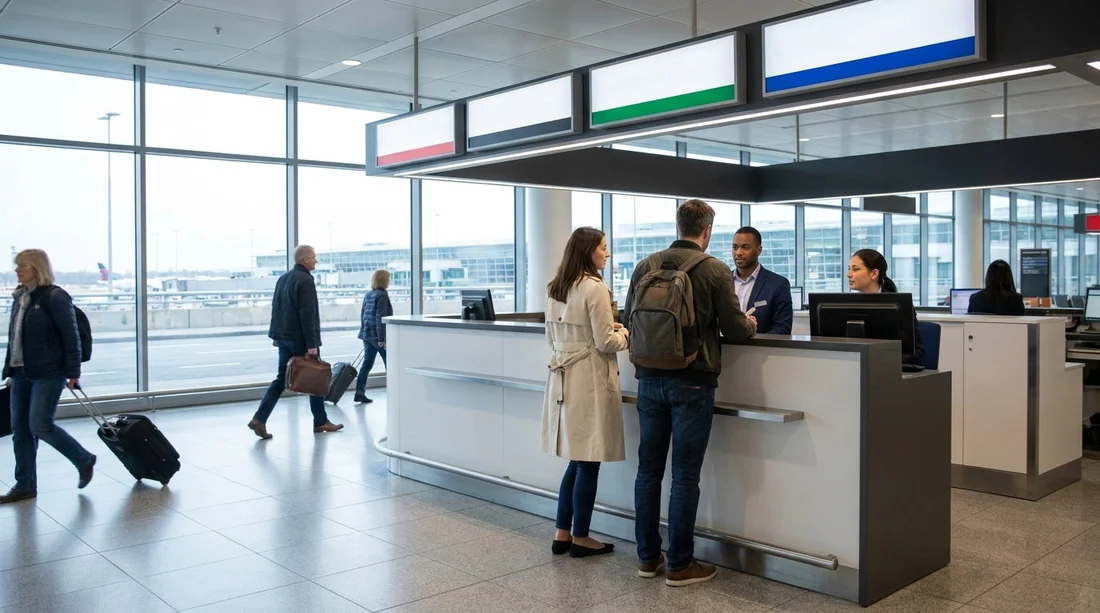
First, one physical desk has multiple brand logos on the front panel or overhead sign. Second, one queue feeds several adjacent desks, and you are directed to the next available agent regardless of brand. Third, the brand on your voucher is handled at a partner desk, for example where a parent company hosts several sub-brands.
Because Hola can arrange car hire with different suppliers, you should not look for “Hola” on the airport signs. Instead, you should look for the supplier brand listed on your voucher, then use airport wayfinding to reach that supplier’s counter.
Step 2: Use the voucher as your map before you leave baggage claim
Before you start walking, open your confirmation email or voucher and locate four items. These are the details that help you correctly identify the shared counter.
Supplier or rental company name: This is the brand that will issue the rental agreement at Newark. If desks are shared, this name is what appears on signage, not Hola.
Pick-up location wording: Look for phrases like “Rental Car Center,” “Car Rental Facility,” “Off-airport shuttle,” or “On-airport counter.” Newark often routes customers to a dedicated rental car facility rather than individual terminal desks.
Terminal or meeting instructions: Some vouchers specify “follow signs to AirTrain” or “take shuttle from level X.” If you are arriving into a particular terminal, these lines save time and prevent you walking to the wrong kerbside.
After-hours and phone notes: Shared desks are most confusing late at night. If the voucher lists reduced hours or a phone number for desk assistance, note it before you lose signal in the terminal.
If you want context on Newark pickup logistics and typical desk arrangements, the Hola landing page for car hire at Newark (EWR) is useful for understanding what to expect before you travel.
Step 3: Follow airport signage, not brand guesses
Inside Newark, the most reliable route is to follow official airport signs reading “Rental Cars” or “Rental Car Shuttle” rather than trying to spot a brand logo from a distance. Airports frequently relocate counters or adjust queueing, but the “Rental Cars” wayfinding is updated and consistent.
As you walk, watch for these signage cues.
Overhead direction boards: These often list “Ground Transportation” with sub-arrows for “Rental Cars.” If you see “AirTrain” in the same cluster, follow the rental car direction first, then confirm whether AirTrain is required for the car rental facility.
Terminal exit level: Many airports route shuttles from a particular level. If your voucher mentions a level number, match it to the terminal directory before exiting.
Shuttle stop identifiers: If the car rental facility requires a shuttle, the stop sign usually names “Rental Car Shuttle” rather than any supplier. Do not worry if your supplier name is not on the stop sign.
Step 4: Enter the rental car counter area and scan for grouped branding
Once you reach the rental car counter hall or facility, pause for ten seconds and look up. Shared counters are easiest to decode from overhead boards and fascia signs. You are looking for the supplier brand from your voucher, plus any parent-company grouping.
Overhead digital boards: Many facilities list each brand with a counter number, or show which queue to join. If your voucher supplier is listed, go directly to that counter range.
Multiple logos on one sign: If you see several logos on one panel, that is a shared desk. Join the queue only if your voucher brand is included on that panel.
Agent greeting scripts: Agents at shared desks often ask which brand you are collecting from. Have your voucher open and say the supplier brand name immediately.
Hola provides bookings across a range of suppliers, including well-known names at Newark. For example, if your voucher indicates Thrifty, you can cross-check general pickup expectations on Thrifty at Newark (EWR). If it indicates Budget, you can reference Budget car hire at Newark (EWR) for brand-specific orientation.
Step 5: Verify you are queuing for the correct entity
Shared counters create a common mistake, joining the longest queue because it looks official. Instead, use a simple verification checklist while you are still deciding where to stand.
Check the exact supplier name on the voucher: Some brands look similar. Make sure you match the name exactly, especially if there are multiple desks for closely related companies.
Confirm the pickup location phrase: If your voucher says “in terminal,” but you are at an off-airport shuttle desk, stop and re-check the instructions. Conversely, if the voucher says “shuttle to rental car facility,” do not keep searching the terminal arrivals area.
Look for partner wording: Some vouchers include lines like “served by” or “operated by.” If you see this, you may need to check in at the operating brand’s desk even if the booked brand is different.
Ask one clear question: If you are unsure, ask the first available staff member, “Is this desk handling pickups for [supplier name] today?” This is more precise than asking for Hola, because staff will recognise the supplier brand.
Step 6: Know what to do if signage is unclear
If you cannot find the supplier name on any overhead board, do not keep walking in circles. Use these fallbacks.
Go to the information point or queue marshal: In consolidated facilities, staff are often positioned to direct people to the correct line. Show the voucher and point to the supplier name.
Check for late-night consolidation: At certain hours, some brands temporarily process customers at a neighbouring desk. That can happen even if the brand has its own signage during the day. Your voucher’s hours and after-hours notes matter most in this scenario.
Use your voucher phone notes: If the voucher lists a desk phone number, call while you are in the facility. A quick confirmation prevents you joining the wrong queue and having to restart.
Step 7: Make sure your documents match what the desk will request
Once you have the right counter, you can save time at the desk by confirming you have the exact items that typically delay check-in. Shared counters tend to be busy, and missing one detail can send you to the back of the queue.
Bring your driving licence, a payment card in the main driver’s name, and your voucher or confirmation reference. If your travel plans involve larger groups, confirm whether you booked a people carrier, as vehicle class can change where you are directed for collection. For orientation on larger vehicles in the Newark area, see minivan rental near Newark (EWR).
Also check the voucher for fuel policy, mileage rules, and whether tolling is handled via a transponder programme. None of these change the location of the counter, but they influence how long you will spend with the agent at a shared desk.
FAQ
Why can’t I find a Hola counter at Newark? Hola is the booking provider, while the on-site desk is staffed by the supplier brand shown on your voucher. Look for that brand’s signage in the rental car facility.
Where should I look first if desks are shared? Start with your voucher supplier name, then follow “Rental Cars” airport signs to the consolidated counter area. Use overhead boards to match the supplier to a desk or queue.
What voucher details matter most for finding the right desk? Focus on supplier name, pickup location wording, terminal or shuttle instructions, and opening hours. These four items usually resolve shared-counter confusion quickly.
What if the brand on my voucher is not listed on any sign? Ask a queue marshal or information staff whether the brand is being handled at a partner desk. Shared counters sometimes process multiple brands under one host sign, especially late.
Is Newark the same as New York for car hire pickup? Newark is in New Jersey, but many travellers use it for New York trips. The pickup process is still airport-led, so follow Newark rental car signs and your voucher rather than city assumptions.






























































































