


Quick Summary:
- Bring a data-capable Lightning cable, many rentals include charge-only leads.
- Check the dashboard ports before leaving, USB-A and USB-C vary.
- Test CarPlay while parked, accept prompts, and confirm audio navigation works.
- Pack a USB-A to USB-C adapter for newer iPhones and vehicles.
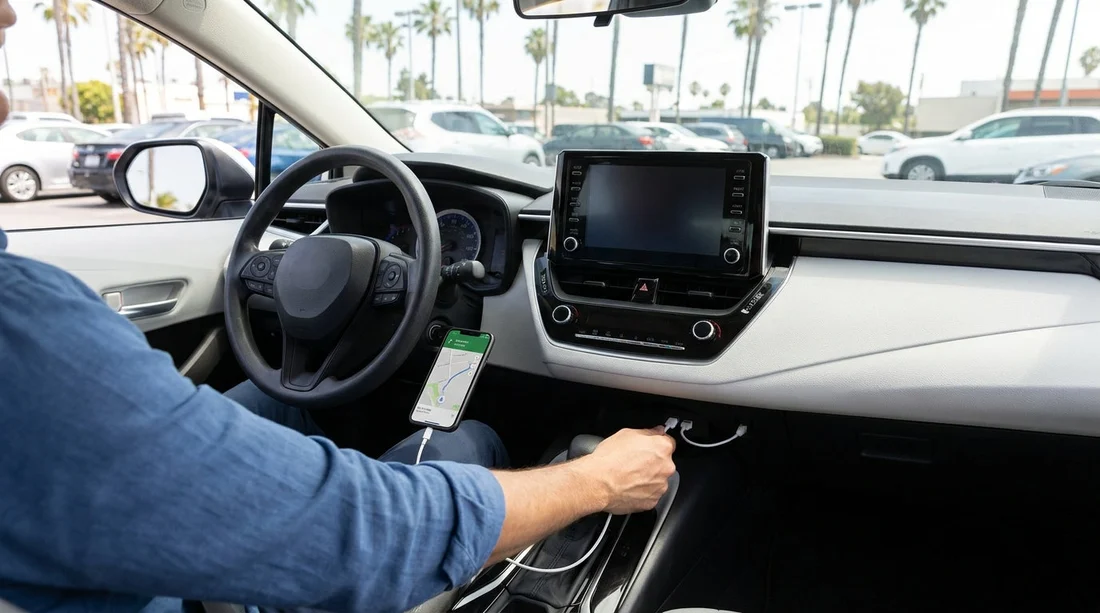
If you are picking up a car hire in Los Angeles and plan to use Apple CarPlay, bringing your own USB cable is usually the safest choice. Some rental vehicles do have cables in the centre console, but they are not guaranteed, they might be worn, and they can be charge-only. CarPlay needs a stable data connection, so the cable and the port both matter.
Los Angeles driving often means long stretches in traffic, complex junctions, and quick lane decisions. Having CarPlay working before you leave the counter area is not just a comfort feature, it can help you keep navigation and calls hands-free once you are on the road.
This guide explains exactly what to check at pick-up, how to identify USB-A versus USB-C ports, how to confirm your cable supports data, and how to complete a quick in-car setup test before you pull away.
Why you might need your own cable for CarPlay
Apple CarPlay can work wirelessly in some cars, but many rental fleets still rely on wired CarPlay, especially across mixed model years. Even when a car supports wireless CarPlay, it may require a one-time wired pairing first. That is why a reliable cable is worth having in your bag.
1) No cable provided. Rental companies often do not include phone cables as standard equipment, or a previous driver may have taken it.
2) The cable is charge-only. Some low-cost or promotional leads only carry power. Your phone will charge, but CarPlay will not launch.
3) The cable is damaged or intermittent. A loose connector can cause CarPlay to disconnect during turns or bumps, which is frustrating when you rely on directions.
If you are arranging a pick-up at the airport, the handover can be fast-paced. When you are collecting at Los Angeles International Airport, it helps to plan ahead so you can check the car in the lot without pressure. If you want to understand typical pick-up flow and what to expect, see car hire airport Los Angeles LAX.
Know your ports: USB-A vs USB-C in rental cars
The first practical step is identifying what port the car actually offers for CarPlay. Many vehicles have multiple USB ports, but not all of them handle data.
USB-A is the classic rectangular port. It is still common in older vehicles and some base trims. If your iPhone uses Lightning, a standard USB-A to Lightning cable usually works. If you have an iPhone with USB-C, you will need USB-A to USB-C.
USB-C is smaller and oval. It is common in newer vehicles and often provides faster charging. For iPhone 15 and later, a USB-C to USB-C cable is typically ideal, provided it supports data.
Important detail: some cars include a USB-A or USB-C port that is charge-only, plus a different port for data. The data-capable port is often near the infotainment screen, not the rear-seat area. Look for icons such as a small phone, a screen symbol, or the word “data” near the port, though labelling varies by manufacturer.
If you have not yet chosen a vehicle class, remember that newer models are more likely to have USB-C and wireless options, while some larger people carriers may have many charge ports but still only one CarPlay-capable data port. For vehicle options commonly used by families, you can compare features on minivan rental Los Angeles LAX.
Choose a data-capable cable, not just any charging lead
CarPlay needs data transfer. A cable that only charges will not trigger the CarPlay prompt on the screen.
Prefer manufacturer or certified cables. MFi-certified Lightning cables and reputable USB-C cables are less likely to drop connection.
Avoid very long cables. Longer leads can be more prone to signal loss, especially in hot cars where the cable may be bent or pinched. A cable around one metre is usually easy to route.
Inspect connectors. If the Lightning or USB-C end feels loose in your phone, choose a different cable. Intermittent connections can cause repeated prompts and audio cut-outs.
Bring a simple adapter. If you are unsure whether the car will have USB-A or USB-C, carrying a USB-A to USB-C adapter can save time. Keep it with your cable so you are not searching at the kerb.
For travellers focused on value options at LAX, you may want to allow extra time for a quick tech check before exiting the facility. Background on budget-friendly fleet choices is available at Dollar car rental California LAX.
Five-minute CarPlay setup checklist before leaving the lot
Once you are in the driver’s seat, do a quick setup while parked. This helps you confirm the port, the cable, and the infotainment system are all behaving normally.
1) Start the car and let the screen fully boot. Some systems take a minute to initialise, especially if you start plugging in immediately.
2) Plug into the correct USB port. Try the port nearest the screen first. If nothing happens after 10 to 15 seconds, try another front port. Avoid rear-seat ports for initial pairing.
3) Unlock your iPhone. CarPlay often will not launch if the phone is locked. Keep it unlocked for the first connection.
4) Accept prompts on both the phone and the car. You may see “Allow CarPlay while phone is locked?” and “Enable Apple CarPlay?”. Approve them so it works smoothly next time.
5) Confirm audio routing. Play a short audio clip and check it comes through the car speakers. Then open Maps and confirm voice navigation works. If you hear audio only from the phone, you may need to select the CarPlay source on the infotainment screen.
6) Check microphone performance. Make a quick hands-free call to voicemail or use Siri to read a message. If Siri cannot hear you, the car may be using a different microphone mode or privacy setting.
7) Secure your phone mount and cable path. Ensure the cable is not interfering with the gear selector or steering. In Los Angeles stop-start traffic, anything dangling can become distracting.
Troubleshooting if CarPlay will not connect at pick-up
If CarPlay does not appear, do not assume the car lacks it. Try these quick fixes in order:
Swap ports. Many vehicles have only one data port.
Swap cable. If you have a second cable, test it. A cable can charge perfectly and still fail for data.
Restart your iPhone. This can clear a stuck CarPlay session, especially after previous Bluetooth pairings.
Forget and re-pair. On iPhone, go to Settings, General, CarPlay, and remove the vehicle, then reconnect.
Check VPN and Screen Time restrictions. Some device policies can interfere with CarPlay. Temporarily disabling restrictions may help.
Confirm CarPlay is enabled on the car. Some systems allow CarPlay to be toggled off in settings.
If you are collecting a car hire and want a smoother pickup process, it can help to choose a location and package where you can take a moment in the vehicle before driving off. For general Los Angeles airport rental context and vehicle categories, see car rental California LAX.
Is wireless CarPlay common in Los Angeles rental cars?
Wireless CarPlay is becoming more common, but it is not consistent across fleets. Two cars parked side by side can have different infotainment versions, even within the same model name. If the car supports wireless CarPlay, you will usually pair via Bluetooth first, then CarPlay will switch to Wi-Fi for the session. Some systems still require a cable for the first setup.
Even with wireless CarPlay, keeping a cable is smart because it lets you charge reliably and gives you a fallback if wireless pairing is temperamental. In heavy Los Angeles mobile coverage areas, wireless connections can occasionally be finicky if the car is juggling multiple saved devices from previous drivers.
FAQ
Do I need to bring my own USB cable for Apple CarPlay with a car hire in Los Angeles?
It is recommended. Many rentals do not provide a cable, and CarPlay needs a reliable data-capable lead to connect consistently.
How can I tell if the car has USB-A or USB-C at pick-up?
Look near the infotainment area and centre console. USB-A is a wide rectangle, USB-C is a smaller oval port, and only some ports support data.
My iPhone charges but CarPlay does not start, what does that mean?
Most commonly the cable or the port is charge-only, or the cable is damaged. Try a different front USB port and a different known-good data cable.
Can I use wireless CarPlay in a rental car?
Sometimes, but it depends on the exact vehicle and infotainment version. Even with wireless support, you may need a cable for first-time pairing.






























































































