


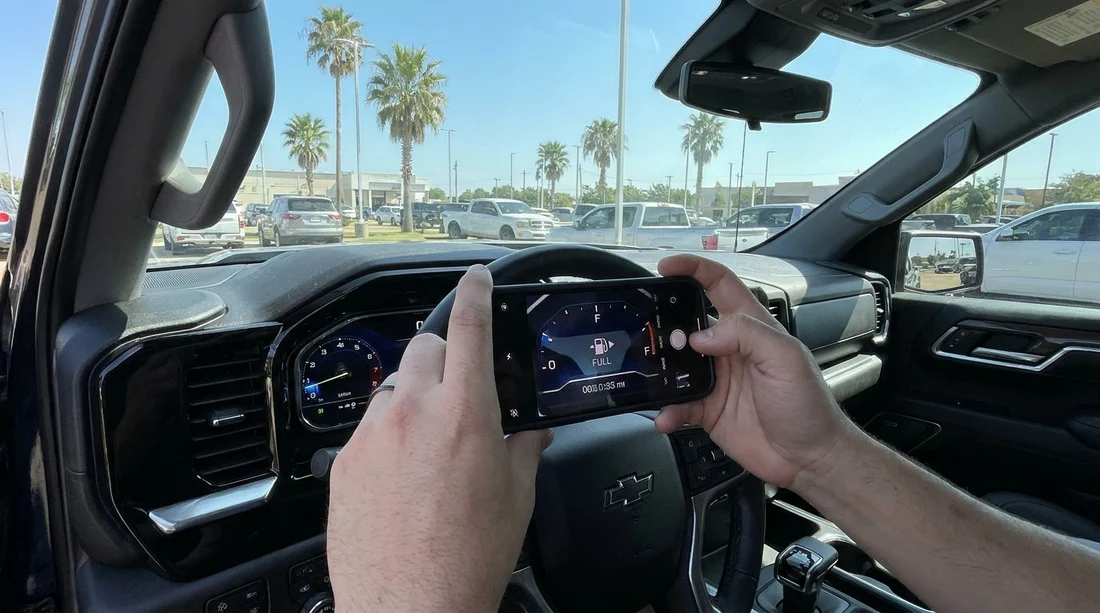
Quick Summary:
- Photograph the full instrument cluster with ignition on, showing fuel level.
- Capture a close-up of the odometer digits, sharp and glare-free.
- Take a wider dashboard shot that links photos to this vehicle.
- Record any low-fuel, range, or warning lights in the same frame.
Before you pull out of the car park in Texas, a few well-planned photos can prevent fuel and mileage disputes later. The goal is simple, create an unmistakable record of the starting fuel level and odometer reading at the exact moment you take responsibility for the vehicle.
If you are picking up around Houston, you will likely be in a multi-level garage with mixed lighting. That is a perfect reason to slow down and photograph the cluster carefully before you drive off from car rental at Houston IAH, where glare and reflections are common.
1) The essential photo, full instrument cluster with ignition on
Your most important image is a straight-on photo of the entire instrument cluster. It should show the fuel gauge, the odometer area, and any indicator lights that appear when the ignition is on. If the vehicle uses a push-button start, press once without pressing the brake to enter accessory mode, so the display lights up without starting the engine.
Why full cluster matters, it proves the fuel reading belongs to that moment and that car, and it captures warning lights that could affect fuel economy or usability. Make sure the photo is not angled, because angled shots can make a needle look higher or lower than it really is.
2) The close-up odometer photo, crisp digits with context
Next, take a close-up of the odometer reading so every digit is sharp. If you zoom in after taking it and the numbers stay clear, it is usable. If the display is digital, avoid motion blur by bracing your elbows against the seat or steering wheel.
Include a little surrounding dashboard in the frame, not just the numbers floating in black. That small context helps prove the photo was taken inside the car you collected, not copied from elsewhere.
3) Fuel gauge proof, including range-to-empty if available
The fuel gauge can be a needle, bars, or a percentage. Photograph whatever the car provides. If there is a range-to-empty number, include it in the same frame as the fuel gauge, because it adds corroboration when a gauge sits close to a tick mark.
If the rental is supposed to be full-to-full, the needle should sit exactly at full, not “almost”. If it is below full, photograph it, then take the issue to the desk straight away so the record matches your return expectations.
4) Warning lights and messages that affect fuel or mileage disputes
In the same cluster photos, look for any lights or messages such as low fuel, check engine, tyre pressure warning, or “service required”. Photograph them clearly, because a warning can change fuel consumption or explain unusual range behaviour.
If you collect in Austin and hit heavy traffic, idling time increases. Having the initial warnings documented can help if you later notice a fuel gauge behaving oddly. If you are collecting near Payless car hire at Austin AUS, take the photos before joining the main airport exit flow.
5) One supporting shot that ties the dashboard to the vehicle identity
Beyond gauge and odometer, take one wider shot that links the interior to the vehicle identity. Good options include the steering wheel with badge and cluster, plus a glimpse of the key fob, or the dashboard with the rental stock tag visible through the windscreen if present.
At large sites like Budget car rental at Fort Worth DFW, cars can look similar in the same row. A quick identity support photo reduces the chance of mixing images if you are travelling with multiple drivers or hiring more than one vehicle.
6) Best practice camera settings for clear, defensible photos
To make your photos usable, focus on clarity and repeatability. Turn off filters, use standard photo mode, and clean your phone lens first, because fingerprint haze is a common reason odometer digits become unreadable.
Hold the phone level with the instrument cluster, then tap to focus on the odometer. If glare is strong, slightly change your angle while keeping the camera square to the display.
7) When and where to take the photos in Texas pickup flow
The ideal moment is after you find the car but before you exit the garage or lot. Sit in the driver’s seat, close the door to reduce glare, then take the cluster shots with the ignition on.
If you are picking up a larger vehicle, the same approach applies. For travellers hiring people carriers, a quick dashboard photo set before leaving van hire at Houston IAH is useful because fuel consumption and range swings can be more noticeable during city driving.
8) What to do if the fuel or mileage does not match your paperwork
If your photos show the tank is not full when it should be, or the odometer is different from the contract, handle it before you leave. Return to the counter and ask them to note the correct starting fuel and mileage, then keep your images as support.
This is particularly helpful at busy counters such as Hertz car rental at San Antonio SAT, where staff can be moving quickly and small mistakes happen.
FAQ
Should I photograph the fuel gauge with the engine running or just ignition on? Ignition on is usually enough because the gauge and odometer illuminate clearly. If the gauge only updates when running, take one extra shot with the engine idling.
What if the car only shows fuel as bars and not a needle? Photograph the bars and any fuel percentage shown. Include the whole cluster so it is clear how many bars were present at pickup.
Is it worth taking a photo of the trip meter as well? Yes, if the trip meter is visible, capture it in the full cluster photo. The total odometer is the key evidence, but trip data can support your timeline.
My dashboard is reflecting the windscreen and the photo is unreadable, what can I do? Close the door, angle your body to block light, and tap to focus on the digits. Take several shots from slightly different angles without tilting the camera too much.
Do these photos help if I am charged for fuel later? They can, because they document the starting level you were given. Pair them with return photos showing the level when you drop the car back to support any query.




























































































