


Quick Summary:
- Expect at least one 12V socket, even in older economy rentals.
- USB-A is most common, with USB-C appearing more in newer trims.
- Bring a dual USB 12V charger plus spare cables for your devices.
- Check dash, console and rear vents for ports before setting off.
Before car hire in Texas, it helps to think about power the same way you think about toll roads, fuel and child seats. Most travellers want to keep phones charged, run maps all day, and maybe power a dash cam or a portable cooler. The challenge is that “USB included” is not consistent across vehicle classes, and even within the same class the exact fit-out depends on model year and trim level.
This guide explains the power sockets and USB ports you can typically expect in a US rental car in Texas, split by vehicle class, with practical cable and adapter planning. It also highlights where ports tend to be located, what works best for Apple CarPlay or Android Auto, and what to do if the car has fewer ports than you hoped.
If you are collecting from a major airport location, fleets can be large and mixed. For example, availability may vary when you arrange car hire at Houston IAH compared with a smaller pool elsewhere, even when the booking category looks identical.
What most Texas rental cars include as standard
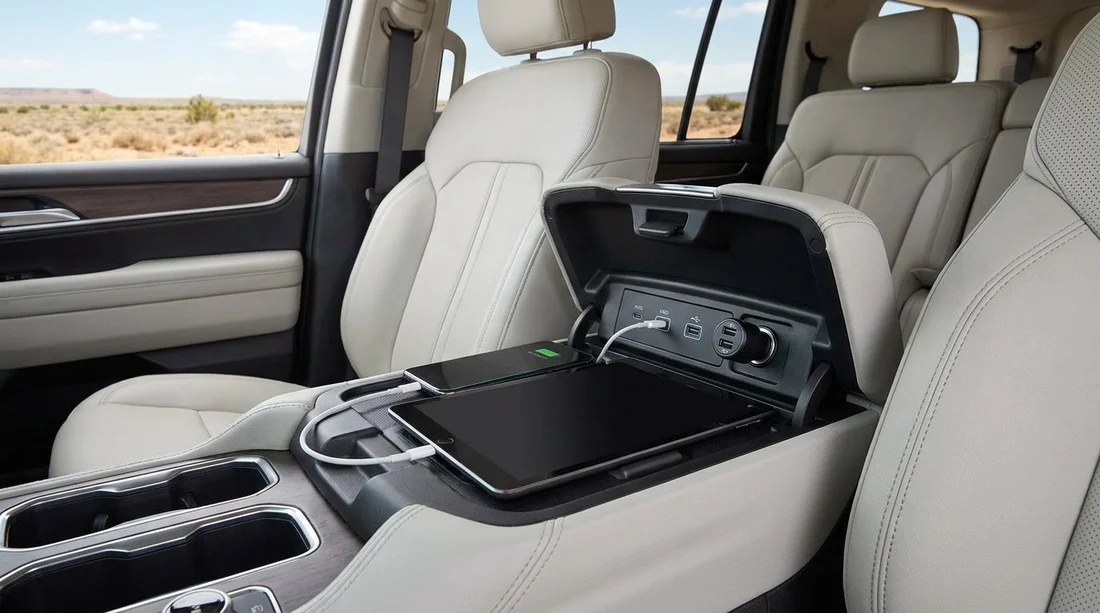
In broad terms, nearly every modern rental car will have at least one 12V socket (often called a “cigarette lighter” socket) plus one or more USB ports. The details that most affect your cable choices are: the number of ports, whether they are USB-A or USB-C, and whether they provide data (for phone projection) or charge-only power.
12V sockets: Very common. You will usually find one in the centre console area or low on the dashboard.
USB-A ports: Still the most common type across rental fleets. Many cars have one or two USB-A ports up front, sometimes duplicated for rear passengers.
USB-C ports: Increasingly common in newer vehicles, especially mid-size and premium categories. Some cars have mixed ports, for example one USB-A and one USB-C up front.
Other power: Wireless charging pads are appearing more often, but you should not rely on them. 110V household-style outlets are mainly in larger SUVs, pickups, minivans and some premium models.
Typical ports by vehicle class
Because rental companies group multiple models into one class, think in probabilities rather than guarantees. Here is what you should usually expect in Texas.
Economy and compact cars: Plan for one 12V socket and one or two USB-A ports up front. USB-C is possible but less predictable.
Midsize and standard sedans: One 12V socket is typical, with two USB ports up front. Mixed USB-A and USB-C appears more often here, especially on late-model cars.
Full-size sedans and premium categories: Expect more charging options: two or more USB ports in front, a higher chance of USB-C, and commonly at least one rear USB port. Wireless charging pads are more likely, though phone cases and camera bumps can affect charging stability.
SUVs (compact to full-size): SUVs tend to be best for passenger charging. Many have multiple USB ports across both rows, and sometimes a cargo-area 12V socket. If you are arranging something like SUV car hire in Austin, it is sensible to pack for several devices, because the car may support them, but not always with the exact port types your group uses.
Minivans: Often excellent for power. Expect multiple USB ports across rows and sometimes a 110V outlet. Still, check whether the rear ports are USB-A or USB-C so passengers bring the right cables.
Pickups: Modern pickups can be generous with power: multiple USB ports, 12V sockets and sometimes a 110V outlet. Older or work-focused trims may have fewer ports than you expect for the size of vehicle.
Where to look for sockets and USB ports
Knowing typical locations saves time in the pickup bay. Before you drive off, do a quick scan of these areas.
Front cabin: Check under the infotainment screen, inside the centre console bin, and at the front of the centre tunnel. Some cars place USB ports inside the armrest compartment, which can be inconvenient for short cables.
Rear passengers: Look at the back of the front centre console, or near the rear air vents. In some SUVs, rear ports are lower down and easy to miss in bright light.
Cargo area: SUVs and minivans sometimes have a 12V socket on the side panel in the boot. If you are powering a cooler, test that it stays on with the ignition off, as some sockets cut power when the car is locked.
Charging vs data, what matters for CarPlay and Android Auto
A common surprise during car hire is that not every USB port supports data. Many vehicles have one “primary” USB port for phone projection, and additional ports that are charge-only. If you plug into the wrong port, your phone may charge but CarPlay or Android Auto will not launch.
What to do: Look for a small phone or “USB” icon near one port, or try the port closest to the infotainment system first. Use a high-quality cable, because low-quality leads often cause dropouts, especially with Android Auto.
Wireless CarPlay/Android Auto: Some newer cars offer wireless projection, which reduces cable dependency, but it can drain battery faster. Even then, you still want a reliable charging option for long Texas drives.
What to pack before car hire in Texas
Rather than guessing the exact port layout, pack a small kit that covers most fleets without overloading your bag.
A 12V multi-port USB charger: This is the most universal solution because nearly every car has a 12V socket. Choose a charger with at least two outputs, ideally one USB-A and one USB-C, so different phones can charge at full speed.
Two cable types: Bring the cable you normally use plus a spare. For mixed groups, a USB-C to USB-C cable and a USB-A to USB-C cable cover many Android devices, while iPhone users may want USB-C to Lightning and USB-A to Lightning options depending on the car.
Optional extras: A small USB-C to USB-A adapter can rescue awkward combinations. If you travel with a dash cam, check whether it is USB-powered or 12V-plug powered and pack accordingly.
Airport pickups and city variations in Texas
Texas is vast, and rental fleets can differ by station, season and demand. At busier airports, you may see more late-model vehicles rotating through, increasing the chance of USB-C ports. Smaller stations can have older vehicles with fewer ports. When travelling via hubs like San Antonio Airport or collecting near the Metroplex with Fort Worth DFW rentals, the safest approach is still to assume you will have a 12V socket and plan everything else as a bonus.
If you have specific needs, for example powering medical equipment or multiple tablets for children, consider focusing on larger classes (SUV, minivan) where extra ports and higher-output chargers are more common. Even then, bring a 12V charger as your fallback.
FAQ
Will every Texas rental car have a 12V socket? In practice, almost all do, even if the car’s USB selection is limited. The 12V socket is the most dependable power source to plan around for car hire.
Should I expect USB-C in a standard US rental car? USB-C is increasingly common in newer vehicles, but USB-A is still more widespread across fleets. Bring at least one USB-C cable, but do not rely on USB-C being the only option.
Are the USB ports always suitable for Apple CarPlay or Android Auto? Not always. Many cars have one data-capable port and other charge-only ports. If projection does not work, try a different port, usually the one nearest the infotainment system.
Can rear passengers usually charge in an SUV? Often yes, particularly in newer SUVs, which may include rear USB ports near the back of the centre console. Still, it varies by model year, so a 12V multi-port charger remains useful.
What is the safest single item to pack for charging? A good-quality 12V charger with both USB-A and USB-C outputs is the best all-round solution, because it works in nearly any US rental car and supports multiple devices.




























































































