


Quick Summary:
- Find the FasTrak transponder and photograph its ID, mount, and switch.
- Only change the switch if you use toll lanes requiring occupancy setting.
- Keep receipts and your route, toll disputes are easier with timestamps.
- At return, report any missing device immediately and request written confirmation.
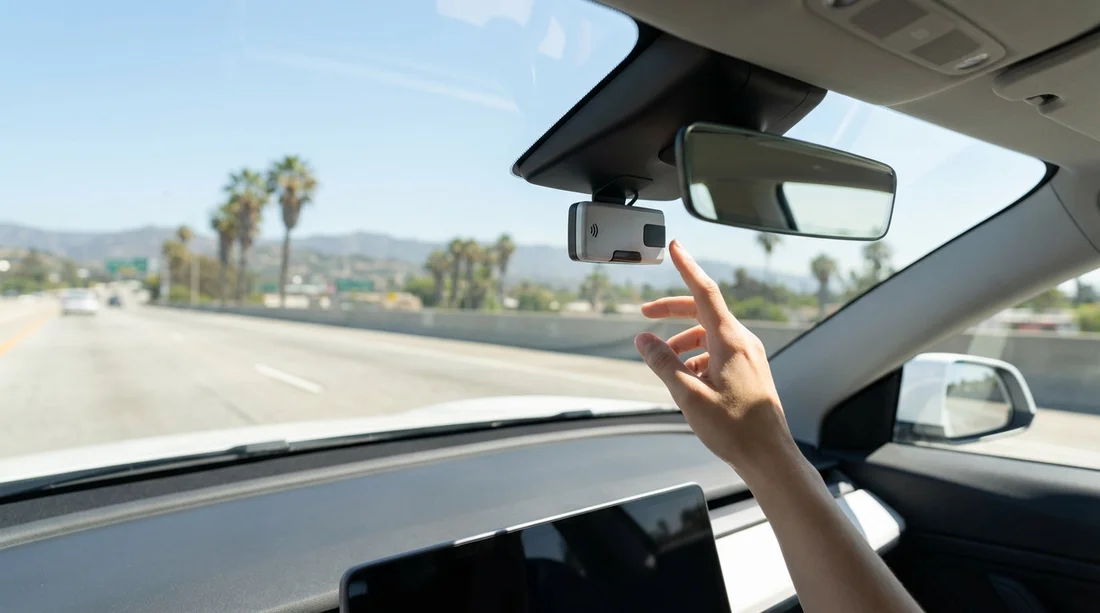
When you pick up a car hire in Los Angeles, you might spot a small box stuck to the windscreen, clipped near the mirror, or sitting in the centre console. That device is usually a FasTrak transponder, and it plays a major role in how toll roads and certain express lanes charge you in Southern California. It is also one of the easiest items to overlook at return, which can lead to avoidable replacement charges if it is missing or damaged.
This guide explains what the in-car FasTrak device does, what the little switch on it means, whether you should touch it at all, and how to document its condition at pick-up so you can hand the vehicle back with confidence.
What the FasTrak device is, and why it’s in your car hire
FasTrak is California’s electronic toll collection system. Instead of stopping to pay cash, toll points and gantries scan a transponder or read your number plate. The transponder is associated with a toll account, which allows toll charges to be billed accurately.
In a car hire, the transponder is typically issued and managed through the rental provider’s toll programme. If you drive through FasTrak toll points, the vehicle can be charged automatically, with the rental company then billing you according to the toll arrangement on your agreement. If you never use toll roads or toll lanes, you may never notice it.
Los Angeles driving can include tolled facilities depending on your route. For example, the I-110 and I-10 ExpressLanes use FasTrak, and some nearby toll roads also rely on electronic charging. Because visitors often use sat nav routes that prioritise speed, it is easy to end up on a tolled lane without meaning to, especially during peak traffic.
If you are collecting from an airport location, you may want to review pick-up instructions and general rental guidance for the area. Hola Car Rentals’ pages for Los Angeles airport car rental at LAX and car rental in Los Angeles LAX are useful starting points for what to expect at the counter, including common add-ons such as toll programmes.
Where to find the transponder, and what it looks like
Most FasTrak transponders are small, rectangular plastic units, sometimes branded, sometimes generic. Common locations include:
On the inside of the windscreen, near the rear-view mirror, sometimes in a bracket. Some are attached with adhesive strips.
In the glovebox or centre console, especially if the provider prefers it not to be left mounted.
On the dashboard in a cradle, less common but possible in some vehicles.
It may have a serial number or barcode on the back. Many also have a slider switch or a button. The moment you locate it, treat it like you would a key or a fuel card, it is part of the vehicle inventory.
What the switch does, and whether you should change it
The small switch is usually tied to “occupancy” settings for lanes that offer different pricing based on how many people are in the car. In parts of California, express lanes can charge differently for solo drivers versus carpools. The transponder setting helps indicate the correct occupancy category when the system reads your tag.
Practical guidance for a Los Angeles car hire:
Do not change the setting unless you understand the lane rules. If you are not using express lanes that require an occupancy setting, leave it as you found it.
Never change it just to try to avoid a toll. Lane enforcement can involve cameras and patrols, and incorrect settings can lead to violations or extra charges.
If you plan to use ExpressLanes, ask at pick-up how their toll programme treats the switch. Some rental toll arrangements charge tolls regardless of switch position, while others may pass through charges based on what the transponder reports.
If you change it for a legitimate carpool trip, switch it back afterwards. Returning it to the original position reduces the risk of being blamed for later mischarges or confusing the next renter.
Because policies vary by rental provider and by transponder model, the safest approach is consistency: note the original setting at collection, only adjust it when you are certain it is required, and document any change you make.
How FasTrak charges work with a rental, and what to check at pick-up
With car hire, tolls are not always billed the same way. In broad terms, there are three parts to understand:
1) The toll itself. This is what the road operator charges for the facility you use.
2) The billing method. This might be a rental toll programme linked to the transponder, or sometimes number plate billing.
3) Additional fees. Depending on the agreement, there can be daily toll programme fees on days you incur tolls, or administrative fees per toll. The exact structure should be stated on your rental paperwork.
Before you drive away, confirm these points at the counter or on your agreement:
Whether the car is enrolled in a toll programme, and how charges appear after return.
Whether you can opt out, and what happens if you use a toll road while opted out.
How violations are handled, and what fees apply if you enter a tolled lane incorrectly.
If you are choosing between providers, the key is clarity about toll handling rather than the transponder itself. Hola Car Rentals pages such as Dollar car hire in Los Angeles LAX and National car rental in Los Angeles LAX can help you compare options and understand what to ask about tolls and vehicle equipment at collection.
How to document the transponder at pick-up to avoid replacement charges
Replacement fees usually arise when the device is missing, broken, or detached and lost. The simplest protection is to build a quick, repeatable documentation habit at pick-up. It takes less than two minutes and can save a lengthy dispute later.
Step 1: Photograph the transponder in place. Take a clear photo showing where it is mounted or stored, and its general condition. If it is on the windscreen, include surrounding context so it is obvious it is in that vehicle.
Step 2: Photograph any identifying number. Flip it carefully if possible, or photograph the serial number/label without removing it from its bracket. If you cannot access the ID without forcing it, do not pry it off. Instead, photograph the unit from multiple angles and note that the label was not accessible.
Step 3: Photograph the switch position. Get a close-up where the switch setting is visible. If the transponder has markings like 1, 2, 3, or “HOV”, capture that clearly.
Step 4: Record it in your pick-up condition report. If there is an inspection sheet or in-app checklist, add a note such as “FasTrak present, mounted by mirror, switch set to X”. This is especially useful if your photos are time-stamped but later hard to match to a specific vehicle.
Step 5: Keep the device where it belongs. If it is mounted, avoid touching it. If it is loose in the glovebox, keep it there and do not move it to a bag where it could be forgotten at return.
These steps are even more important if you are hiring a larger vehicle for a group, where multiple drivers and passengers can accidentally knock or remove items. If you are travelling with extra luggage and people, review practical vehicle options on van rental in California LAX, then apply the same documentation routine at pick-up.
What to do if the transponder looks loose, damaged, or missing at pick-up
If you cannot find the transponder, or it looks like it is hanging off the windscreen, address it before you leave the car park.
If it’s missing: return to the desk or call the location immediately. Ask them to note on your agreement or inspection record that the FasTrak device was not present at pick-up. Take photos of the windscreen area and any bracket without the transponder to show it was not there.
If it’s loose: do not re-adhere it with your own tape unless staff instruct you. Improper mounting can affect readability and can look like tampering. Photograph the loosened state and ask for assistance.
If it’s damaged: take close-ups and report it. A cracked casing, broken clip, or missing label is the sort of detail that can later be misinterpreted as renter-caused damage.
In all cases, the best outcome is an annotated record created at pick-up. If the location fixes it, ask for confirmation that the issue was resolved and that your file was updated.
What if the FasTrak device is missing at return?
If you reach return and notice the transponder is missing, act quickly and keep the conversation factual. Many replacement charges happen because the staff member checking in the vehicle cannot verify whether it was missing earlier or went missing during your rental.
1) Check the obvious places before handing over the keys. Look in the glovebox, centre console, door pockets, and under the seats. If it was windscreen-mounted, look for the bracket or adhesive base.
2) Tell the return agent immediately. Do not wait for them to discover it later. Explain where it was at pick-up, and when you noticed it was gone.
3) Provide your pick-up photos. Show the time-stamped images of the device and its position. If you reported a loose mount at pick-up, show that record too. This establishes a timeline and can reduce the chance of an automatic replacement fee.
4) Ask for a written note on the return receipt. If the agent agrees it was already missing or cannot confirm responsibility, request that they record your report on the return paperwork.
5) Follow up promptly if a charge appears. If you later see a replacement charge, respond with the photos and the return documentation. Clear evidence often shortens resolution time.
Even if you did everything right, a missing transponder can still trigger an automated fee in some systems. Documentation is what helps a human reviewer understand the situation and apply the correct outcome.
Tips to avoid unintended toll charges in Los Angeles
FasTrak is not only about the device, it is about the lanes you choose. A few habits can reduce surprises:
Check your navigation settings. Many apps have “avoid tolls” options. If you do not want toll routes, enable that setting before you start driving.
Watch for ExpressLanes signage. The I-110 and I-10 ExpressLanes are clearly marked. Entering them can be easy during heavy traffic if you are following flow rather than signs.
Keep a simple log of toll days. Note the date and approximate time you used a toll facility. If you later query a charge, this helps you confirm whether it matches your travel.
Do not remove the transponder. Some drivers assume removing it prevents tolls, but number plate billing can still occur, and removal increases the risk of a replacement charge.
FAQ
What is the FasTrak device in my Los Angeles car hire? It is an electronic toll transponder used to register toll road and express lane usage in California. In rentals, it is typically linked to the provider’s toll billing programme.
Should I change the switch on the FasTrak transponder? Only if you are deliberately using lanes where occupancy selection is required and you understand the rules. Otherwise leave it in the original position and document it at pick-up.
What proof should I keep at pick-up to avoid replacement fees? Take photos showing the transponder present, its serial number if accessible, and the switch position. Add a note to the vehicle condition report stating it was present and where it was located.
What happens if the FasTrak device is missing when I return the car? You may be charged a replacement fee unless you can show it was missing or defective earlier. Report it immediately at return and ask for written confirmation on your return receipt.
Can I avoid tolls completely while driving in Los Angeles? Often yes by selecting “avoid tolls” in your navigation and watching for ExpressLanes entrances, but some routes may still present toll options. If you accidentally use a toll lane, keep the time and location for later reference.




























































































