


Quick Summary:
- Dash cams are generally legal in California, but windscreen mounting is restricted.
- Disable audio or get consent, California’s two party rule applies.
- Mount low corner windscreen or behind mirror, never blocking driver visibility.
- Remove the device at return and avoid adhesives that mark the glass.
If you are planning a California road trip on car hire, a dash cam can feel like a sensible extra. It can help document an incident, capture number plates after a minor bump, or provide context if there is a dispute about what happened. The good news is that dash cams are generally allowed in California. The details, however, matter, especially around where you mount the camera and whether it records audio. A poor installation can obstruct your view, create a distraction, or raise questions at return inspection.
This guide covers the practical points for California car hire drivers, including what the law usually allows, the common pitfalls with audio recording, and mounting locations that are unlikely to cause problems. It is written for visitors and locals alike who want to stay on the right side of the rules while keeping their rental vehicle in good condition.
Are dash cams legal in California?
In California, using a dash cam is generally legal. The main legal friction is not the idea of filming the road, but the way devices are mounted on the windscreen and, separately, whether the camera captures audio of people in the car. California has specific rules about objects attached to the windscreen that could obstruct the driver’s view, so a dash cam can be legal yet still become a problem if placed in the wrong spot.
For car hire, there is also a contractual and practical layer. Rental companies typically expect the vehicle to be returned with no damage or residue, and with nothing left installed. A suction mount is usually easier to remove cleanly than an adhesive pad. Even when the law allows a location, you still want a setup that does not leave marks, does not interfere with sensors, and does not look like it has been permanently fixed.
If you are collecting near major hubs, you may be arranging pickup through Hola Car Rentals at locations such as Los Angeles LAX or San Diego. The legal principles are statewide, but the driving environment changes quickly, from dense urban traffic to open desert roads, so a stable, non-distracting mounting position is key.
Windscreen mounting rules that matter for car hire
California restricts items attached to the windscreen because they can block visibility. Dash cams are typically permitted if mounted in limited areas, with size limits and positioning that avoid the primary viewing area. In practice, the safest approach is to keep the camera small, mount it high, and place it where it least affects your forward view.
Commonly accepted mounting zones in California include small devices positioned in the lower corners of the windscreen (driver side or passenger side) and certain placements near the centre high area behind or adjacent to the rear view mirror, provided they do not obstruct the driver’s clear view of the road. Because individual vehicles differ, especially modern models with cameras and sensors, always check for factory equipment around the mirror housing and at the top centre of the windscreen. Do not cover any built-in camera modules or rain sensors.
From a car hire standpoint, the mounting choice should also avoid contact with tinted bands, heated windscreen elements (if present), and any areas that could cause squeaks or rattles. A dash cam that vibrates or partially detaches becomes a distraction, which is the opposite of what you want while navigating unfamiliar junctions or freeway lanes.
Audio recording pitfalls, California’s two party consent issue
The biggest surprise for visitors is often audio. California is widely treated as a two party consent state for recording confidential communications. That means recording audio of conversations inside the car can create legal risk if everyone being recorded has not consented, especially if the conversation is private and not intended to be overheard.
For a dash cam used during car hire, this is easy to manage. Most dash cams let you disable audio recording in settings, and doing so is often the simplest option. If you do want audio, you should obtain clear consent from passengers before recording begins. This is particularly important if you are travelling with friends, colleagues, or anyone who may not expect their voice to be captured.
Also consider incidental audio. If your phone is connected to the car via Bluetooth, your dash cam microphone might pick up calls. If you carry passengers such as rideshare users, or if you are discussing personal information, audio recording becomes even more sensitive. Disabling audio helps you focus on what dash cams do best, recording what happens on the road.
Practical mounting spots that usually avoid visibility issues
When choosing a mount, prioritise a stable view of the road without blocking the driver’s sight lines. The best placement is typically the one you forget about once you start driving. Here are practical options that tend to work well in California rental vehicles.
Mount behind the rear view mirror (high centre)
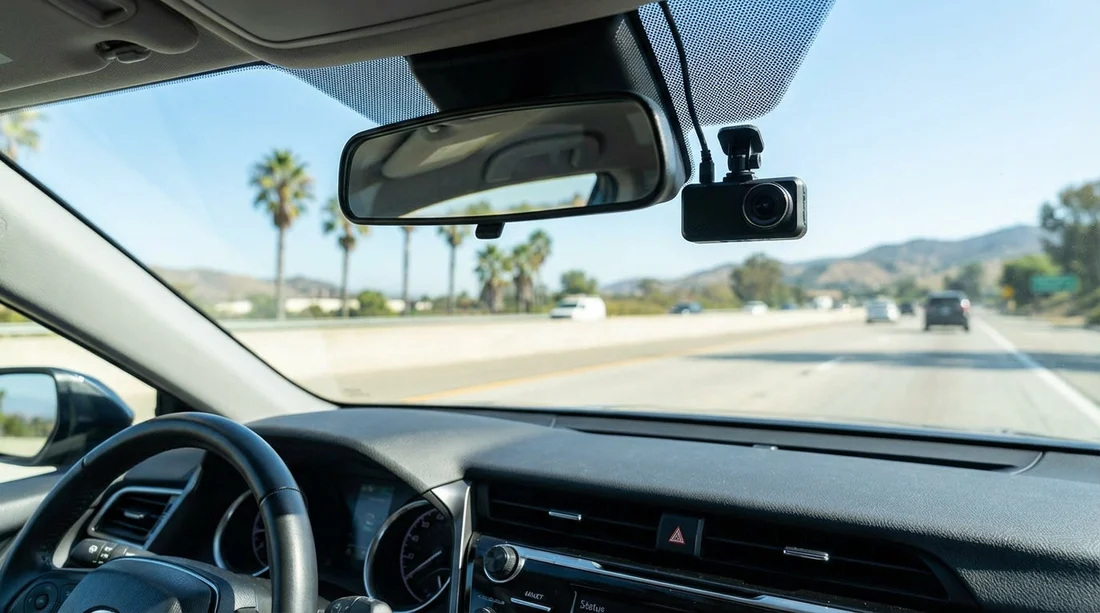
Placing the camera high on the windscreen, tucked behind the rear view mirror, usually keeps it out of your direct field of vision. It can also protect the camera from direct sunlight and reduce glare. Before you stick anything to the glass, sit in your driving position and confirm you cannot see the camera body when looking forward normally. If it is visible, move it slightly higher or more central behind the mirror housing.
Be careful around built-in sensors and cameras. Many newer vehicles have a cluster behind the mirror that controls lane keeping, emergency braking, or adaptive cruise. Do not mount over these areas, and do not route the cable in a way that interferes with the mirror movement.
Lower passenger side corner (discreet and often compliant)
A lower passenger side corner mount can keep the dash cam far from the driver’s central view. It may also make it easier to reach the camera for removing the memory card or adjusting settings without leaning across the steering wheel. The trade-off is that low mounting can increase dashboard reflections and reduce the camera’s view of far-distance traffic signals. Using a polarising filter can help with reflections, but keep the setup simple for car hire.
Lower driver side corner (only if it does not distract)
A lower driver side corner mount can align well with legal positioning rules, but it is more likely to catch your eye. If you choose this spot, ensure the screen is off while driving, and that indicator lights are not flashing in your peripheral vision. Many dash cams have a “screen saver” setting that turns the display off after a few seconds.
Avoid these mounting choices in rental cars
Some placements are more likely to cause trouble, even if the device itself is legal. Avoid mounting in the middle of the windscreen at eye level, anywhere that blocks the view of the road, or any spot that could be interpreted as obstructing visibility.
Also avoid mounting on the dashboard using adhesive pads that can leave marks, especially on textured surfaces. Rental dashboards can stain, and adhesive residue can be hard to remove without cleaners that you should not use on a hired vehicle. Similarly, do not mount on the side windows if it affects your ability to check mirrors or see cyclists. Finally, do not route cables across airbags. A-pillar and curtain airbags can deploy with force, and a cable can become a hazard.
Return inspection friendly setup for car hire
Return inspections are usually quick, but anything that looks permanent can raise questions. A suction cup mount is generally easier to remove cleanly. If you use an adhesive mount, choose one designed to remove cleanly and test it on your own vehicle first, not on a rental.
Before returning your car hire, remove the dash cam, mount, and all cables. Check for any marks on the glass and gently wipe with a dry microfibre cloth. Do not use harsh chemicals. Also make sure you have removed the memory card if it contains footage you want to keep. Leaving a memory card behind can expose personal travel details.
If you are collecting and returning at different points, for example flying into San Jose and dropping elsewhere, keep your dash cam kit together in a pouch so it is easy to uninstall quickly at the end of the trip.
Privacy, footage handling, and sharing
A dash cam records more than just you. It may capture pedestrians, other drivers, and number plates. In general, filming in public spaces is widely permitted, but sharing footage can raise privacy concerns, especially if it includes faces, children, or identifying details. If you post clips online, consider blurring plates and faces, and avoid sharing information that reveals your accommodation or daily route.
For accidents or disputes, keep original files. If you need to provide footage to an insurer or authorities, avoid editing the clip in a way that could be questioned later. It can also help to note the time and location, since some dash cams lose correct time when unplugged.
Choosing a dash cam that suits California driving
You do not need an extreme setup for car hire. Look for a compact camera with a wide but not distorted field of view, reliable night performance, and a mount that can be removed cleanly. A capacitor-based model can handle heat better than a battery-based model, which matters in sunny California parking lots.
Also consider whether you truly need a rear camera. A rear camera can be useful, but it doubles the cabling and increases the chance of messy routing near airbags or trim clips. For most travellers, a single front-facing camera, mounted properly, provides the best balance of usefulness and simplicity.
If your trip includes family travel, you might be using a larger vehicle arranged through pages like minivan hire in California at LAX. Larger cabins can make cable routing easier, but the same rules apply, keep cables away from airbags and avoid blocking any driver view.
Common scenarios: what to do when you are stopped or questioned
If a police officer asks about your dash cam, stay calm and be ready to explain that it is for road safety and documentation. The key question is usually whether it obstructs visibility. If you have mounted it discreetly behind the mirror or within an allowed corner zone, you are in a stronger position. If the officer considers the placement obstructive, the practical solution is to remove or reposition it promptly.
If a passenger objects to being recorded, turn off audio immediately, and if necessary turn off the camera. For car hire, keeping the peace inside the vehicle matters more than recording every second of a holiday drive.
Finally, if you are touring from Northern California gateways such as Sacramento SMF, remember that different cities may have different enforcement priorities, but statewide windscreen visibility and audio consent principles still apply.
FAQ
Can I use a dash cam in a California rental car? Yes, dash cams are generally legal in California, but you must mount them so they do not obstruct your view and you should avoid leaving any residue or damage on return.
Is it legal for my dash cam to record audio in California? Audio recording can be risky because California is often treated as requiring consent from all parties for confidential conversations. The safest option is to disable audio.
Where should I mount a dash cam so it does not block my view? A common safe spot is high on the windscreen behind the rear view mirror, or in a lower corner, provided it stays outside your primary viewing area.
Will a dash cam cause problems at return inspection for car hire? It can if you use adhesives that mark the glass or leave cables routed messily. Use a removable mount, keep cables tidy, and remove everything before returning.
Should I tell passengers that a dash cam is installed? Yes, especially if audio is enabled. Clear communication helps avoid consent issues and keeps everyone comfortable during the journey.

























































































