


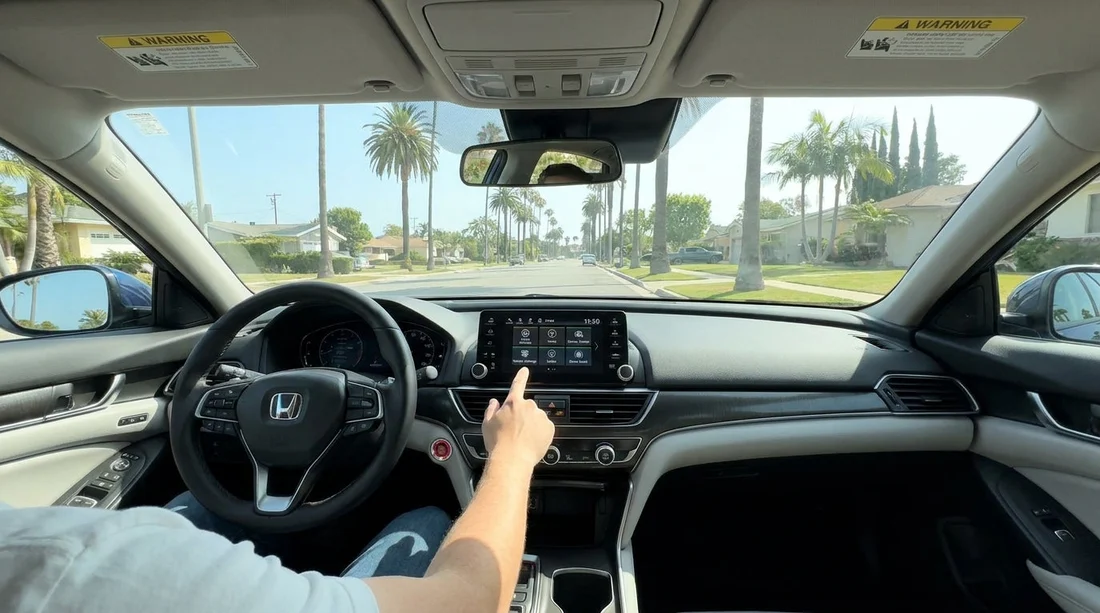
Quick Summary:
- Adjust seat, head restraint, mirrors, and steering wheel for safe visibility.
- Verify tyre pressure and tread, lights, wipers, and washer fluid.
- Review driver-assist features, calibrate alerts, and learn how to disable them.
- Locate hazard controls, spare or sealant kit, and emergency contact details.
Before you pull out of the car park in California, take five to ten minutes to confirm the safety basics and the driver-assist settings. Modern rental vehicles often arrive with unfamiliar menus, loud alerts, and features that can surprise you in dense traffic, on freeways, or on steep coastal roads. A short, systematic check helps you drive comfortably, avoid warning lights, and reduce the chance of a minor issue turning into a roadside problem.
If you arranged your car hire through Hola Car Rentals, you may collect from different partners depending on your route. Even if you are arriving via another state first, the same checks apply. For example, collections around San Jose SJC often mean immediate freeway driving, while a pickup via San Diego SAN might put you into heavy urban traffic quickly. Either way, do the checks before you join the flow.
1) Driving position and visibility settings
Start with the fundamentals because they influence every other system. Adjust the seat so you can fully press the pedals without stretching, and set the backrest so your shoulders stay against it while your hands rest at roughly nine and three on the wheel. Position the head restraint so the centre of the restraint aligns with the back of your head, not your neck.
Then set mirrors for maximum coverage. Side mirrors should minimise the view of your own car and maximise adjacent lanes. If the vehicle has blind-spot monitoring, correct mirror placement still matters because sensors can miss fast-moving motorcycles or cars approaching from unusual angles. Check that rear visibility is not blocked by headrests, tinted glass, or luggage.
Finally, confirm the steering wheel and instrument cluster are readable. If the car has a digital display with multiple layouts, choose a simple view that clearly shows speed, fuel, and any safety warnings. This is particularly useful in California where speed limits change often between city streets and freeways.
2) Tyres, brakes, and basic roadworthiness
Tyres are the single most important safety item you can easily inspect. Look for an obviously low tyre, sidewall bulges, or visible damage. If the car provides a tyre-pressure display, compare all four readings. They should be broadly consistent, and not flagged with a warning. If the pressure seems off, request it be corrected before you leave.
Check tread visually, especially if you expect rain in coastal areas or mountain routes. You do not need a gauge to spot problems, a very worn centre strip or uneven wear can indicate under-inflation, over-inflation, or alignment issues.
When you first move the car a few metres, apply the brakes gently. You are listening and feeling for grinding, a pulling sensation, or a very soft pedal. If anything feels wrong, return immediately while you are still close to the pickup point.
3) Lights, indicators, wipers, and defogging
California sun can be bright, but fog, coastal mist, and sudden evening glare are common. Confirm you know how to operate headlights, high beams, indicators, and hazard lights. Many modern cars use automatic headlights, but you should still locate the manual setting in case conditions demand it.
Test windscreen wipers and washers. Make sure the blades clear the screen without smearing. Also check front and rear demisters. A fogged windscreen during a temperature shift can quickly become dangerous, especially when joining a freeway ramp.
4) Driver-assist systems, learn what is fitted and how it behaves
Driver-assist technology varies widely by model and trim. Before leaving, identify which features are present and what their alerts sound like. Common systems include forward collision warning, automatic emergency braking, lane departure warning, lane keeping assist, adaptive cruise control, and blind-spot monitoring.
Go into the vehicle settings menu and confirm the alert volume is not excessively loud. Set lane-related warnings to a level that helps rather than startles. If the car allows it, choose a normal sensitivity for collision warnings rather than the most aggressive setting.
Importantly, learn how to temporarily disable features. Lane keeping assist can feel intrusive if road markings are faded, during roadworks, or on narrow lanes. Knowing the button or menu path prevents panic if the steering wheel begins to nudge unexpectedly.
If you are collecting after another flight segment, you might have already driven a different car. Settings do not translate across brands, so do not assume the same icons mean the same behaviour. Whether your trip began near Seattle SEA or you previously hired in Portland PDX, treat each new car as a fresh setup.
5) Cruise control and speed-limit tools
On long California freeways, cruise control can reduce fatigue, but only if you understand which type you have. Standard cruise holds a set speed, while adaptive cruise also manages following distance. If adaptive cruise is fitted, locate the distance setting and select a sensible gap for fast traffic. A very short gap may feel uncomfortable and may prompt frequent braking.
Some vehicles include speed-limit recognition that reads roadside signs. It can be helpful, but it is not perfect, especially near slip roads or where temporary roadworks signs appear. Use it as a prompt, not as the final authority.
6) Parking aids, reverse camera, and sensor behaviour
Before you rely on parking aids, verify they work. Engage reverse while stationary and check the reverse camera image is clear. Confirm the guidance lines move with steering input if the car supports it. If there are parking sensors, listen for the beep pattern and note that rain, dirt, or angled kerbs can cause false warnings.
7) Doors, locks, child safety, and window controls
Confirm the central locking works from the driver’s door and from the key fob, and learn how the car behaves when you walk away. Some models auto-lock, others do not, and some will lock but keep the boot accessible. Avoid assumptions, particularly if you plan to leave luggage in the car.
If you are travelling with children, locate child locks and window lock switches. Make sure car seats can be installed correctly with either ISOFIX or seat belt routing, and verify the rear seat belts are accessible and not jammed behind cushions.
8) Warning lights, fuel type, and range checks
With the engine on, check for warning lights that remain illuminated after start-up. A tyre-pressure warning, airbag light, or brake system alert should be resolved before departure. Also check the fuel level and estimated range so you are not forced into an immediate stop in an unfamiliar area.
Confirm the fuel type, petrol versus diesel. Many US rentals are petrol, but do not rely on that. The fuel door or handbook usually states the correct type, and using the wrong fuel can cause costly damage and major delays.
9) Emergency equipment and roadside basics
Know where key items are stored. Find the hazard-light switch, spare wheel or tyre inflator kit, jack points, and the towing eye location if provided. Some vehicles have no spare and instead include sealant and a compressor. If you are unfamiliar with that system, check the instructions so you understand the limitation.
10) A short test loop before committing to the motorway
If possible, do a short loop around the pickup area. Check steering feel, braking response, and that lane and collision alerts are not overly sensitive. Pair your phone via Bluetooth only after you are parked, and confirm hands-free calling works. Set navigation and volume while stationary to avoid distraction.
Once you are satisfied, you can drive away confident that your rental’s safety features are working with you, not against you. That is the goal of a quick pre-departure check, safer driving, fewer surprises, and a calmer start to your California trip.
FAQ
Should I turn off lane keeping assist in a rental car? Only if it distracts you or behaves unpredictably. In heavy traffic or on roads with faded markings, reducing sensitivity or switching it off temporarily can make driving smoother.
How do I know if a rental has adaptive cruise control? Look for a following-distance button or menu setting, and icons showing a car with distance bars. If you are unsure, ask staff to point out the controls before leaving.
What tyre checks can I realistically do at pickup? Visually inspect for damage, compare tyre-pressure readings if displayed, and ensure no warning light is present. If a tyre looks low, request an air check immediately.
Are automatic headlights reliable enough to leave alone? Often yes, but you should still know how to switch them on manually. Fog, dusk, and tunnels can confuse sensors, so manual control is useful.
What should I do if a warning light comes on right after departure? Pull over safely as soon as practical, check the owner information screen for details, and contact the rental provider or roadside assistance. Avoid continuing if it indicates brakes, airbags, or overheating.































































































