


Quick Summary:
- Check your voucher for the operating brand, not just the headline brand.
- Follow SFO Rental Car Center signs, then verify desk screens and placards.
- Match the queue to your brand family, confirmation number, and loyalty profile.
- Ask staff to confirm the issuing company before handing over licence and card.
At San Francisco International Airport, it is common to find car hire brands sharing the same counter or being handled by an operating partner. That can feel confusing after a flight, especially when you can see your brand name on a poster but the staff member tells you to join a different line. The good news is that the correct counter is usually easy to identify if you know what to check before you commit to a queue.
This guide focuses on practical ways to confirm you are in the right place at SFO, what desk signage really means, and which booking details matter most. If you want background on picking up vehicles at the airport generally, Hola Car Rentals also keeps an overview of car hire at San Francisco Airport (SFO), including where collections typically happen.
Why brands share desks at SFO
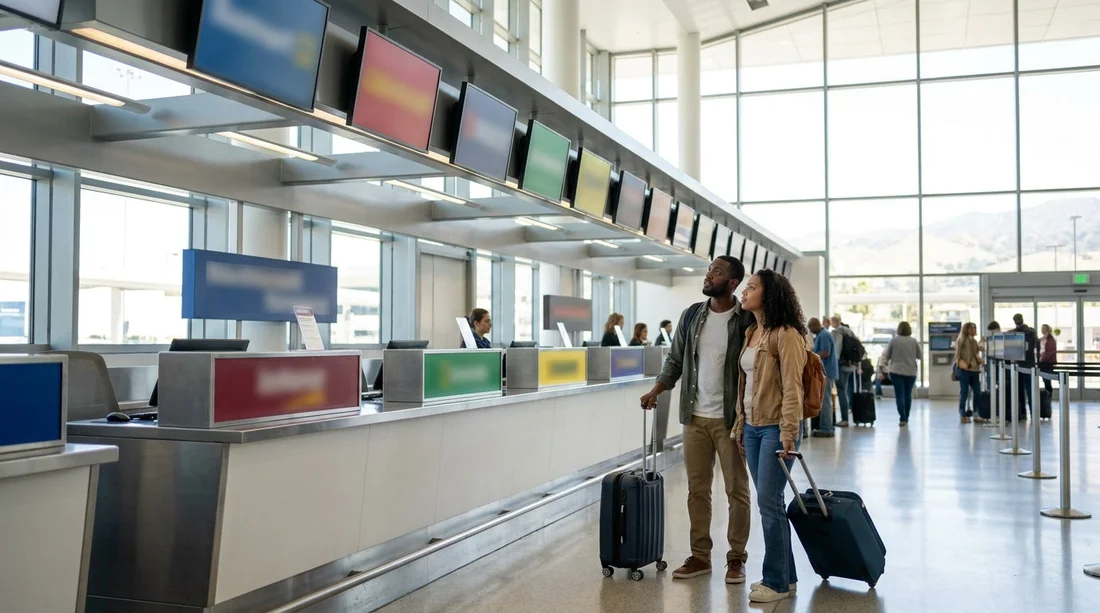
Shared desks happen for a few reasons: two brands may be owned by the same group, one brand may outsource counter operations at certain airports, or multiple brands may share staff and systems to speed up processing. The result is that the name you booked can be different from the name printed on the counter header, or the desk might show multiple brand logos on one sign.
Start by confirming where counters are located
First, make sure you are heading to the correct facility. SFO’s rental operations are typically in the Rental Car Center rather than in every terminal. Airport wayfinding signage usually directs you, and once you arrive, you will see banks of counters. If your booking confirmation mentions SFO specifically, that should align with airport pick-up. If you are comparing options or checking what is included for different suppliers, you can cross-reference Hola’s SFO pages such as car hire in San Francisco SFO for general pick-up expectations.
Practical tip: if your paperwork lists a street address that is not the Rental Car Center, do not queue yet. Some corporate, neighbourhood, or hotel locations have similar brand names but different collection points.
Check the booking details that decide the correct desk
When brands share desks, your most reliable clues are in your confirmation email or voucher. Before joining any queue, open the booking and look for these fields:
1) Supplier or operating company name. Many vouchers show both a consumer-facing brand and an operating company. The operating name often matches the actual counter banner, the printer header on your agreement, or the staff system.
2) IATA airport code and location identifier. SFO should appear clearly. Some systems also include a location number or short code. If the code does not match SFO, step aside and verify, because you might be looking at the wrong pick-up point.
3) Confirmation number format. Different groups use distinct formats, for example letters plus digits, or a particular length. If the counter screens show “Now serving” for a brand family, the staff can often tell from your reference whether you belong in that line.
4) Payment and card rules. If your voucher specifies “pay at counter” or prepayment, that affects which desk can process you. Shared desks sometimes have a separate lane for pre-paid or express pick-up, but it still needs to match your supplier’s workflow.
How to read shared-counter signage properly
At SFO, shared desks are usually indicated in one of three ways:
Multiple logos on one header sign. This typically means one team can serve all displayed brands, but queues might still be split for speed. Look for smaller placards that say “Serving” or “Check-in for” and list which brands belong in that line.
One logo at the top, smaller “operated by” text. In that case, your voucher’s operating company is your key. If the counter staff are trained under the operator brand, they may ask for that name rather than the headline brand.
Digital screens cycling brand names. Screens can rotate, so do not assume the current slide is the only brand served. Stand where you can watch a full cycle, or look for a static placard at eye level near the start of the queue.
If your booking is with a specific provider, it can help to review the relevant supplier page in advance, for example Payless car rental in San Francisco SFO or Thrifty car hire in San Francisco SFO, then compare the desk branding you see against the “operated by” detail on your voucher.
Queue choice: what to check before you commit
When several lines sit in front of a shared counter, do a fast checklist before joining:
Look for lane labels: “Reservations”, “Walk-up”, “Prepaid”, “Members”, and “Returns” are often separate. Joining the wrong lane can cost time even if you are technically at the right desk.
Confirm the brand family: If the placard lists multiple brands, check that yours is explicitly named. If it is not listed, assume it might be handled elsewhere in the same hall and ask a staff member or marshal.
Match your pick-up time window: Some desks triage by time, especially at peaks. If you are early or late, you might be redirected to a different agent or window within the shared counter.
Check whether your booking includes a van or specialty vehicle: Some suppliers handle vans, larger vehicles, or specific categories at a different window or via a different process. If you are collecting a larger vehicle, the notes on van rental in San Francisco SFO can help you anticipate questions about seating, luggage, and allocation so you do not queue in the wrong place.
What to ask at the desk, quickly and politely
If you are unsure, it is worth confirming before you hand over your documents. A simple approach saves time for you and the agent:
Ask which brands and reservations that position can process. Shared desks sometimes have agents logged into different systems, even within the same counter bank.
Show your voucher on your phone. Point to the supplier or operating company line and the confirmation number. That is usually enough for an agent to direct you to the right queue or complete the check-in.
Confirm the pick-up location. Ask whether your agreement will be issued for SFO Rental Car Center. If the agent hesitates, pause and re-check the location code on your voucher.
Avoid common mix-ups that send people to the wrong counter
Relying on the biggest logo in the hall. Large banners are often general branding, not a guarantee of which system your booking is in.
Confusing broker and supplier names. If you booked through a comparison site or travel portal, the brand on your email header may be the broker, while the counter uses the supplier name shown deeper in the booking details.
Assuming “same group” always means “same queue”. Even when brands share staff, they can still run separate queues for different rate types, contracts, or membership programmes.
Documents to have ready once you are at the correct counter
Having the right documents ready helps the agent find your booking in a shared-desk setting where speed matters:
Driving licence for every named driver, plus an International Driving Permit if your licence requires one for the US.
Passport or ID as requested.
Payment card in the main driver’s name, matching the supplier’s deposit rules.
Voucher or confirmation with supplier and operating company details visible.
FAQ
How do I know if my car hire brand is sharing a counter at SFO? If your voucher lists an operating company or shows multiple brand names for the same location, you are likely using a shared desk. At the Rental Car Center, look for counters with multi-logo signage or “served by” placards.
What is the most important detail to check before joining a queue? Check the supplier or operating company line on your voucher and confirm it matches the desk system. If your confirmation number format looks unfamiliar to the desk, ask staff to direct you before waiting.
Why does the counter name differ from the brand I booked? Some brands are operated by partner companies at specific airports, or they use shared staff and systems under a parent group. Your rental agreement will usually reflect the operating company even if your booking headline shows another brand.
What should I do if I have queued and the agent cannot find my reservation? Ask the agent to confirm the operating company and location code, then step aside and re-check your voucher for SFO and the supplier name. It often means you are at the wrong brand family desk or in the wrong lane.
Do shared counters change the deposit, insurance, or fuel rules? The rules come from the supplier and the rate you booked, not the physical counter setup. Still, review the voucher carefully and ask the agent to explain any chargeable items before you sign.































































































