


Quick Summary:
- Phones work well in cities, but expect signal gaps in parks.
- Download offline maps and save key addresses before leaving pickup.
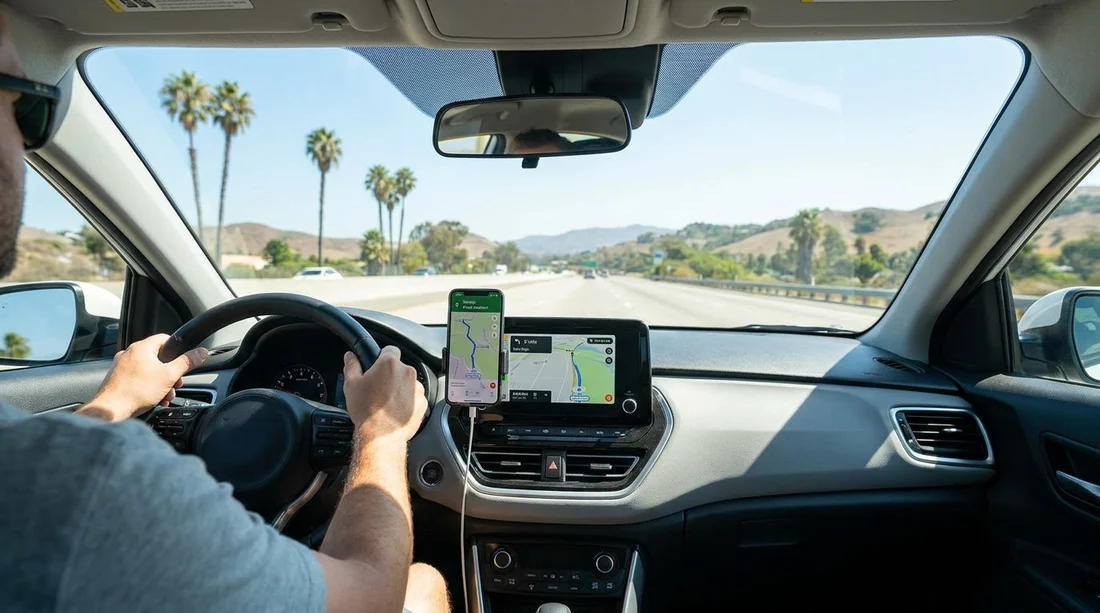
- Bring a proper car charger, cable, and windscreen or vent mount.
- Consider rental sat nav if you need reliability for multi-stop days.
When you collect a car hire in California, navigation is one of those small decisions that can affect the whole trip. A dedicated sat nav can feel reassuring, but your phone is usually faster, more up to date, and already set up with your preferences. The best choice depends on where you are driving, how comfortable you are managing power and data, and whether you can prepare routes before you leave the pick-up area.
California has excellent mobile coverage in major cities and along busy interstates, so phone navigation works brilliantly for typical routes around Los Angeles, San Francisco, San Diego, and between airports and hotels. However, large parts of the state include mountains, deserts, and coastal stretches where signal drops, data slows, and battery drain becomes a real issue. That is where planning and offline options matter most.
Where phone navigation shines in California
For many travellers, a phone is the easiest navigation tool for car hire because it offers live traffic re-routing, accurate ETAs, lane guidance, and easy searching for food, fuel, and parking. Live traffic is particularly valuable around LA freeways, Bay Area bridges, and weekend bottlenecks heading towards beaches or national parks.
Phone maps also tend to update quickly when roads change, which can be helpful around long-term roadworks. If you are collecting near a major hub such as Los Angeles Airport (LAX) or San Francisco Airport (SFO), you will have strong coverage to get you out of the immediate airport area and onto the right freeway.
Where signal gaps can catch you out
The downside is that California’s scenery is exactly where coverage can be patchy. You may lose data in mountainous areas, on remote parts of the Pacific Coast, and in sections of desert. Even when you have a signal, it can be too weak for smooth map loading, especially if your plan has limited roaming speed, or you are tethering multiple devices.
Signal gaps matter most when you are relying on live map tiles, voice guidance, and re-routing. If the app cannot load the next turn in time, you might miss exits, end up in the wrong lane, or have to pull over in an unfamiliar place. For a long day that includes rural highways or park roads, offline preparation is what makes phone navigation feel as dependable as a sat nav.
Offline maps, the simplest reliability upgrade
If you want to use your phone for car hire navigation in California, downloading offline maps before you depart the pick-up area is the single most effective step. With offline maps, your phone can still locate you using GPS even when data drops. You can continue to follow a planned route, see your position, and find previously loaded places.
Before you drive away, download the region you will cover for the next few days, not just one city. If your trip includes a loop, download overlapping areas so you are not caught out when you cross a county line. Also save key locations, such as your first hotel, any pre-booked attractions, and the return location, then test that the route preview loads while you are on airport Wi-Fi or solid mobile data.
Charging, cables, and mounts, what you actually need
Navigation is power-hungry. Screen-on time, GPS, and background data can drain a phone faster than you expect, particularly if the device is older or running hot in the sun. California heat plus a windscreen mount can overheat phones, causing dimmed screens or temporary shutdowns. That is frustrating if you are mid-route on a multi-lane freeway.
For car hire navigation, treat charging as essential kit. Bring a car charger with enough power for modern phones, plus the correct cable, and ideally a spare. Many rental cars have USB ports, but they may charge slowly, or the port might be in an awkward spot. A 12V adapter can be more reliable for fast charging.
A mount is not just convenience, it is safety. Use a secure vent or windscreen mount so you are not looking down at your lap. If you are using a windscreen mount, position it to avoid extreme sun exposure and keep the phone within easy reach but not obstructing your view. If your car supports it, Apple CarPlay or Android Auto can reduce distraction by putting maps on the infotainment screen.
Sat nav add-ons, when they can still be worth it
Booking a sat nav can make sense for travellers who prefer a dedicated device that is always charged, always visible, and separate from their personal phone. It can also be useful if you want to keep your phone free for calls, travel documents, and photos, or if your mobile plan has limited data abroad.
A sat nav can be particularly reassuring if you are doing long, multi-stop driving days with uncertain coverage, or if several people in the car will be navigating and you want one consistent setup. If your itinerary starts in Northern California, for instance, you might collect near Sacramento Airport (SMF) and immediately head into areas where coverage varies. A dedicated device can reduce stress for the first day while you settle in.
That said, sat nav units can have older maps, fewer live updates, and less accurate traffic prediction than phone apps. If you choose a sat nav, check whether it includes current maps for the US and whether it will handle closures and re-routing well. Even with a sat nav, keeping a phone as backup is wise.
Planning before you leave the pick-up area
The most common navigation problems happen in the first 30 minutes, when you are learning the car, adjusting mirrors, and dealing with unfamiliar road layouts. Airports and downtown pick-up locations can be confusing, and missing one exit can add significant time. Wherever you are collecting your car hire, plan to spend a few minutes stationary to get navigation sorted.
Start by confirming your first destination address in full, including any suite numbers, and verify it looks correct on the map. Then select a route that fits your comfort level. Some apps default to toll roads or express lanes, which can be fine, but you should know what you are agreeing to. If you are uncertain, choose a route that avoids tolls for the first leg until you are confident.
If you are collecting around the Bay Area, traffic patterns can change quickly with bridge congestion. A good approach is to set your first stop, then also save a second safe stop such as a supermarket or service station where you can pull in and re-check directions. This is useful if you are heading from SFO into the city and want a calm place to reassess once you are away from airport roads.
A sensible phone-first setup for most California trips
For the majority of car hire journeys in California, a phone with offline maps, a solid charger, and a proper mount is enough, and it often outperforms a standalone sat nav. The key is treating navigation like part of your departure checklist, not something to fix while merging into traffic.
If you expect remote driving days, or you simply want the reassurance of a dedicated device, adding sat nav can still be a reasonable choice. Many travellers do best with a belt-and-braces approach: phone navigation as primary, offline maps downloaded, and a second device or passenger phone ready as backup. If you are heading south for coastal cities, having your route set up before leaving San Diego Airport (SAN) can make the first drive noticeably calmer.
FAQ
Is phone navigation reliable enough for car hire in California? Yes for most routes, especially in cities and on major interstates. Reliability improves hugely if you download offline maps and save key locations before you drive.
Where are the biggest signal gaps likely to be? Coverage can drop in mountainous areas, deserts, and some coastal stretches. National parks and rural highways may have limited data even when GPS still works.
What should I prepare before leaving the pick-up car park? Download offline map areas, set your first destination, check the route preview, and confirm voice guidance volume. Plug in your charger and mount the phone safely before moving off.
Do I need a special charger or cable for navigation? A fast 12V car charger plus the right cable is ideal, as constant GPS and screen use drains batteries quickly. A mount also helps keep the phone cool and visible.
When does booking a sat nav make sense? It can help if you have limited roaming data, expect long remote driving days, or prefer a dedicated device. Many drivers still keep phone maps as a backup for traffic updates.































































































