


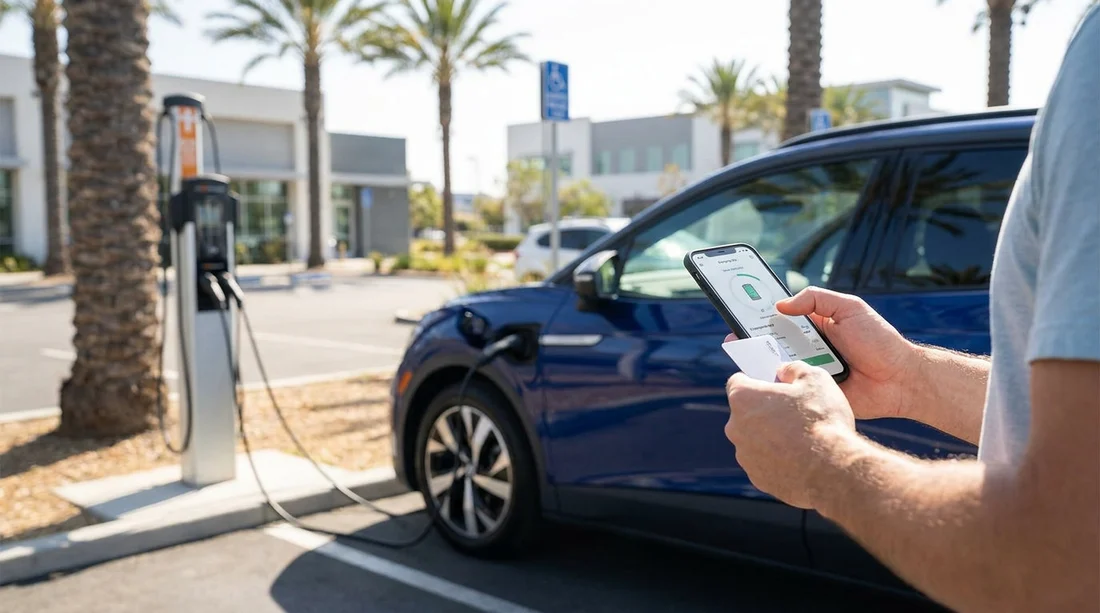
Quick Summary:
- Most chargers accept contactless cards, but apps can make charging quicker.
- Install two or three key apps and add a payment card.
- Tesla Superchargers usually bill through the vehicle account, not yours.
- Bring a backup card, as some sites have weak signal.
Picking up an EV for car hire in California is straightforward, but public charging can feel unfamiliar if you have not done it before. The short answer is that you do not usually need a charging app or an RFID card before you collect the car, because many chargers accept contactless bank cards. However, setting up the right apps in advance can save time, reduce stress in low-signal areas, and help you find compatible stations quickly.
California has one of the densest charging landscapes in the US, but it is not a single unified network. Different operators run different sites, and they each have their own ways to start a charge. Planning ahead matters most if you are landing late, driving straight into the hills or desert, or relying on fast charging during a tight itinerary.
If you are collecting near Southern California airports, you may be comparing pick-up points like car rental Los Angeles LAX or Orange County options such as car rental Santa Ana SNA. In Northern California, the same charging preparation helps whether you are in the Bay Area or starting a coastal drive after collecting via Payless car rental San Francisco SFO. The point is consistent: arrive with a simple charging plan, not a dozen accounts.
Do you need an app or RFID card before pick-up?
In most cases, no. Many Level 2 chargers and a growing number of DC fast chargers in California support tap-to-pay with a contactless debit or credit card. That said, app-based payment is still very common, and some sites work more reliably with an app than with the card reader on the unit.
RFID cards are less essential for travellers than they once were. They can be convenient, but they also take time to order and ship, and you are unlikely to receive one quickly if you are visiting from abroad. For short trips, a smartphone app plus a contactless bank card is the most practical setup.
The bigger variable is your vehicle and charging port type. If your EV uses CCS or NACS (Tesla style), that determines which fast chargers you can use and whether you might need an adapter supplied with the car. The payment method is secondary, but still worth preparing.
Common public charging networks you will see in California
Travellers typically encounter a mix of DC fast charging for road trips and Level 2 charging at hotels, car parks, and attractions. The most recognised networks include Tesla Superchargers, Electrify America, EVgo, ChargePoint, and Shell Recharge, plus smaller regional providers. Availability varies by route, but urban areas around Los Angeles, Orange County, San Diego, San Jose, and San Francisco generally offer many choices.
Tesla Superchargers are a special case. If your rental is a Tesla, access often depends on the vehicle being tied to an owner or fleet account. You normally start charging by plugging in, and billing is handled through the car’s linked account. If your rental is a non-Tesla with NACS and Supercharger access, the process may require the Tesla app and an enabled profile, but this is vehicle and site dependent.
Electrify America and EVgo are common for CCS fast charging. ChargePoint is widespread for Level 2 and some DC fast sites, especially in city car parks and workplaces. Because each network has its own app and pricing, a small amount of setup before you arrive can prevent last-minute account creation while you are parked at a charger with a queue behind you.
Payment methods: what actually works at the charger
When you pull up to a charger, you will usually start the session in one of these ways: tap a contactless card on the terminal, scan a QR code to launch a payment page, use the network’s app to start the charger, or use an RFID card linked to a network account.
Contactless card payment is the simplest, but the card reader can sometimes be slow, exposed to weather, or out of service. QR-code payment can work well, but it depends on mobile data coverage. Apps are the most flexible, because they can show real-time availability and let you start a charge even if the card reader is temperamental.
Pricing can vary by method. Some operators show discounted member rates inside the app, while ad hoc card rates may be slightly higher. Even when the price difference is small, app setup can still be worth it for reliability and planning.
What to set up in advance, before you travel
For most visitors, the best approach is to set up two or three major charging apps that match the connectors your EV is likely to use. Add a payment card, verify your email, and allow location services so you can quickly filter nearby stations. Doing this on hotel Wi-Fi or at home is far easier than doing it in a car park at night.
Also prepare your phone for the practical realities of charging stops. Ensure your phone can roam in the US or that you have an eSIM with data. Bring a charging cable for your phone so you are not trying to manage an EV charge with 8 percent battery left on your handset.
Finally, check with your rental provider at pick-up about any charging access bundled with the vehicle. Some fleets include plug-and-charge style functionality on certain networks, while others require you to pay per session. Knowing the rule for your specific car is more important than memorising every network.
What to ask at the rental counter for EV car hire
Five quick questions can remove most uncertainty. First, confirm the connector type and whether the car includes any adapters. Second, ask how fast charging is billed, through the rental company, through the car’s account, or paid directly by you at the charger. Third, clarify the expected return charge level and any fees for returning low. Fourth, ask whether the vehicle supports plug and charge on any network. Fifth, confirm where nearby fast chargers are located, especially if you are collecting late and want a reliable first stop.
If you are starting your trip around San Diego, this preparation can be as useful as choosing the right pick-up point, such as Payless car rental San Diego SAN. In practice, the first charging session is often the only one that feels unfamiliar, then the process becomes routine.
RFID cards: when they help, and when they are unnecessary
An RFID card can still be handy for drivers who want a fast, no-fuss start at the charger, or for those who do not want to rely on mobile data. Some workplaces and hotel car parks also use RFID access. But for travellers on short stays, the drawbacks are clear: you may not be able to obtain the card in time, you may have to keep track of multiple cards for different networks, and you may still need the app for real-time station status.
If you are visiting California for a longer period and will charge frequently, an RFID card from a widely used network could be worth considering, but only after you have confirmed where you will actually charge.
Practical charging tips for smooth road trips
Plan charging around meals and breaks rather than waiting until you are low. Aim to arrive at a fast charger with a comfortable buffer, especially when heading into areas with fewer stations. If you are using DC fast charging, remember that charging slows as the battery fills, so shorter stops can be more efficient than trying to reach 100 percent every time.
Keep your options open. If a site is full or one unit is down, having another network app ready can save you from detours. This is where preparation pays off, and it is the main reason to set up apps before you pick up your EV.
FAQ
Do I need to download charging apps before collecting my EV in California? You do not have to, but downloading two or three major apps beforehand makes starting a session faster and helps you find compatible chargers.
Can I pay for EV charging with a UK bank card in California? Usually yes, most public chargers accept major debit and credit cards with contactless. It still helps to have an app ready if the card reader fails.
Will my rental Tesla require my own Tesla account to use Superchargers? Typically no, Supercharging is commonly billed through the vehicle’s linked account. Confirm the billing method and any fees at pick-up.
Is an RFID card necessary for public charging in California? Not for most travellers. RFID can be convenient as a backup, but apps and contactless payment cover most use cases.
What should I do if the charger has poor mobile signal? Try contactless payment first, move to a different stall, or drive to a nearby site. Having multiple apps set up reduces dependence on one method.































































































