


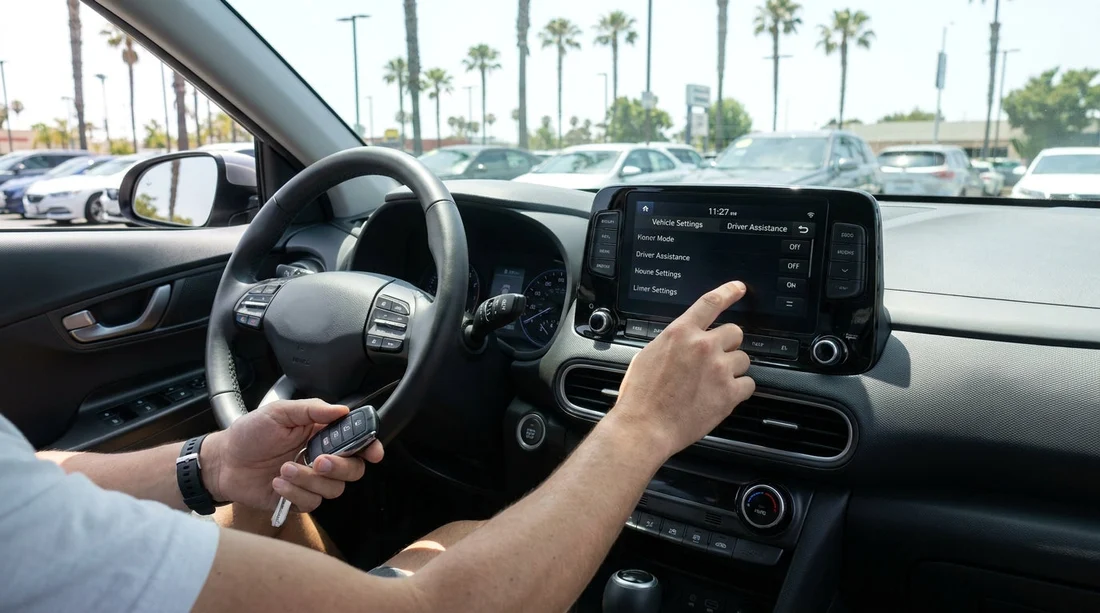
Quick Summary:
- Set seat and mirrors, then confirm seatbelt and airbag warnings clear.
- Test headlights, indicators, wipers, washers, and windscreen demisting before departure.
- Check cruise control, lane alerts, and emergency braking icons show ready.
- Confirm tyre pressures, then locate spare or inflator kit and jack.
When you collect a car hire in California, you often step from the counter straight into unfamiliar controls. A two minute check can prevent warning lights, disabled driver-assistance features, or simple visibility problems once you are already in traffic. The goal is not to learn every menu, it is to confirm the essentials work, are switched on as intended, and match the conditions you will drive in, including freeways, coastal fog, or bright sun.
If you are collecting at a busy terminal such as Los Angeles LAX or heading out of San Francisco SFO, do the quick checks while still parked, engine on, doors closed, and your seat position set. That is when most systems complete their self-tests and show clear status messages.
Before you move, set the driver position and confirm warning lights
Start with the basics, because driver-assistance depends on your seating position and clear sensor views. Adjust seat height, reach, and backrest so your wrists rest on the top of the wheel and you can fully depress the brake. Set the steering wheel so the instrument cluster is visible, then set mirrors and check the rear head restraints are not blocking your view.
With the engine running, scan the dashboard for warning lights. A brief illumination at start-up is normal, but lights that stay on need attention before you roll. Pay particular attention to airbag, ABS, brake system, tyre pressure monitoring (TPMS), and any “Front Assist”, “Pre-Collision”, or “AEB” warnings. If a message says a sensor is blocked, check for heavy dirt, transport film, or a dealer plate bracket obscuring the camera or radar area.
Check lights, signals, wipers, and demisting, your visibility toolkit
California driving can mean bright glare, early morning marine layer, or sudden rain in the north. Confirm you can see and be seen. Turn headlights to “Auto” if available, then manually flip to low beam and high beam to confirm operation. Walk around quickly to confirm both headlights and rear lights illuminate, and test turn signals and hazard lights. If a bulb is out, it is easier to swap vehicles before you leave.
Test the windscreen wipers on low and high, then use washer fluid to confirm spray reaches the glass. Check the rear wiper if the vehicle has one. Next, set the climate controls to full defog/defrost and confirm you feel air at the windscreen vents. If the windscreen fogs easily, you will want the A/C engaged, even on a cool day, because it removes moisture.
Confirm braking, parking brake, and emergency controls
Before moving, press the brake pedal firmly. It should feel solid, not spongy or sinking. Put the car in gear, release the parking brake, and creep forward one car length, then brake smoothly to ensure the car stops straight without unusual vibration. Reapply the parking brake and confirm the indicator shows engaged. On many rentals the parking brake is electronic, so make sure you know the release method, which may require pressing the brake pedal.
Locate the hazard light button by touch and make sure you know how to activate it quickly. In dense freeway traffic around San Diego SAN or on multi-lane approaches near San Jose SJC, hazards are useful when slowing abruptly for congestion or an incident.
Driver-assistance alerts to verify, then set to sensible levels
Modern rentals may include a suite of assistance systems, but the settings can be changed by the previous driver. Your check is twofold, confirm the systems are not disabled, and ensure alerts are set to a level you will notice without becoming distracting.
Automatic Emergency Braking (AEB) and Forward Collision Warning: Look for a status icon that indicates the system is ready. In menus, confirm it is enabled and the alert timing is not set to its least sensitive option. If the car allows “Early/Normal/Late”, choose Normal unless you have a strong preference.
Lane Departure Warning and Lane Keeping Assist: Confirm whether the car only warns or actively steers. Check the lane icon in the cluster. If you dislike steering intervention, you may choose warning only, but avoid disabling everything without a reason. Also confirm the system understands turn signal use, most suppress warnings when you indicate.
Blind Spot Monitoring and Rear Cross Traffic Alert: These are especially helpful in large car parks and on wide California highways. Confirm indicator lights in the mirrors illuminate briefly when the car starts, then check the menu to ensure both functions are on. Keep in mind heavy rain, bright sun angles, or dirty sensors can reduce reliability.
Cruise control and adaptive cruise, test the basics safely
On long freeway stretches, cruise control reduces fatigue, but only if you know which version you have. While stationary, locate the cruise buttons and identify “On/Off”, “Set”, “Cancel”, and “Resume”. If the car has adaptive cruise, find the following distance button and set it to a longer gap to start, especially if you are not used to it.
Do not try to fully test cruise inside the rental facility. Instead, on your first safe, open stretch of road, set cruise at a modest speed and confirm you can cancel instantly using the brake, the cancel button, and the main off switch. For adaptive cruise, confirm the car detects a vehicle ahead and adjusts speed smoothly. If braking feels abrupt, increase the following distance setting.
Tyres, TPMS, and what to do if a warning appears
Tyres are a primary safety item and a common cause of issues on a car hire. Walk around and look for obvious cuts, bulges, or very low tread. Open the driver door and find the tyre pressure label, then compare it to the reading shown in the vehicle menu if available. Some cars do not show individual pressures, only a warning light. If TPMS is on, do not ignore it, ask the lot staff to check pressures with a gauge.
Also confirm you have a clear plan for a puncture. Many newer vehicles have a tyre inflator kit rather than a spare. Locate the kit in the boot area and check it is complete. If you are driving far from urban areas, consider whether a vehicle with a proper spare is a better match for your route.
Quick comfort and distraction checks that improve safety
Pair your phone with Bluetooth or CarPlay/Android Auto while parked. Confirm you can make a call hands-free and that navigation audio plays through the speakers. Set media volume to a moderate level, then lower it, because some rentals are left at high volume.
Check the driver display brightness for daylight, and at dusk lower it so it does not glare. If the vehicle has “Auto High Beam” or “Auto Wipers”, confirm they are enabled if you want them, but remember automated features can behave differently in fog or heavy spray.
Finally, reset trip information if you use it to track fuel or distance, and set your preferred units and language. These small steps reduce time spent scrolling menus while driving.
FAQ
Q: What are the most important safety settings to verify before leaving the rental lot in California?
A: Prioritise working lights and wipers, no active brake or airbag warnings, and enabled AEB, lane alerts, and blind spot monitoring where fitted.
Q: If a driver-assistance feature shows “unavailable”, should I still drive away?
A: Not until you understand why. It may be a blocked camera, a fault, or a setting turned off. Ask staff to clean sensors, reset, or swap cars.
Q: How can I tell if the car has adaptive cruise control versus standard cruise?
A: Adaptive cruise usually has a following distance button and shows a car icon with bars. Standard cruise typically only offers a set speed with no gap setting.
Q: Should I disable lane keeping if I find it annoying?
A: If it interferes, reduce intervention or switch to warning only rather than disabling everything. Keep it consistent with your comfort and the type of roads you will drive.
Q: What tyre checks are realistic to do quickly at pickup?
A: Look for obvious damage, confirm tread is not severely worn, and compare TPMS readings or staff gauge readings to the door-jamb pressure label.






























































































