


Quick Summary:
- Mount low in the passenger-side corner to keep sightlines clear.
- Lower driver-side corner can work if it stays unobtrusive.
- Avoid high-centre mounting that could obstruct forward visibility.
- Use removable mounts and tidy cables before leaving the counter.
Dash cams can be useful in California, especially when you are navigating unfamiliar freeways, busy city streets, and long drives between destinations. If you are using car hire, the key is to mount the camera in a way that stays within California’s windscreen obstruction rules and does not damage the rental vehicle. The practical aim is simple, record the road while keeping the driver’s sightlines clear and leaving no residue or marks when you return the car.
This guide explains the most relevant California rules in plain English, then gives practical fitting tips you can apply in minutes before you leave the counter.
What California law is trying to prevent
California’s windscreen rules focus on visibility. Anything that blocks, obstructs, or reduces the driver’s clear view through the windscreen can attract attention from law enforcement, even if the device itself seems small. A dash cam is not automatically illegal, but its placement can be.
For most drivers, the safest approach is to avoid mounting anything in the upper middle area of the windscreen, where it can sit in the primary field of view and where many vehicles house sensors behind the mirror. Instead, use the areas that are generally treated as acceptable because they are low and out of the direct sightline.
Where you can legally mount a dash cam on the windscreen
California allows certain objects to be attached to the windscreen when they are placed in limited areas that do not obstruct the driver’s view. For dash cams, the most commonly accepted windscreen placements are:
1) Lower passenger-side corner. This is often the easiest compliant location, because it is furthest from the driver’s direct viewing area. Mounting low on the passenger side also helps keep the camera out of the path of your hands and out of the way when adjusting mirrors.
2) Lower driver-side corner. This can also be acceptable when kept low and unobtrusive. If you choose this side, be extra careful that the unit does not interfere with your view of pedestrians, cyclists, or vehicles when you are turning left, entering junctions, or pulling out.
In both cases, keep the unit as low as practical while still capturing a useful view of the road. Also ensure the dash cam does not intrude into the area swept by the wipers, because a camera sitting in the wiper path can reduce cleaning effectiveness in rain and can cause streaking around the mount.
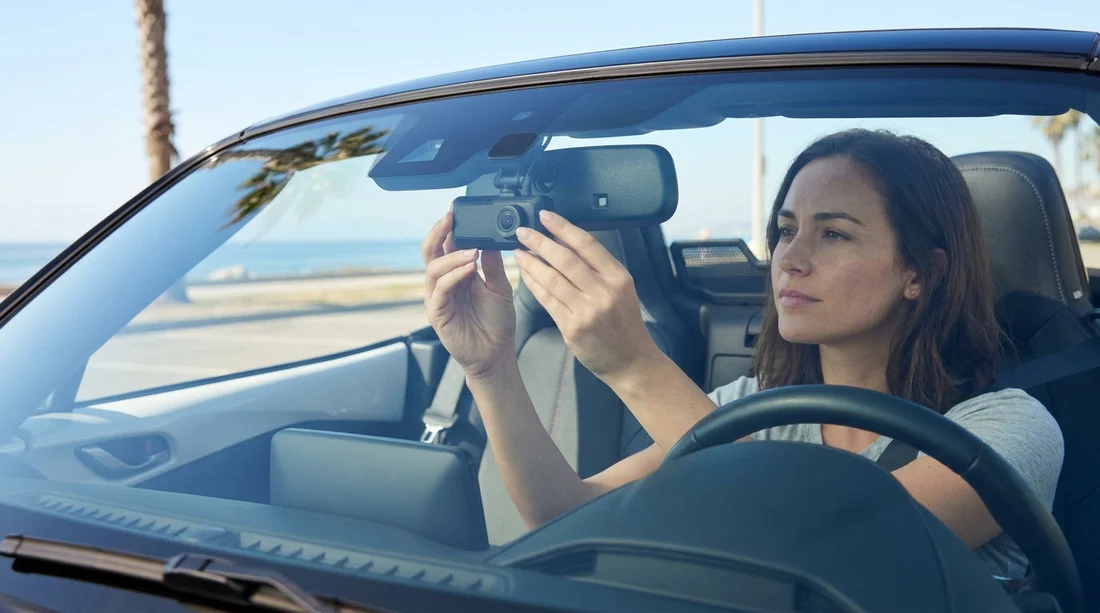
Many drivers instinctively mount a camera near the rear-view mirror to centre the footage. In a privately owned car that is already set up, that can be common, but with car hire it is not the best first choice. In California, a high-centre mount is more likely to be considered an obstruction and it can also conflict with rain sensors, cameras for driver assistance, or toll and telematics equipment fitted by the fleet.
What to avoid when you are in a rental vehicle
Even if a placement seems technically small enough, rental realities matter. Avoid these common pitfalls:
Do not mount across the driver’s primary viewing area. If your eyes naturally look through that part of the windscreen while driving straight, keep it clear. A small device can still be distracting.
Avoid adhesives that could leave residue. Many rental agreements prohibit attaching items that could damage glass, trim, or headlining. Prefer suction mounts or removable static-cling pads designed for windscreens.
Do not route cables over airbags. Many modern cars have curtain airbags in the A-pillar and along the headliner edge. Tucking a cable into the wrong seam can interfere with airbag deployment.
Do not block sensors. A surprising number of cars have cameras and sensor pods behind the mirror. If you cover or crowd that area you can trigger warnings or disable driver-assistance features.
Practical mounting checklist before leaving the counter
If you want a quick routine that works across most vehicles, use this order:
Clean the glass first. Even a light film can reduce suction strength. Wipe the inside of the windscreen where the mount will sit, then dry it so the suction cup seals properly.
Pick the side and keep it low. Choose lower passenger-side first, then lower driver-side if the passenger-side view is blocked by the dash shape. Make sure the camera body stays outside your natural sightline.
Confirm wiper sweep and bonnet line. Sit in your normal driving position. Check that the dash cam captures the horizon and that the bonnet does not dominate the frame.
Route power neatly. Use the shortest safe path to a 12V socket or USB port without crossing steering controls or airbag zones. If you are using a long cable, coil any excess and secure it so it cannot snag pedals.
Do a 10-second test recording. Start recording, then play it back to confirm angle, glare, and that the mount is stable.
When you pick up a vehicle through Hola Car Rentals, you can do this check in the car park while you inspect for pre-existing damage. If you are collecting in Northern California, see car hire at San Jose Airport for typical pick-up setups, where you can take a moment to position the camera before joining the motorway.
Rental agreement and privacy considerations
California has privacy expectations that matter when recording. A forward-facing dash cam that records the road is usually straightforward, but audio recording and filming people inside the vehicle can raise issues. If you plan to record audio, understand that consent rules can apply in California in some contexts. From a practical standpoint, many drivers choose to disable audio to reduce complications.
Also remember that rental cars may be used by multiple authorised drivers. Tell anyone who will drive the vehicle that a dash cam is installed and where it is mounted, so they are not surprised or distracted.
Finally, treat the installation as temporary. With car hire, you should remove the camera before returning the vehicle, wipe any marks from the windscreen, and make sure no cable clips or pads are left behind.
Best mount types for a rental car windscreen
Suction cup mount. Usually the best match for rental use because it is removable and does not leave adhesive residue when used correctly. Re-seat it if temperature changes cause it to loosen.
Static-cling pad plus mount. Useful if the windscreen texture or curvature makes suction unreliable. Ensure it peels off cleanly and does not leave a border.
Adhesive mount. Not recommended for a rental vehicle. Even if it holds well, removal can leave residue or damage, which can create charges at return.
Drivers choosing a larger vehicle, such as an SUV or van, may find the dash and windscreen angles different from a standard saloon. If you are comparing vehicle types, see SUV rental in San Jose or van rental in San Jose to get a sense of typical cabin layouts and windscreen height, which can affect where “low and unobtrusive” ends up in practice.
Quick self-check for legality and safety
Before you drive off, use this simple self-check. From the driver’s seat, can you see the dash cam without moving your head? If yes, it might be too prominent. When you look at the road ahead, does the unit sit in your line of sight? If yes, move it lower or to the passenger side. Can you operate indicators, wipers, and infotainment without the cable snagging? If not, reroute the power lead. This takes less than a minute and helps ensure your setup is both legal and practical.
If your trip includes Southern California hubs, you might collect at Los Angeles LAX or head down to San Diego. In both areas, take the same approach, mount low, keep the driver’s view clear, and test quickly before merging into fast traffic.
With the right placement and a removable mount, you can capture useful footage while respecting California’s emphasis on unobstructed windscreens and keeping your car hire vehicle in return-ready condition.
FAQ
Can I mount a dash cam behind the rear-view mirror in California? It depends on whether it obstructs your view. To stay safer, mount low in a lower corner rather than high-centre near the mirror.
Is the lower passenger-side corner always legal? It is generally the least intrusive location, but you must still ensure it does not block your view or interfere with safe driving.
Will a rental company allow a dash cam mount on the windscreen? Many will tolerate removable suction or static-cling mounts. Avoid permanent adhesives and remove everything cleanly before return.
Do I need to tell other drivers in the rental car about the dash cam? Yes, anyone who may drive should know it is installed, where it is, and whether it records audio.






























































































