


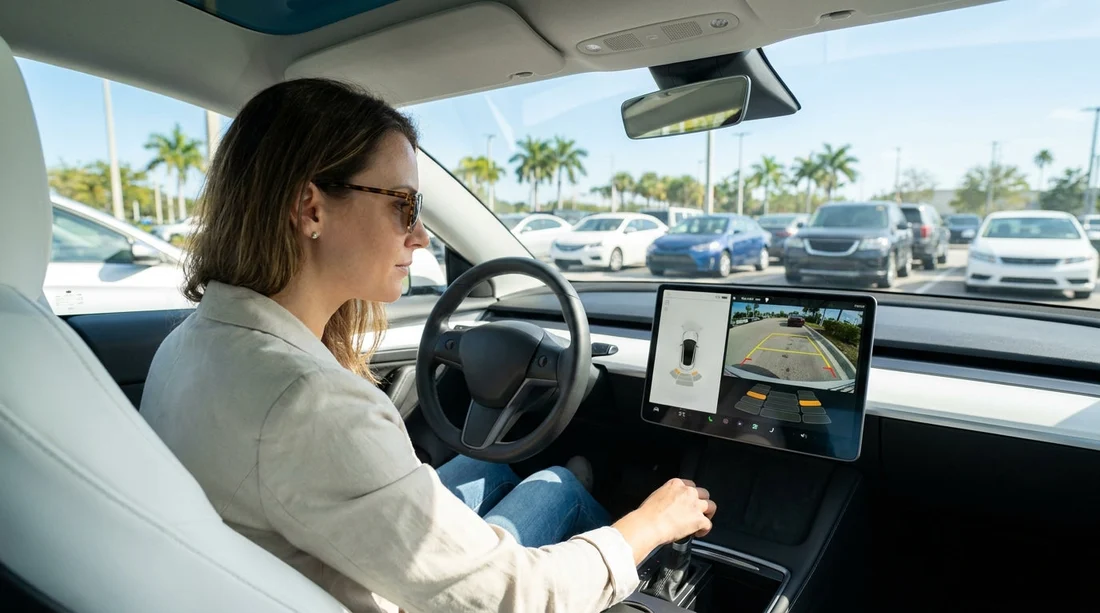
Quick Summary:
- Test reversing camera clarity, guidelines, and night mode before leaving.
- Confirm parking sensors beep consistently, and spot any dead zones.
- Photograph warning messages and note faults on the condition report.
- Check bumper corners for scuffs that can confuse sensor readings.
Yes, you should check the reversing camera and sensors before leaving with a rental car in Florida. It takes only a few minutes, but it can save time and stress if a feature is faulty, misaligned, or already showing warnings. Parking-assist systems are often relied on in busy Florida car parks, hotel garages, and tight spaces near beaches and attractions. If a camera is blurred or a sensor is not responding, you want that recorded on the condition report before you drive away.
This matters for two reasons. First, safety, because you may depend on these aids when reversing near pedestrians, luggage trolleys, and low walls. Second, accountability, because bumper scuffs, cracked sensor rings, or a misfitted number plate frame can trigger false alerts. If you do not document issues at the counter, it can be harder to explain later that the fault was present at pick-up.
If you are collecting at a major hub like Orlando MCO, you may be tempted to drive off quickly, especially after a flight. Build a short test into your handover routine, just like checking fuel level and existing body damage.
What to test, and why it is worth doing
Reversing cameras and sensors are not all the same. Some cars have a basic wide-angle camera, others add dynamic guidelines, rear cross-traffic alerts, and a 360-degree view. Any of these can fail without being obvious until you are already in a tight spot. In car hire, you might also be switching between vehicle types, so the placement and behaviour of sensors can feel unfamiliar.
Common issues at pick-up include a camera lens smeared by cleaning products, guidelines that do not appear, a warning message about parking assist being unavailable, or a sensor that beeps constantly because of a previous bumper knock. None of these automatically mean the car is unsafe to drive, but they should be noted and, where possible, corrected before you leave.
A counter-ready checklist to run in five minutes
Use this sequence while the agent is still available and the car is stationary in a safe bay. If you are in a multi-storey garage, keep speed at walking pace and do not test features in active traffic lanes.
1) Confirm the camera turns on in reverse. With the engine running and foot on the brake, select reverse and check that the display switches promptly. A long delay, flicker, or a black screen is worth documenting. If the system needs you to press a camera button, confirm you can access it quickly.
2) Check image quality and lens condition. Look for blur, water spots, or a hazy film that suggests the lens is dirty. On Florida’s humid days, condensation can appear, but it should clear. If it does not, photograph the display. Also glance at the physical lens on the tailgate or bumper for cracks.
3) Verify guidelines and steering response. Many cars show static lines, others show dynamic lines that curve as you turn the wheel. Turn the steering slightly and confirm the lines behave as expected. If guidelines are missing, it can still be usable, but you should not be surprised later in a tight Miami parking space.
4) Test night mode and glare handling. If you are collecting in the evening, check that the display is bright enough without washing out detail. Even in daylight, reversing from a shaded garage into bright sun can create glare. A camera that cannot cope may make you rely more on mirrors, which is fine, but note it.
5) Check sensor beeps and distance bars. With a safe object such as a painted pillar, stop well short and creep backwards slowly. You are listening for consistent beeps that increase in frequency. If one corner stays silent or the system screams continuously with nothing behind you, something is off.
6) Look for dashboard warnings or menu errors. Some vehicles log faults like “Parking assist unavailable” or “Clean sensor”. Take a clear photo showing the message and mileage. If the vehicle has a settings screen, confirm sensors are enabled and volume is not muted.
7) Do a quick walkaround of the bumpers. Parking sensors sit in the bumpers, so scuffs, dents, or poorly repaired paint can affect them. Pay attention to corners, because that is where light contact happens most. In coastal areas, grit and salt can also leave residue on sensors, causing false positives.
8) Check for towing hitches, bike racks, or accessories. If a vehicle has a hitch or add-on accessories, they can trigger the sensors. That is not necessarily a fault, but you should know how the system behaves. If you are in a larger vehicle from SUV hire in Doral, this is especially relevant because rear visibility can be more limited.
What to record on the condition report
If anything looks wrong, record it in writing on the condition report, not just verbally. Ask the agent to add a note such as “rear camera blurry”, “rear sensors constant beep”, or “parking assist warning present at collection”. Then take your own photos and short video clips for reference.
Focus your evidence on three things: the physical area (bumper corners, sensor circles, camera lens), the display output (blurred image, missing guidelines), and any warning message with time and mileage. If the pick-up location is busy, like Downtown Miami, step to a safe place and document calmly, rather than rushing and forgetting a key detail.
When a fault is a deal-breaker vs a note-and-go
Not every issue requires a vehicle swap, but some do. Consider requesting a fix or alternative car if the camera screen is blank, the image is severely distorted, or the system throws repeated error messages. Also be cautious if the sensors give unpredictable beeps that distract you, or if the car applies automatic braking unexpectedly while reversing.
If the camera works but is slightly dirty, ask if it can be wiped quickly, then re-test. If one sensor seems less sensitive but the rest are fine, you may decide to proceed, as long as it is recorded. In any case, treat cameras and sensors as aids, not replacements for mirror checks and a shoulder glance.
Florida-specific parking situations where this really helps
Florida driving often includes tight, high-turnover parking. Hotel drop-off zones can be crowded with pedestrians and luggage. Beach car parks often have low posts, sand berms, or uneven kerbs that can sit below the camera’s field of view. Multi-storey garages in tourist areas can have narrow bays and concrete pillars that sit right where sensors should warn you.
In places like Miami Beach, a working camera helps you judge distance to scooters, low walls, and parallel parking gaps. Around airports and theme-park corridors, constant stop-start movement makes reliable sensor beeps a practical stress reducer, but only if you know they are accurate.
Tips to avoid false alarms after you leave
Once you drive off, you can still improve reliability. Keep the camera lens and sensors clean, especially after rain, driving through puddles, or parking near sprinklers. If you notice repeated warnings, pull over safely and check for stuck debris. Sometimes a simple wipe with a soft cloth resolves a “clean sensor” message.
If the car has adjustable sensor volume or sensitivity, avoid turning it off entirely unless necessary. If you do mute it, remember to restore the setting before returning the vehicle, so you do not forget how you left it. For longer drives across the state, for example from Orlando to the Gulf Coast, you may end up returning at a different location such as Tampa TPA, so keeping notes and photos organised is useful.
FAQ
Do I have to check the reversing camera and sensors for car hire in Florida? You are not usually required to, but it is a smart handover step. If a fault exists at pick-up, documenting it helps avoid disputes and sets expectations for safe parking.
What is the fastest way to test parking sensors before leaving? Engage reverse in a safe bay, then creep slowly toward a fixed object like a pillar while listening for consistent beeps and watching the distance display.
If the camera is blurry, can I just clean it myself? You can wipe the lens gently if it is just grime, then re-test. If it remains blurry or flickers, note it on the report and photograph the screen.
Will a bumper scuff affect reversing sensors? It can. Even light knocks can misalign a sensor or crack its ring, which may cause constant beeping or a dead zone. Photograph any scuffs near sensor circles.
Should I rely on the camera and sensors when reversing in busy Florida car parks? Use them as assistance, not as your only check. Always use mirrors, look over your shoulder where safe, and reverse slowly, especially around pedestrians.






























































































