


Quick Summary:
- Dash cams are generally legal in New York, if they do not obstruct view.
- Avoid placing anything on the windscreen where it blocks the driver’s sightline.
- Audio recording can raise consent issues, so disable mic unless everyone agrees.
- Mount low on the windscreen or on dashboard, and keep airbags clear.
Dash cams can be a helpful companion on a New York road trip, especially if you are navigating busy boroughs, parkways, and airport approaches in an unfamiliar car hire vehicle. The big questions are whether they are legal, where you may mount them, and what to do about audio recording. New York does not have one single dash cam statute that spells out every detail, but there are clear principles that matter in practice: do not obstruct the driver’s view, do not interfere with safety systems, and be careful with recording voices.
This guide breaks down the practical rules and the safest mounting choices for hire cars, with extra attention to windscreens, suction mounts, cables, and what to do before you return the vehicle.
Are dash cams legal in New York State?
In general, yes, using a dash cam is legal in New York State. Most legal issues arise not from having the camera, but from how it is installed and what it records. For car hire drivers, the two biggest compliance topics are visibility obstruction and audio recording consent.
It is also sensible to treat your dash cam as a temporary accessory rather than a modification. A hire car is not your vehicle, so you should avoid any installation that leaves marks, damages trim, or routes wires in a way that could be considered unsafe. If you are collecting a vehicle after a flight, it helps to plan a quick and removable setup. Many travellers pick up vehicles around JFK, and a short stop to position the camera properly before driving off can reduce distraction later. If you are comparing pick-up options, see car rental at New York JFK for general airport collection context.
Windscreen obstruction, what New York drivers must avoid
New York’s visibility rules are designed to keep the driver’s view clear. Even when a device is small, mounting it in the wrong spot can create a blind area or encourage you to look away from the road. The safest approach is to treat the swept area of the windscreen, the area your wipers clear, as a “keep clear” zone wherever possible, then use a low or high edge position that does not intrude into your direct view.
Practical obstruction guidance for dash cams in a car hire vehicle:
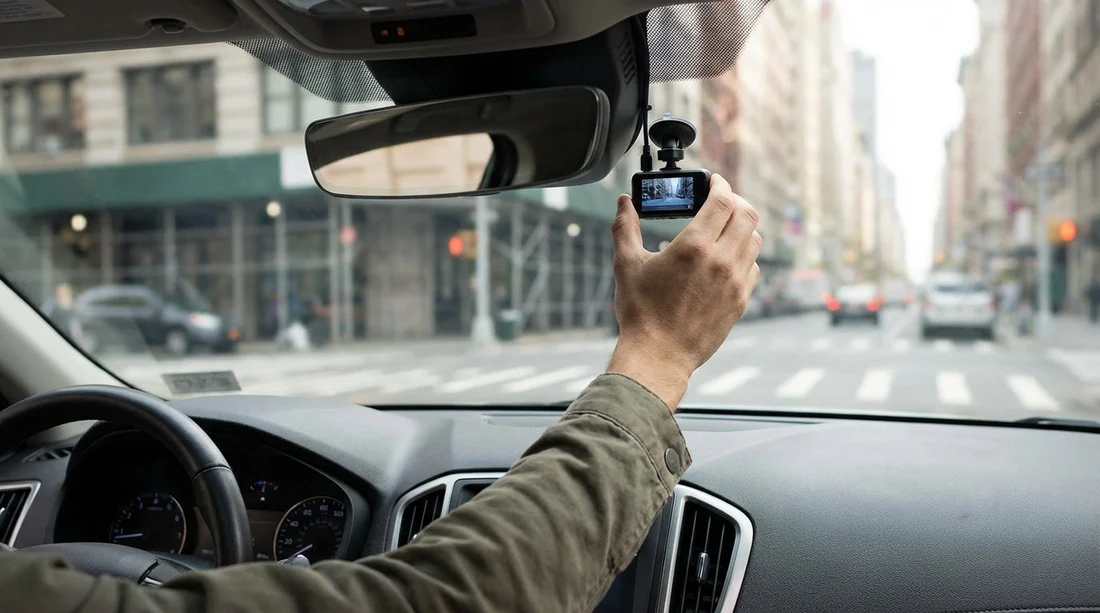
Keep the camera outside your primary sightline. A good rule is that if you can see the unit when you are looking straight ahead, it is probably too low or too central. Many drivers choose a position behind, or just to the passenger side of, the rear-view mirror so the camera body is hidden by the mirror assembly.
Avoid the lower centre of the windscreen. That area is where your eyes naturally move when checking lane position, pedestrians, and traffic lights, especially in Manhattan and Brooklyn intersections.
Check your view in all conditions. Sit in your normal driving posture, then look left and right as if you are scanning for cyclists and turning traffic. If the camera blocks any of those glances, reposition it. Repeat at night, when reflections and small obstructions can feel larger.
Do not block sensors. Many modern vehicles have cameras or sensors near the mirror used for lane assist or auto high beam. Placing a dash cam in front of these can affect safety features and could create fault messages.
Best mounting positions for a hire car in New York
Because you will return the vehicle, the best mounts are removable and leave no residue. A suction mount is common, but it can fail in extreme heat or cold. An adhesive mount is often more stable, but it is usually a poor choice for a hire car because removing it can mark the glass or trim.
Here are safe, hire-friendly positions in typical New York driving:
High windscreen, passenger side of the mirror. This is usually the best compromise between road coverage and a clear driver view. It also keeps the camera farther from hands and from casual interference when you are adjusting climate controls or infotainment.
High windscreen, directly behind the mirror. Many people like this because it hides the device from the driver’s view. However, ensure the lens is not blocked by the mirror stem or dotted frit band, and that it does not interfere with built-in sensor housings.
Dashboard mount (if stable and non-slip). A dashboard mount can avoid windscreen obstruction concerns, but it must not become a projectile in a sudden stop. Only use a mount designed for dashboards, keep it low, and make sure it does not block airbags or vents.
Avoid A-pillar and airbag zones. Side curtain airbags often deploy from the headliner and along the A-pillar. Do not route cables up the A-pillar unless you are certain you are not crossing an airbag deployment path. In a hire car, the safest approach is minimal cable routing.
If you are hiring near JFK and expect stop-start traffic as you head toward the bridges and tunnels, a stable mount matters. Vibrations can blur number plates and lane markings, which defeats the purpose of recording. For general New York pick-up planning, car rental New York JFK is a useful starting point for understanding typical fleet types and collection flows.
Power and cabling without creating a safety hazard
Most dash cams use USB power from a 12V socket or USB port. In a car hire vehicle, resist the temptation to tuck cables deep into trim panels unless you know exactly where airbags and wiring run. A neat setup is good, but safety comes first.
Safer cabling tips:
Keep the cable short and controlled. Route it so it cannot interfere with steering, pedals, gear selector, or the handbrake area. Avoid loops that could snag a hand or bag.
Do not drape across the driver’s side. Run the cable along the passenger side if possible, then across to the power socket, keeping it away from knees and the steering column.
Avoid hardwiring in a hire car. Hardwiring kits can be tidy, but they are a modification and can raise liability issues. Stick with plug-in power.
Check that ports still work for essentials. If you need your phone for navigation, ensure the dash cam does not take the only workable charging port without a plan.
Audio recording in New York, consent basics for dash cams
Video of public roadways is usually less sensitive than audio of private conversations. In New York, recording audio can create legal risk if you capture conversations without the required consent. The safest approach in a car hire context is simple: if you do not specifically need cabin audio, switch the microphone off.
Practical consent guidance:
Disable audio by default. Many incidents are adequately documented by video, speed, and time data alone.
If you keep audio on, get clear agreement. Tell passengers that audio is being recorded and only proceed if they agree. If you are travelling with colleagues, this matters even more because the conversation may be considered private.
Be careful at pick-up counters and service areas. If you leave audio on, you might record staff conversations unintentionally. Switching audio off avoids awkwardness.
Children and vulnerable passengers. Take extra care with privacy and avoid recording audio at all.
Using dash cam footage after an incident
If something happens, stay focused on safety first. Move to a safe location, call emergency services if needed, and follow local reporting requirements. Dash cam footage can help clarify what occurred, but it is not a substitute for proper documentation.
Good practice for footage handling:
Preserve the file. Many dash cams loop record and overwrite older clips. Save the relevant clip as soon as it is safe, or remove the memory card later.
Do not edit the footage. Keep an original copy. If you share it, share a duplicate.
Note the time and location. Write down cross streets, mile markers, or nearby landmarks. This helps match footage to reports.
Respect privacy. Avoid posting footage that identifies individuals unnecessarily.
Hire car practicalities, what to check before you drive
A dash cam can be compatible with almost any car hire vehicle, but different body styles change your best mounting plan. An SUV may have a steeper windscreen angle and more headliner space, while a minivan may give you a higher seating position and a different mirror housing.
If your trip starts in New Jersey and crosses into New York City, you may be collecting at Newark. For vehicle type comparisons, you can browse car hire Newark EWR and SUV hire Newark EWR to get a sense of the typical options people choose for family luggage, winter stability, or longer highway drives.
Before you set off, do this quick check in under two minutes:
Confirm visibility. Sit normally, check mirrors, and ensure the camera is not in your direct view.
Confirm wiper sweep. Run the wipers once. If they hit the mount area or leave an unreadable band, reposition.
Confirm stability. Tug lightly on the mount. If it moves, it will shake on potholes and bridge joints.
Confirm no warning lights. If the vehicle has driver assistance, ensure your placement has not blocked sensors.
Confirm cable safety. Turn the wheel lock-to-lock while stationary, check that nothing snags.
Returning the vehicle, removal without damage
When your rental ends, remove the dash cam carefully. Do not rip suction cups off at an angle, as that can leave marks or stress the glass. Release the suction tab, then lift away slowly. Wipe any prints from the windscreen with a soft cloth. Check that you have not left a mount, cable clips, or a memory card behind. If the dash cam uses an adhesive pad and you must remove it, go slowly and avoid scratching, but for hire cars it is better to avoid adhesive pads from the start.
Finally, consider what you recorded. If you captured audio unintentionally, delete it. If you captured footage that includes other people in sensitive situations, store it securely and avoid sharing it casually.
FAQ
Are dash cams legal to use in New York State? Yes, dash cams are generally legal, but you must mount them so they do not obstruct the driver’s view and you should take care with audio recording.
Where should I mount a dash cam in a New York car hire vehicle? A high position on the windscreen near the rear-view mirror, usually slightly to the passenger side, is often safest for visibility and stability.
Can I mount a dash cam on the windscreen in New York? You can, provided it does not block your sightline or interfere with built-in sensors. Avoid central, low placements that intrude into your forward view.
Should I record audio inside the car? It is safest to turn cabin audio recording off unless every passenger clearly agrees, as audio consent issues can arise more easily than video issues.
Do I need to tell passengers they are being recorded? Yes, if audio is enabled you should inform passengers and get their agreement. Even with video only, it is courteous to let people know.






























































































