


Quick Summary:
- Most Florida car hire desks accept e‑signature on a tablet at pick-up.
- Match driver, payment card and booking name before signing the agreement.
- Check totals, deposits, fuel and mileage terms to avoid disputes later.
- Confirm insurance choices and authorised drivers to prevent counter delays.
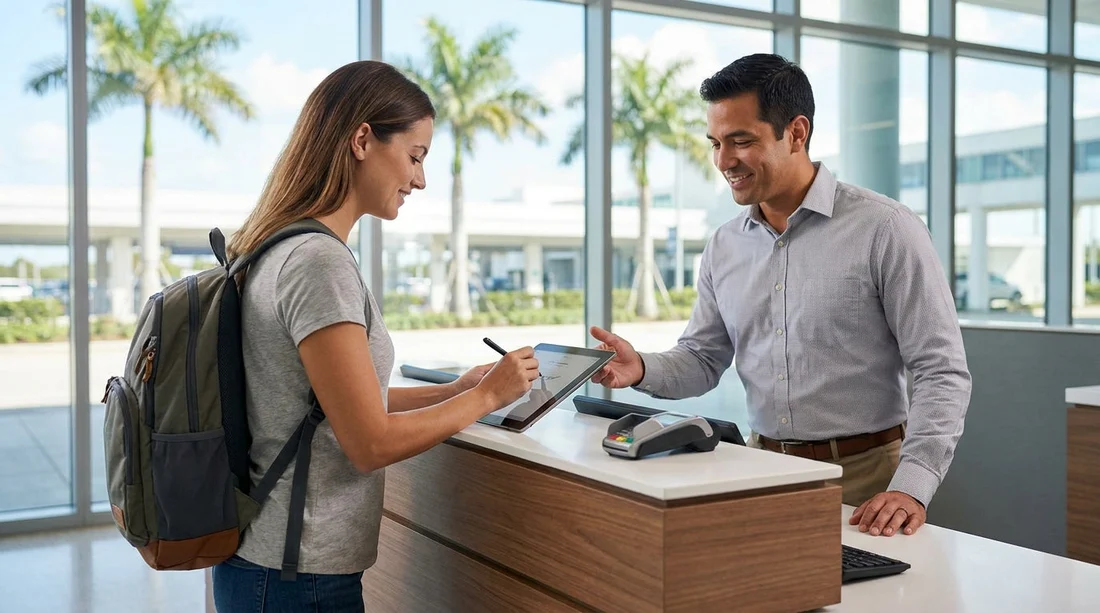
E‑signature is widely accepted on rental car agreements when you pick up car hire in Florida. In most airport and city locations you will review the contract on a counter screen or tablet, then sign electronically using a finger or stylus. The digital signature is generally treated the same as a handwritten signature, as long as the rental company can link it to your transaction and provide a copy of the signed agreement.
That said, acceptance and the exact process can vary by brand, location, and even the specific desk system in use that day. A temporary system outage can also mean a printed contract instead. The best approach is to arrive prepared for either method, and to use the few minutes before signing to confirm key details that commonly cause delays.
How e‑signing typically works at the counter in Florida
When you reach the desk, the agent will confirm your identity, driving licence, and payment method, then build or retrieve your reservation. After that, you will usually see the agreement on a screen with several pages of terms, itemised charges, and a summary. You will be asked to confirm selections such as fuel policy and protection products, then sign electronically.
In many Florida locations, you receive the final agreement by email. Sometimes you will be offered a printed copy, or a short receipt printout with a reference number, while the full contract is sent digitally. If you do not receive an email, ask the agent to verify the address on file before you leave the counter.
If you are picking up near Miami, processes can differ slightly between downtown and airport facilities due to queueing and pre-authorisation workflows. For example, you might see variations at car hire Miami compared with a city neighbourhood pickup, even within the same rental brand.
If your reservation is tied to a specific provider, desk steps can also vary between brands like Avis car hire Florida and other counters in the same terminal.
What to review before you e‑sign the rental agreement
E‑signing can be fast, but speed increases the risk of missing a detail. Treat the on-screen agreement like a final checklist. The goal is not to read every line of legal text at the desk, but to confirm the figures and conditions that affect cost, eligibility, and return requirements.
Start with the renter details. Confirm your full name matches your licence, your address is correct, and the contact email is accurate. Next, confirm the rental period, pick-up and drop-off locations, and the vehicle category. If your plan includes returning to a different branch, confirm the one-way terms and any drop-off fee appear exactly as expected.
Then review the itemised charges. Ensure the daily base rate, taxes, facility fees, and any additional products align with what you agreed. If you are unsure why a charge appears, ask before signing. It is much easier to correct at the counter than after the rental is closed.
Finally, verify the payment and deposit section. Many Florida rentals place a security deposit hold, separate from the rental charges. The agreement should show the estimated total and the authorisation amount, and sometimes a note about when the hold is released after return.
Details to double-check to avoid pick-up delays
Most pick-up delays happen because one of the essentials does not match the rental company rules. E‑signature is rarely the bottleneck, but the checks that happen before the signature can trigger extra questions or a declined deposit.
1) Name alignment across documents
Make sure the booking name, driving licence name, and payment card name are consistent. If a middle name appears on one document but not another, it usually is fine, but large mismatches can cause a refusal. If someone else needs to pay, ask whether they must be present and listed as the renter.
2) Driving licence and additional ID
Florida desk agents commonly accept a UK photocard licence. If you are an international visitor, some companies may request a passport as secondary ID. If your licence is damaged or close to expiry, resolve it before travel. Delays often occur when the agent cannot verify the licence details or the licence is not accepted for the driver’s age group.
3) Payment method and deposit rules
Even if you paid a reservation upfront, the desk may still require a credit card for the deposit. Debit cards can be accepted at some locations, but with restrictions, higher holds, or extra proof of travel. Review the payment section carefully on the agreement screen, and confirm the deposit amount you are authorising. If you are collecting near business districts, card policies can be strict, such as around car rental Brickell.
4) Insurance and protection selections
One of the most common counter slowdowns is uncertainty about insurance. The agreement will list what is included and what is optional, sometimes using abbreviations. Before you sign, confirm whether you are accepting or declining each product, and whether your decision changes the deposit. If you plan to rely on your own cover, ask what proof is required, if any, and whether third-party liability is already included.
5) Additional drivers, young driver fees, and authorised use
Ensure any additional driver is present with their licence at pick-up if required. The agreement should state the additional driver fee, if applicable. If the primary driver is under 25, confirm the young driver surcharge appears correctly and that the vehicle category is allowed. These factors can change the final price and may be enforced at the counter.
6) Fuel policy, mileage, tolls, and extras
Florida driving often involves toll roads. Your agreement should explain the toll programme, administrative fees, and how charges are collected. Confirm whether mileage is unlimited, and check the fuel policy, for example full-to-full. If you add a child seat, GPS, or roadside assistance, verify the daily cost and whether taxes apply to those items.
Tips to make e‑signing smoother at Florida car hire counters
Arrive with your documents ready, and keep your phone accessible for email verification. If you have a long travel day, it can be tempting to sign quickly just to get on the road, but a 60-second review of the totals and options can prevent lengthy disputes later.
If anything on the screen does not match what you expected, ask the agent to explain the line item and, if appropriate, remove or correct it before you sign. Once you have signed, changes often require a contract rewrite, and that can mean re-queueing or waiting for a supervisor override.
Finally, take a moment to confirm your return plan. The agreement will show the due-back date and time, and late returns can trigger extra day charges. If your flight timing changes, update the return time as early as possible so the final contract reflects your actual itinerary.
If you are heading north after Miami, the signing flow can feel different at smaller airport desks, such as Thrifty car hire Tampa, where staffing and queue patterns may affect how quickly contracts are issued.
For pickups in nearby neighbourhood branches, such as Hertz car rental Coral Gables, you may see more manual checks before the agreement is finalised on screen.
FAQ
Is an e‑signature legally valid for car hire agreements in Florida?
Yes, in practice it is commonly treated as valid, and most rental companies use it as their standard signing method. Your signature is linked to the transaction and stored with the contract record.
Will I still get a copy of the agreement if I sign on a tablet?
Usually, yes. Most branches email a copy to the address on file, and some can print a summary if you ask. Confirm the email address before leaving the counter.
What should I check first before signing the rental agreement?
Check your name, rental dates, pick-up and drop-off locations, and the total estimated charges including taxes and fees. Then confirm the deposit or pre-authorisation amount.
Can e‑signing slow down the pick-up process?
Typically no, it is designed to be faster. Delays are more often caused by payment card issues, deposit requirements, age or licence eligibility, or uncertainty about insurance selections.
What if I disagree with a charge shown on the e‑signature screen?
Ask the agent to explain the line item and amend it before you sign. Once you sign, corrections may require a new agreement and can take longer to process.






























































































