


Quick Summary:
- Dashcams are usually allowed, but follow California windscreen obstruction rules.
- Use removable mounts, avoid airbags, and keep cables secured neatly.
- Tell passengers about recording, especially if your camera captures audio.
- Remove the camera, mounts, and residue fully before returning the vehicle.
If you are planning to use a dashcam with car hire in California, the good news is that it is usually doable. The main issue is not whether a rental car can physically take a camera, it is whether your setup follows California rules on windscreen obstructions, does not damage the vehicle, and respects privacy when recording people.
This guide focuses on practical preparation, so you can fit a dashcam quickly and responsibly, without creating visibility hazards, leaving marks on glass or trim, or recording someone in a way that could cause complaints.
Is a dashcam allowed with car hire in California?
In most situations, yes. California does not ban dashcams outright, and rental companies typically do not forbid you from bringing your own camera. The constraints come from where you place it, whether it interferes with safe operation, whether it causes damage, and whether you record audio or people without proper notice.
At the counter, you might be asked to agree that you will not modify the vehicle or attach items that leave residue. A dashcam is normally fine if it is temporary, removable, and does not obstruct the driver’s view. If you pick up from a high-traffic location like LAX car hire options, it is worth having a small kit ready so you are not rummaging around in the car park.
Windscreen mounting rules: keep the view clear
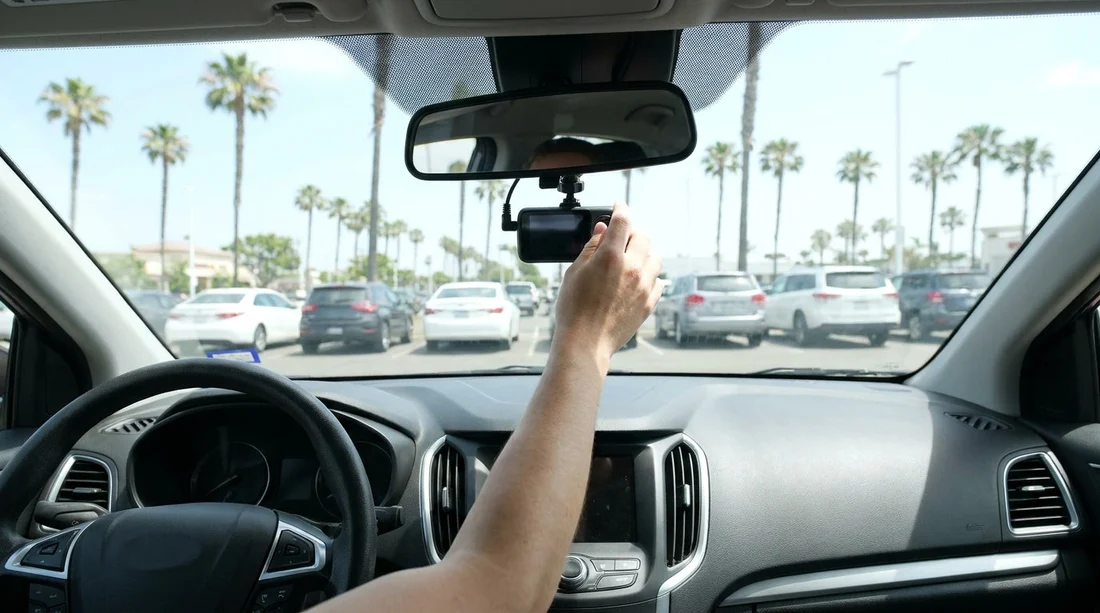
California has rules designed to prevent objects from blocking your view through the windscreen. In practice, a dashcam should be mounted in a way that stays out of your primary viewing area. The safest approach is usually high and centred, behind the rear-view mirror, so the camera is hidden by the mirror from the driver’s seated position.
Choose a compact camera body. Bulky units are more likely to be considered an obstruction and are more visible to thieves.
Place it where you cannot see it while driving. If you can easily see the device without leaning, it may be too low or too far to the side.
Keep it clear of sensor housings. Many newer vehicles have camera and radar modules near the mirror. Do not cover or press against them.
If you are collecting an SUV for a longer road trip, you may want extra attention to placement because taller windscreens can make it tempting to mount lower than ideal. When comparing vehicles through SUV hire in San Francisco, plan for a discreet, high mount and a short cable run.
Mounts and adhesives: avoid damage charges
The fastest way to fall out with a rental company is to return a car with adhesive residue, peeled tint film, or marks on the dashboard. For car hire in California, stick to mounts that remove cleanly and do not require tools.
Recommended options include a quality suction mount, or an electrostatic cling pad that sits on the glass and allows a suction mount to attach without direct contact. If you use an adhesive pad, make sure it is designed for easy removal and that you are willing to remove it before you hand the car back.
Avoid hardwire installs, fuse taps, trims pulled off to hide cables, or any mount that uses screws. Even if you are careful, a rental vehicle may already have brittle plastic clips or delicate headliner edges, and any breakage can be charged.
Power and cable routing: keep it safe and tidy
Most drivers power a dashcam from a 12V socket or a USB port. For rental use, this is usually the simplest and safest option. The priority is to route the cable so it does not interfere with controls, airbags, or your ability to see.
Airbags are the big concern. Do not run a cable across an A-pillar airbag seam, along the steering wheel area, or in front of any airbag cover. If an airbag deploys, a cable can become a hazard.
Keep cables out of the driver’s footwell. A loose cable near the pedals is a real safety issue. Use small removable clips or a short length of reusable hook-and-loop strap to gather slack.
If you are collecting at a busy location such as San Diego Airport, pre-assemble the camera, mount, and power lead at home so the install is quick and you are not distracted in the pick-up lanes.
Privacy and consent: video is one thing, audio is another
Dashcams record video of the road, and that is usually the main purpose. Privacy issues become more sensitive when the camera captures faces inside the car, records conversations, or is used around private property such as driveways and hotel car parks.
For car hire in California, treat this as a simple rule set.
Tell passengers clearly. If friends, colleagues, or rideshare companions are in the car, let them know a dashcam is recording.
Be very cautious with audio. Audio recording often triggers stricter consent expectations than silent video. If your dashcam has an audio option, consider turning audio off unless everyone in the car is comfortable with it.
Aim the lens outward. An outward-facing view reduces privacy concerns and usually provides better evidence for incidents on the road.
Do not publish footage casually. Even if recording is lawful, sharing clips online can create separate privacy and reputational issues. If you need footage for an insurer or police report, keep it limited to the relevant event.
During your rental: using dashcam footage responsibly
Dashcam footage can be helpful after a collision, a close call, or a dispute about damage. If something happens, save the relevant clip immediately if your camera allows event locking, then back it up to your phone or a laptop as soon as practical.
Also consider theft risk. Do not leave the camera visible when parked in tourist areas, beaches, or trailheads. Either remove it or at least detach the camera body and leave the mount.
If you are doing a one-way trip or planning multiple stops, it can help to choose a pick-up point that fits your route. Options like car rental in San Jose (SJC) can make it easier to install your kit calmly before heading onto faster roads.
Return day: remove everything and check for residue
Before returning your car hire vehicle, remove the dashcam, mount, and all cables. Check for suction marks or adhesive residue on the windscreen, and ensure no clips or pads remain on the dashboard or trim.
A final walk-around video can be useful, showing the windscreen area where the camera was mounted, plus the interior condition. It is a simple habit that can reduce misunderstandings later.
If you want a straightforward end-of-trip process, booking through a familiar provider can help with consistent return routines. For example, Enterprise car rental in Sacramento is a practical option when you want a clear handover and quick inspection.
FAQ
Can I fit my own dashcam in a California rental car? Usually yes, as long as it is temporary, does not damage the car, and does not obstruct your view through the windscreen.
Where should I mount a dashcam to stay on the safe side? High and centred behind the rear-view mirror is typically the least intrusive position, because it sits outside your main viewing area.
Should I record audio in the car? Only if everyone in the vehicle is aware and comfortable. If in doubt, switch audio off and rely on video footage.
Can I hide the power cable behind trim in a rental? It is better not to remove trim pieces on a rental car. Route the cable neatly without crossing airbag areas, and secure slack with removable organisers.
Do I need to remove the mount before returning the car? Yes. Remove the camera, mount, and all accessories, and check for residue on glass or marks on trim before handing the vehicle back.






























































































