


Quick Summary:
- Dash cams are usually allowed, but avoid wiring changes or trim removal.
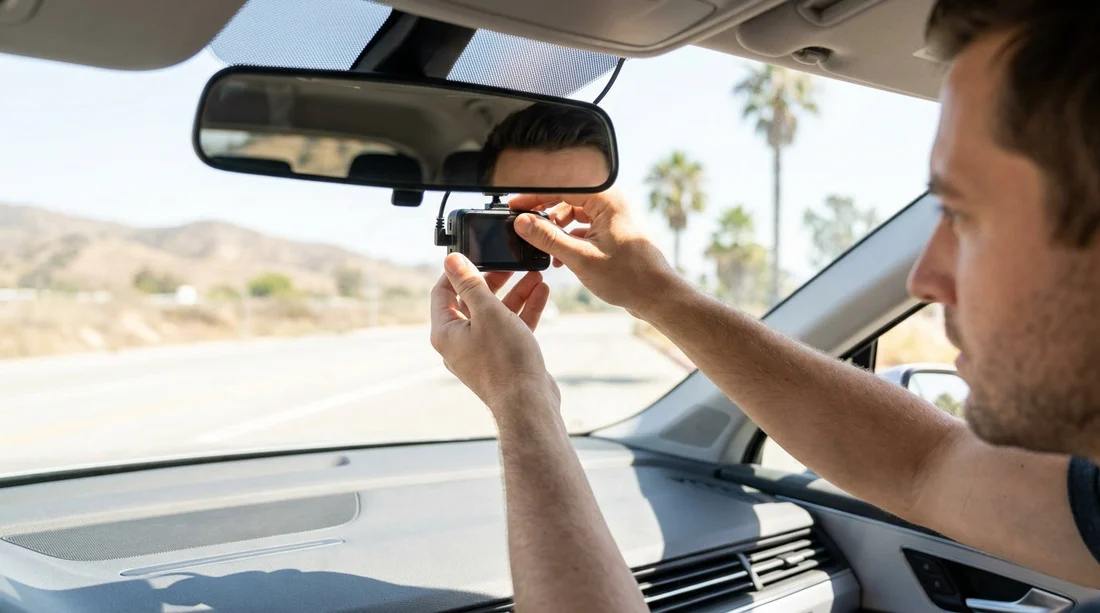
- Mount high behind the rear-view mirror, clear of airbags and sensors.
- Use suction or removable mounts, and avoid permanent adhesives or screws.
- Photograph glass and dashboard at pick-up, and record any marks.
Dash cams can be useful on California roads, whether you are navigating unfamiliar junctions, dealing with heavy motorway traffic, or parking in tight city spaces. If you are arranging car hire, the key question is not only whether you can use a dash cam, but also how to mount it without causing damage or interfering with the vehicle’s safety systems. Most rental companies are fine with customers using their own devices, provided you do not leave marks, alter the vehicle, or create a hazard.
This guide covers what is typically allowed, the best mounting locations in California, and what to avoid at pick-up and drop-off so you do not face cleaning, damage, or equipment tampering fees.
Is it allowed to use a dash cam in a rental car?
In most cases, yes. A dash cam is generally treated like any other personal accessory you bring into the car. Rental terms usually focus on protecting the vehicle, not banning cameras. The usual boundaries are simple: do not hardwire into the car, do not remove interior panels, do not block visibility, and do not attach anything that could damage glass, plastics, or upholstery.
Because rental policies vary by brand and location, it is sensible to skim the agreement at pick-up for wording about accessories, adhesives, and modifications. If you are collecting at a busy hub such as San Francisco Airport (SFO) or Los Angeles (LAX), you will usually have a few minutes at the counter or kiosk to confirm what is and is not permitted.
Also remember that a dash cam records more than the road. If you use one with an interior-facing lens, it may capture passengers. That is a personal responsibility issue rather than a car hire issue, but it is still worth considering for privacy and consent.
Where should you mount a dash cam in California?
The safest and most widely recommended position is high on the windscreen, tucked behind or just to the passenger side of the rear-view mirror. This placement tends to keep the camera out of the driver’s primary field of view, gives a clear forward perspective, and reduces distracting reflections from the dashboard.
In California, visibility matters. You want the lens to capture the lane ahead, traffic lights, and number plates where possible, without creating a blind spot. A good rule is that you should not be able to see the camera’s screen while driving unless you lean forward. If your camera has a screen that stays on, set it to dim or switch off after a few seconds.
Avoid mounting too low in the centre of the windscreen, which can block sightlines, or too far left, which can obstruct your view at junctions. If the car has a dotted tint band near the top of the glass, suction mounts can struggle there. Move the mount slightly lower where the glass is smooth.
Mounting without damage: best methods for rental cars
Your aim is a secure mount that removes cleanly. In rentals, the best options are suction cups or removable static-cling mounts. They are usually easy to position, leave minimal residue, and can be taken down in seconds at drop-off.
When routing the power cable, do not tuck it into headliner edges near curtain airbags. Many modern cars have airbags running along the A-pillar and roofline, and a cable in the wrong place can interfere with deployment. Instead, route the cable along the passenger side, keeping it loose and away from airbag seams, then down towards the centre console.
If you are driving a larger vehicle, such as an SUV from San Diego, be especially careful not to obstruct any forward-facing camera or driver assistance sensors near the mirror housing. Some cars have lane-keeping, automatic high beam, or collision avoidance cameras in that area, and an accessory placed too close can cause warnings or misbehaviour.
Hardwiring and OBD power: what to avoid
Hardwiring a dash cam is common in privately owned cars, but it is usually the wrong approach for a rental. It can be seen as a modification, it often involves prying trim, and it can lead to broken clips or rattles. Similarly, avoid installing add-ons that require access to the fuse box or pulling weather seals away from the frame.
For car hire, the least controversial power source is the standard 12V socket or USB port, with a cable routed neatly so it does not cross pedals, steering controls, or the gear selector.
Windscreen laws, visibility, and camera placement
California is strict about anything that materially obstructs the driver’s view. Even when an accessory is technically permitted, a poorly placed mount can create a safety issue. Keep the camera compact, place it high, and ensure it does not block your view of the road, mirrors, or instrument panel.
Also consider heat. In many parts of California, a car parked in the sun can become extremely hot. Suction mounts may loosen, and batteries in some dash cams do not like prolonged high temperatures. If you park for long periods, remove the camera or at least take it off the windscreen and store it out of direct sunlight.
What to check at pick-up to avoid disputes
Most problems happen when a rental is returned and there is a question about marks on the windscreen or interior trim. At pick-up, take a slow walk-around and photograph the windscreen from inside and outside, the dashboard top, and the area around the rear-view mirror. If there are existing smudges, chips, or adhesive marks, note them and keep the photos.
It is also wise to locate the airbags. Look for “AIRBAG” or “SRS” labels on the A-pillars and headliner edges, then plan your cable route accordingly. If you are collecting at a high-volume location such as budget car hire at SFO, you may receive a variety of models, so do not assume the airbag layout is the same as your car at home.
Removing the dash cam cleanly at drop-off
Plan a couple of minutes to remove the camera and cable before you return the car. Take the mount down gently. For suction mounts, release the tab rather than pulling straight off. For removable adhesive, peel slowly and keep it parallel to the glass to reduce residue. If any light residue remains, buff it with a clean microfibre cloth.
Do a final set of photos after removal, especially of the mounting area. This helps if a question arises later about streaks or marks. If you are returning to a different city, for example after picking up through Dollar at LAX, your after-photos provide a consistent record regardless of the drop-off staff member’s inspection style.
FAQ
Can I use a dash cam with a suction mount in a rental car in California?
Yes, suction mounts are usually the safest option for car hire because they are removable and typically do not leave residue when applied to clean glass.
Where is the best place to mount a dash cam without blocking my view?
High on the windscreen behind or just beside the rear-view mirror is usually best, as it keeps the unit out of your main sightline while maintaining a clear forward view.
Should I hardwire my dash cam in a rental car?
No, hardwiring can be treated as a modification and may involve removing trim. Use the 12V socket or USB power instead and route the cable safely.
What should I photograph at pick-up before installing the dash cam?
Take photos of the windscreen inside and out, the mirror area, and the dashboard top. This helps show any pre-existing marks or chips.
Could a dash cam interfere with airbags or driver-assist sensors?
Yes, poor placement can obstruct sensors near the mirror or route cables near curtain airbags. Keep the camera compact and avoid airbag seams and sensor housings.




























































































