


Quick Summary:
- Install the Tesla app, create an account, and add payment before pickup.
- Confirm whether your rental enables Supercharging or requires app-based payment.
- Check your car’s charge port type and any required adapter compatibility.
- Know Supercharger etiquette, idle fees, and charge limits to avoid surprises.
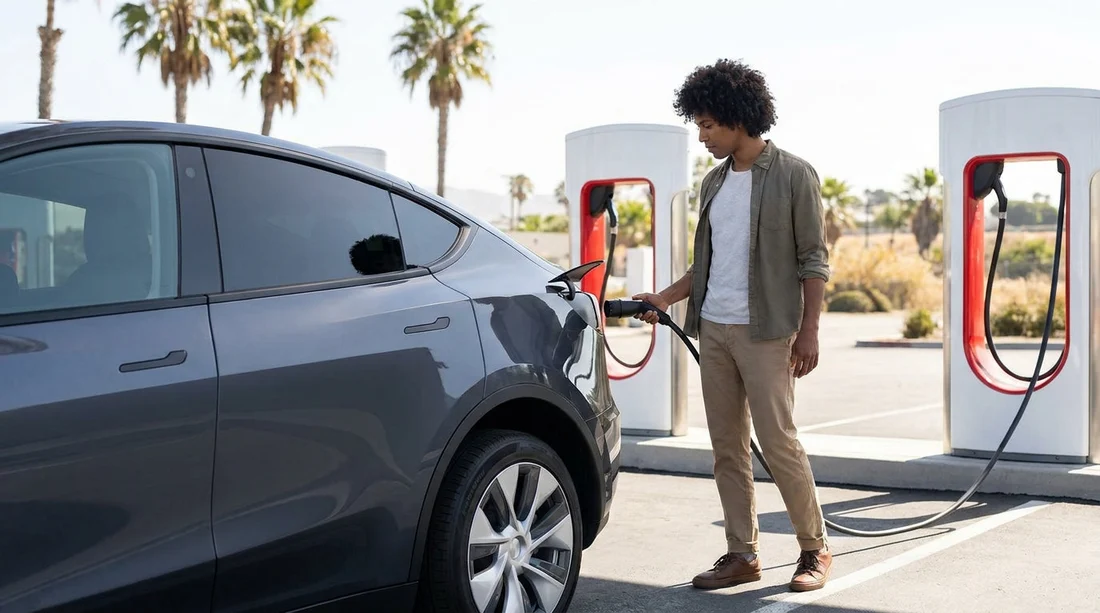
Planning an electric car hire in California is easiest when you sort Supercharging access before you collect the keys. Tesla’s network is widespread along major routes, but the steps to use it vary depending on whether you are driving a Tesla rental or a non-Tesla EV that can access select Superchargers. The essentials are straightforward, app access, payment readiness, and knowing what connector your car actually uses.
This guide focuses on pre-pick-up preparation, what to verify with your rental, how billing typically works, and the connector details that determine whether you can plug in and charge without hassle.
1) Identify what you are driving, Tesla or non-Tesla
The first thing you need is clarity on the vehicle type, because Supercharger access works differently.
If your rental is a Tesla: most charging is simple, you plug in, the car and charger handshake, and billing is handled through a Tesla account tied to the vehicle or the rental operator. However, some rentals are not linked to your personal Tesla account, which affects how receipts and payment appear.
If your rental is a non-Tesla EV: access depends on whether that Supercharger location is open to non-Tesla vehicles and whether your EV’s connector can mate with the stall. In California, you will see more “open to non-Tesla” sites than in many other places, but it is not universal, and not every stall at a site is always compatible.
Before your trip, confirm the exact make, model, and trim. “EV” is not specific enough to know which connector you have or what adapters are included.
2) Set up the Tesla app and account before you fly
For many drivers, the single most useful pre-pick-up task is setting up the Tesla app. Even when you are driving a Tesla, the app can help you find Superchargers, see live availability, and understand pricing. When you are driving a non-Tesla at a Supercharger site that supports it, the Tesla app is often required to start and pay for a session.
Do this ahead of time:
Install the Tesla app on your phone and confirm you can log in.
Create a Tesla account using your preferred email address and mobile number. Use details you can access while travelling.
Add a payment method in the app so you are not stuck at a charger trying to verify a card or your bank’s security prompt.
Enable location permissions for smoother Supercharger discovery and to avoid manual searching when you are on the road.
3) Understand rental billing, who pays for Supercharging
With car hire, Supercharging costs are not always paid the same way. Ask, and ideally get it in writing, how charging is handled for your specific rental.
Common arrangements include:
Charging billed to the rental company and passed through to you later. This is typical when the car is enrolled in a fleet account. You plug in and go, then charges appear on your rental receipt, sometimes with an admin fee.
Charging paid by you in the Tesla app. This can apply to non-Tesla Supercharging sessions, and sometimes to Tesla rentals where the operator expects you to initiate and pay via app-based access.
Charging included up to a cap. Some rentals include a daily or trip allowance, after which extra charges apply.
If you are collecting near a busy airport, it is worth having this clarified before you arrive. For example, picking up around Los Angeles can be fast-paced, and you may prefer to settle charging expectations in advance. Hola Car Rentals has California pages that can help you orient yourself around collection areas like car hire at LAX and local operators such as Alamo at LAX.
4) Check connector type and adapter needs
Connector compatibility is the make-or-break detail for Supercharging, particularly in California where you will see a mix of older and newer charging hardware.
Tesla (North America) connector standard: many Tesla Superchargers use the Tesla plug, and newer sites increasingly use NACS hardware. Tesla vehicles natively support this.
CCS connector (common on many non-Tesla EVs): some Supercharger sites have hardware or “Magic Dock” style solutions to serve CCS vehicles, but only at participating locations. You cannot assume a random Supercharger will work for CCS.
Before pickup, verify:
What charge port your rental has (Tesla/NACS or CCS), and whether the car comes with any adapters.
Whether you are allowed to use an adapter if you have one personally. Some rental agreements prohibit third-party accessories.
How to open the charge port on that model, and where the release is located inside the cabin. This sounds basic, but it saves time at night or in rain.
If you are starting in the Bay Area, it can also help to plan around where you collect, because early familiarity reduces stress. Hola Car Rentals location pages such as San Francisco Airport (SFO) car rental and SUV rental at SFO are useful for understanding pickup points and typical driving routes out of the terminals.
5) Make sure your payment method will not fail on the road
Even if you have added a card, payments can still fail due to bank security rules, travel flags, or insufficient authorisation for pay-as-you-go charging.
To reduce problems:
Use a card that supports international and out-of-state transactions if you are visiting from abroad.
Enable app-based banking authentication before you travel, since some banks require in-app approvals.
Keep a backup payment method saved in the Tesla app where possible.
Check your mobile data plan because starting and monitoring sessions can depend on connectivity.
6) Know the key Supercharger rules that affect rental drivers
Tesla Superchargers are designed for fast turnover. The main “rules” you will feel as a driver are mostly about cost and courtesy.
Idle fees: if your car stays plugged in after charging completes, you can be charged an idle fee, especially when the site is busy. With a rental, those fees can be passed through later, so set a phone reminder to move the car.
Charging to 100% can be slow: fast charging slows significantly as the battery fills. For road trips, it is often faster to charge to a sensible level and continue rather than wait for a full battery.
Parking and accessibility: do not use charging bays as parking, and do not block access. California sites can be busy at peak travel times.
7) Do a quick pre-departure checklist at the counter
Before you leave the lot, take two minutes to confirm the practical details that matter for Supercharging:
Charging access method: ask whether you just plug in, or you must start sessions in the Tesla app.
Receipts: ask how you will see Supercharging costs, in-app, on your rental bill, or both.
Included accessories: check the boot and glovebox for any adapters and the mobile charging cable, if provided.
Battery level at pickup: note the percentage and estimated range, and clarify any return expectations.
If you are collecting in Southern California and continuing onwards, you may also pass through Orange County corridors. Hola Car Rentals pages like car hire at Santa Ana (SNA) can help you compare pickup locations and plan your first charging stop accordingly.
FAQ
Do I need the Tesla app to use a Supercharger with a rental? Often yes, especially for non-Tesla vehicles at eligible sites. For Tesla rentals, you may be able to plug in and charge without the app, but the app is still useful for locating chargers and understanding prices.
Can any electric rental car use Tesla Superchargers in California? No. Tesla cars can use them, but non-Tesla EV access depends on the specific Supercharger location and your connector type. Always confirm the site supports non-Tesla charging before relying on it.
How do I know whether Supercharging will be billed to me or the rental company? Check your rental terms and ask at pickup. Some fleets pass through Supercharging charges later, while other setups require you to pay in the Tesla app at the time of charging.
What happens if I leave the car plugged in after it finishes charging? You may be charged idle fees, particularly when the site is busy. With a rental, those fees can still be passed to you, so plan to return before the session ends.
Should I charge to 100% before returning an electric rental car? Not necessarily. Follow the return policy you were given. Many rentals focus on returning with a minimum battery percentage, and charging to 100% can take much longer than charging to a practical level.




























































































