


Quick Summary:
- Follow AirTrain signs to the Rental Car Center, then exit to garages.
- Match your paperwork’s zone letter to overhead signs in each garage.
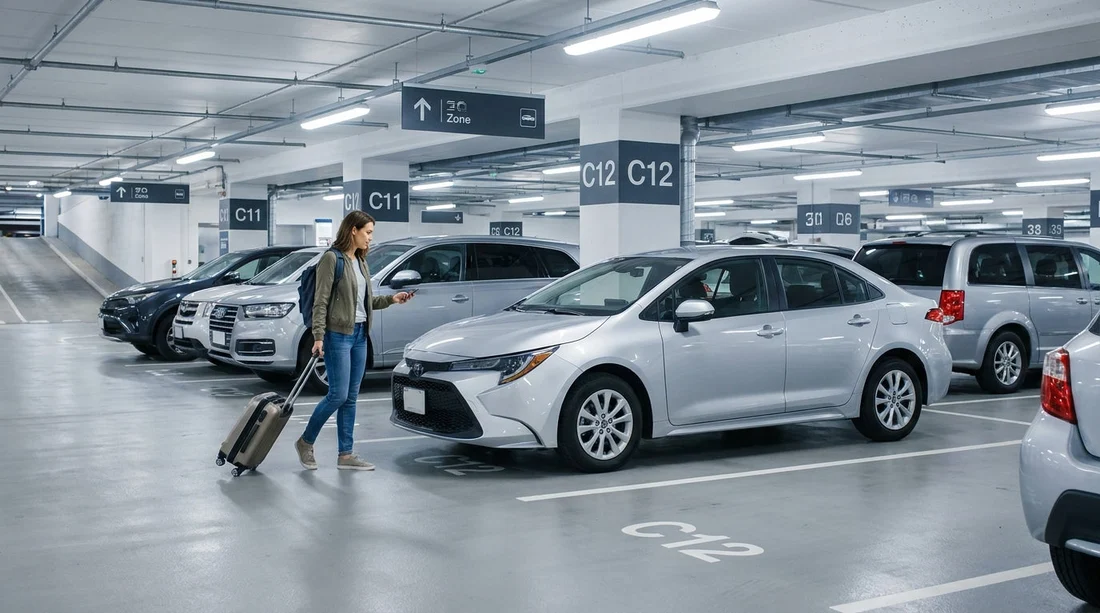
- Use bay numbers on pillars, rows, and kerb paint to pinpoint location.
- Confirm vehicle plate and stall number before loading bags and driving out.
After you have finished at the counter or kiosk, the biggest time saver is knowing how the Rental Car Center is organised. At San Francisco International Airport, the SFO Rental Car Center is designed like a multi-storey garage complex with clear, repeated wayfinding. The system relies on three things working together: colour and wording on overhead signs, zone letters, and bay numbers placed on pillars and at the ends of rows.
If you are comparing options for car rental at San Francisco SFO, it helps to understand the on-site layout in advance, because different brands are assigned to specific areas and floors. The key is to treat your rental agreement or pickup slip as a map reference, then follow the garage’s own signage to narrow it down from building, to level, to zone, to bay.
Start with the right arrival point: AirTrain and the Rental Car Center
From the terminals, most travellers reach the Rental Car Center by taking the AirTrain (the airport people mover). Stay on until the stop labelled “Rental Car Center”. When you exit, you are typically channelled towards pedestrian routes leading into the garages and the customer service desks, depending on how your provider handles handover.
As you walk in, look for the large overhead wayfinding boards that list companies and directional arrows. These signs are usually repeated at decision points, so if you do miss one, you will see another shortly. If you have arranged your vehicle through a specific provider, the signage will steer you to their counter area or to the aisle for their “ready line” vehicles.
Understand the three-part logic: company area, zone letter, bay number
To find your car hire bay quickly, you need to interpret the information in the order the garage expects you to use it.
1) Company area or brand lane
First, confirm you are in the correct operator’s area. Some brands have their own aisle or section, and staff may direct you to a particular floor. Do not start hunting for a specific bay number until you are confident you are in the right branded area.
2) Zone letters narrow down the search
Next, use the zone letters, commonly displayed on overhead signs and on pillars. Think of a zone letter as a “neighbourhood” within the garage. Your paperwork might say something like “Zone C” or show a letter prominently near the stall or location details. Head towards the matching letter signs, and keep following them until you are fully inside that zone.
3) Bay numbers identify the exact stall
Finally, locate the bay number, which is the “house number”. Bay numbers are normally printed large on pillars, on row end caps, and sometimes on the ground or kerb paint. If you have a bay number, you should be able to walk directly to it once you are in the correct zone.
This sequencing matters. Many delays happen when travellers fixate on the bay number while standing in the wrong zone, or in the wrong brand area. Use the biggest sign categories first, then move to smaller identifiers.
Where to spot bay numbers and what they look like
Bay numbering is intended to be visible at speed and from multiple angles. At SFO’s Rental Car Center, you will usually see the bay number in several places, so use whichever is easiest from where you are standing.
Pillars and columns: The clearest reference point is often the concrete pillar next to the stall. The number may be printed high up for visibility across rows.
Row markers: At the end of a lane, there may be a sign showing a range of bay numbers within that row. This helps you choose the correct aisle before walking the full length.
Painted kerbs or ground markings: Some sections repeat bay numbers at ground level. This is useful when you are close, but less visible from a distance, especially with luggage or other cars blocking sightlines.
If your slip only provides a partial clue, for example a row and not a bay, start by finding the row marker, then walk down the row checking each pillar until you reach the exact stall.
How to use signage to avoid walking the wrong level
At multi-storey facilities, level confusion is common. The trick is to treat level signs as non-negotiable. If your pickup instructions mention a level, prioritise that before looking for letters and numbers. Overhead signs near lifts, stairs, and entrances typically show the level and direct you to vehicle pickup lanes.
If the facility uses separate lanes for “pick-up” and “return”, make sure you are following the pick-up directions. It is easy to drift towards return lanes if you follow cars rather than signs. Look for repeated wording such as “Pick-Up” or “Ready/Go” style lanes. If in doubt, stop and check the nearest overhead board, as they usually indicate both directions clearly.
Travellers who also rent elsewhere in the region sometimes assume layouts are identical. They are not. If you later collect a vehicle from car rental at San Jose Airport SJC, expect different zone and bay conventions, even if the basic idea is similar.
What your paperwork or kiosk receipt is really telling you
Your rental agreement, kiosk slip, or staff handover note typically contains location hints, even if it is not formatted like a map. Look for a zone letter, a stall or bay number, vehicle details, and any exit instructions. Read it before you reach the bay so you do not have to stop and juggle documents with bags.
If you are picking up a larger vehicle, stall placement can be slightly different due to height and turning space. Information on van hire at San Francisco SFO is especially useful if you expect a taller van, as you may be directed to a more accessible lane or a specific floor section.
Fast troubleshooting if you cannot find your bay
Even with good signage, there are a few common reasons a bay is hard to locate. Re-check the zone letter first, then confirm the level if the numbering does not match your slip. If you are collecting with a specific provider, such as Thrifty car hire at San Francisco SFO, staff in that branded area are typically the fastest to assist because they can confirm whether vehicles have been moved or swapped.
If your assigned vehicle class is unavailable, your bay assignment can change. Sometimes a new bay is written on the slip or updated in the system. If the bay is empty, go back to the desk area or the nearest help point and verify the updated stall.
Double-check before you load luggage and head to the exit
Once you find the bay, do a quick confirmation before you settle in. Match the registration plate or the vehicle description on your paperwork, then check for any posted bay number that confirms you are in the correct stall. This takes seconds and prevents returning to the desk after you have already arranged bags and child seats.
Before driving off, locate the exit lane signage. Many facilities require you to stop at an attendant booth where they verify the agreement and vehicle condition. Have your documents ready, and note that some exit lanes are separated by brand.
Finally, remember that finding your car hire bay is easier if you keep your navigation steps simple: correct brand area, correct level, correct zone letter, then exact bay number. Once you are used to that logic, the SFO Rental Car Center becomes quick to navigate, even during busy periods.
FAQ
How do I know which zone letter to follow at SFO?
Your rental agreement or kiosk receipt usually shows a zone letter near the location or stall details. Follow overhead signs and pillar markers that repeat that letter.
What if my bay number is not visible from the aisle?
Use row-end signs to find the right lane, then walk alongside the pillars. Bay numbers are often printed on columns rather than hanging signs.
My assigned bay is empty, what should I do?
Return to the nearest help desk or staff member in your brand area. Vehicles can be moved for cleaning, upgrades, or last-minute swaps, and staff can provide the updated bay.
Are pick-up and return areas in the same place?
They are usually within the same Rental Car Center, but lanes are separated and clearly signed. Make sure you follow “Pick-Up” directions after leaving the counter.
Do van pick-ups use different bays or zones?
Sometimes, yes. Larger vehicles may be staged in more accessible sections for height and manoeuvring, so follow any van-specific directions on your paperwork.





























































































