


Quick Summary:
- Photograph all four sides, roof, and wheels, keeping straight-on framing.
- Capture close-ups of every scratch, dent, chip, crack, and scuff.
- Include timestamp evidence via phone screen, contract, and location signage.
- Record dashboard mileage, fuel level, warning lights, and key condition.
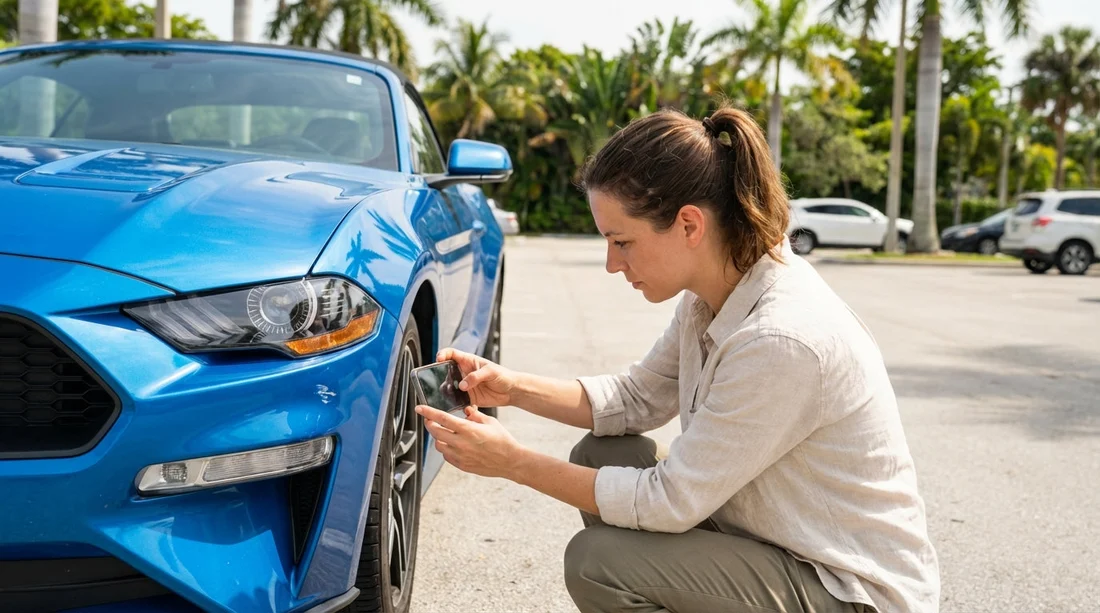
When you collect a car hire in Miami, the busiest part is often the counter, not the car. Yet the photos you take in the first five minutes can matter most if you later need to prove a mark was already there. The goal is not artistic photography, it is to create a simple, complete set that matches how damage is logged on typical rental condition reports: side panels, bumpers, glass, wheels, interior, and dashboard details, with clear context and time evidence.
This guide gives you an exact, repeatable photo set you can follow at Miami International Airport, Downtown Miami, Coral Gables, or nearby areas. It focuses on wide shots for context, close-ups for proof, and timestamp cues that make the images credible and easy for staff to match against a damage diagram.
If you are collecting at an airport location, you may find it helpful to review pick-up expectations for Miami airport car rental before you arrive, especially for where the inspection area is and when you can pause to take photos.
Before you start: set your phone up for clear evidence
Do these quick settings and habits before you take the first shot. They help your photos match common damage-report fields and reduce arguments about when, where, and what the image shows.
Clean the lens and use 1x zoom. A smudged lens makes scratches look blurry, and zoom can distort panel lines. Use normal 1x and move closer for detail.
Turn on date and time accuracy. Make sure your phone’s time is correct and set to automatic. You do not need a special timestamp app if your device stores metadata reliably, but adding visual time cues in-frame is even better.
Use consistent angles and distances. For wide shots, stand about 2 to 3 metres away and keep the camera level. For close-ups, take one image that shows the damage and surrounding panel edges, then one very close image for texture.
Use flash only when needed. In Miami sun, flash can wash out paint and hide scuffs. In shaded garages, flash can help reveal curb rash on wheels and scratches on bumpers.
Take photos before you drive a single metre. If the car is already pulled out for you, step around it immediately and start with wide context shots.
The exact photo set to match common damage-report sections
Most condition reports break the car into zones: front, rear, left, right, roof, wheels, glass, interior, and dashboard. Follow this order so your images are organised and easy to reference later.
1) Identity and timestamp set (4 photos)
These images anchor your whole folder to the exact vehicle and pick-up moment.
Photo 1, contract and key packet next to the car. Frame the paperwork or key sleeve in front of the vehicle’s number plate or a distinctive feature. Make sure the date is visible if printed.
Photo 2, VIN plate on the windscreen or door jamb. Many reports reference the VIN. Take it straight-on so characters are readable.
Photo 3, number plate plus surroundings. Include a sign, bay number, or building feature. This creates location context without needing any external proof.
Photo 4, your phone lock screen visible in reflection. If you can safely do it, take a picture where the phone screen time is visible in the car’s paint reflection. If that is awkward, skip it and rely on the contract photo and metadata.
Wherever you pick up, keep the process calm and consistent. At a busy urban branch such as Downtown Miami car rental, these identity photos can save time later if multiple similar cars are parked together.
2) Full exterior walkaround (10 photos)
This is the core of what most damage diagrams represent. You are creating a “baseline” showing all panels with no gaps.
Photo 5, front three-quarter left. Capture bonnet, front bumper, left headlight, left front wing, and wheel.
Photo 6, front straight-on. Include grille, both headlights, and the full bumper. Aim to show lower bumper edges where scrapes are common.
Photo 7, front three-quarter right. Mirror of Photo 5.
Photo 8, right side straight-on. Include both right doors, sills, and mirror. Keep the camera parallel to the side to show dents clearly.
Photo 9, rear three-quarter right. Capture rear bumper corner, tail light, quarter panel, and wheel.
Photo 10, rear straight-on. Include the full bumper, boot lid, tail lights, and number plate.
Photo 11, rear three-quarter left. Mirror of Photo 9.
Photo 12, left side straight-on. Mirror of Photo 8.
Photo 13, roof and upper body. Take from a safe angle, showing roof, windscreen top edge, and roof rails if present. Roof damage is frequently missed on reports because it is hard to see.
Photo 14, under-bumper lower edge. Crouch slightly and photograph the lower front lip and lower rear edge. Scrapes here are common and often disputed because they are not obvious from standing height.
3) Panel-by-panel close-ups (minimum 12 photos)
Now you match what staff typically log as “scratch”, “dent”, “chip”, “scuff”, or “crack” on a diagram. Use the rule: one close-up that shows where it is on the panel, then one tighter close-up that shows the damage texture.
Front bumper and grille area. Take close-ups of stone chips, scraped paint, and any missing tow hook covers. Include both bumper corners, as kerb contact often affects one side.
Bonnet and leading edge. Stone chips and paint pitting can be overlooked. Photograph any clusters.
Door edges and handles. Look for paint nicks and scratches around handles.
Wing mirrors. Photograph scuffs on mirror caps and the indicator lens, if fitted.
Quarter panels. Dents can be subtle. Take an angled shot that catches reflections, then a straight-on shot.
Rear bumper loading lip. The top edge of the rear bumper is a common scuff point from luggage.
Fuel door area. Scratches near the fuel flap can be misread as new damage.
In bright Miami light, use shade to reveal fine scratches. If you are in a sunny open lot, move your body to create a shadow line across the panel, which helps show depth.
4) Wheels, tyres, and rims (8 photos)
Wheel damage is one of the most frequently claimed issues because curb rash can happen quickly and is easy to miss at pick-up. Many reports have a specific “wheels” section, so treat this as its own set.
Photo set for each wheel: one straight-on wheel face showing the full rim, and one close-up of any scuffs or gouges. Repeat for all four wheels.
Include the tyre sidewall. Photograph any bubbles, cuts, or severe scuffs. Also capture tread depth visually if it looks low.
If you are collecting a larger vehicle, this is especially important because kerb rash is easier to pick up when parking. For example, if you are arranging an SUV-focused car hire near Coral Gables, the rims can be larger and more exposed. See location context at SUV hire Coral Gables and plan a slower, more thorough wheel check.
5) Glass, lights, and plates (10 photos)
Cracks and chips in glass can spread, and a small chip may later be blamed on you if it is not documented.
Windscreen: take one wide shot of the full windscreen, then close-ups of any chips, especially near the wipers and edges.
Rear window: one wide shot, plus any defect close-ups.
Side windows: at least one photo per side, focusing on scratches or tint damage.
Headlights and tail lights: straight-on shots of each light cluster. Look for cracks, missing pieces, moisture, or heavy hazing.
Number plates: front and rear. Ensure they are readable and not cracked or loose.
6) Interior condition set (12 photos)
Condition reports usually include upholstery, dashboard, odours or stains, and missing items. Photos can only show some of that, but you can still document visible wear and cleanliness.
Photo 1, driver seat and floor. Include seat base, seat back, and floor mat area.
Photo 2, front passenger seat and floor. Mirror of driver side.
Photo 3, rear seats wide. Capture the full rear bench and footwells.
Photo 4, boot or cargo area. Include the floor, side panels, and any cover. If there is a spare tyre kit area, photograph whether it looks intact.
Photo 5, headliner and pillars. Quick shot to capture stains or sagging fabric.
Photo 6, door cards and sills. Scuffs on door sills and armrests are common.
Photo 7, infotainment screen off. Screens show scratches best when off and dark.
Photo 8, steering wheel and centre console. Capture wear, sticky residues, or damage around cup holders.
Photo 9, climate controls area. Buttons can be missing or cracked.
Photo 10, seatbelts extended slightly. Capture fraying or staining.
Photo 11, roof console and visors. Especially if mirrors are broken.
Photo 12, any odour or wetness indicator. If you see wet mats or leaks, photograph the moisture and surrounding area clearly.
If you are travelling as a group and collecting a people carrier, interior photos matter even more because multiple rows and sliding doors create extra wear points. The same method applies if you are comparing vehicle options like minivan hire Downtown Miami.
7) Dashboard evidence: mileage, fuel, and warning lights (5 photos)
This set maps directly to the most common check-out fields: odometer, fuel level, and warning indicators.
Photo 1, ignition on, full instrument cluster. Make sure mileage and fuel gauge are visible together if possible.
Photo 2, close-up of odometer. Ensure the digits are sharp.
Photo 3, close-up of fuel gauge. Useful if you were told it is “full” but it shows otherwise.
Photo 4, any warning lights. If any warning appears, capture it. Then take another photo showing the warning within the full cluster for context.
Photo 5, settings or vehicle info page. If it shows tyre pressure warnings or service notices, photograph that screen.
8) Keys, accessories, and supplied equipment (6 photos)
Missing accessories can become charges. Photograph what you were given and what is present in the car.
Key fob front and back. Show any cracks, missing emergency key, or weak buttons.
Second key if supplied. Photograph it as well.
Charging cables, adapters, toll transponder. If present, photograph where it is mounted and any serial number label.
Jack and tool kit area. If accessible, take a quick photo showing whether it appears complete.
Emergency triangle or safety kit. Photograph if provided.
Child seat condition if hired. Photograph straps, buckles, and any visible damage.
How to make the set match the damage report you are signing
Sometimes you are given a digital or paper diagram with marks already noted. Your photos should make it easy to confirm those marks and add any missing ones before you leave.
Photograph the report itself. Take a clear photo of the damage diagram and the written notes, including any ticked boxes for “scratches”, “dents”, “chips”, “interior stains”, and fuel level. If it is on a screen, photograph the screen without glare.
Match each diagram mark to at least one close-up. If the diagram shows a scratch on the left rear door, ensure your folder has a left-side wide shot plus a left rear door close-up.
If you find unmarked damage, document and report immediately. Take two photos as described earlier, then ask staff to note it on the report. Stay factual and specific: panel location, size, and type of damage.
Common Miami pick-up conditions and how to adapt your shots
Bright sun and glare. Miami sun can hide scratches. Use angled shots and your body’s shadow to reveal swirls and scuffs.
Parking garages with low light. Increase exposure slightly and use flash for wheel close-ups. Keep the phone steady and take two shots to avoid blur.
Afternoon rain. Water droplets can disguise chips. Wipe only a small area around damage if possible, then photograph both before and after wiping so the context is clear.
Busy lots and traffic. Safety first. If the pick-up lane is moving, take the identity and dashboard set immediately, then pull into a safe bay for the full exterior walkaround.
If you are picking up near the beach, you may encounter tight parking and sand on floor mats. For location-specific planning, see Enterprise car hire Miami Beach for guidance on typical branch setups and inspection areas.
File management: keep your proof easy to retrieve
Name or favourite the best images right away, especially any close-ups. If your phone allows it, create an album called “Miami car hire pick-up” and place the photos there. Keep them until after the final invoice is settled.
Also consider taking a short, slow video walkaround after the photos. Video is not a replacement for close-ups, but it can show continuity across panels and capture sound if you narrate what you are seeing. Keep it simple and do not skip the still photos, as damage claims are usually assessed from single frames.
FAQ
How many photos should I take at pick-up? Plan for 60 to 80 photos for a thorough set: 10 wide exterior shots, 12 or more close-ups, wheels, glass, interior, plus dashboard and paperwork.
Should I take photos before or after signing the condition report? Take the exterior walkaround and key dashboard shots before signing. If you must sign first, photograph immediately after and ensure any extra damage is added right away.
What damage is most often missed on rental reports? Lower bumper scrapes, wheel rim rash, tiny windscreen chips, and scuffs on door sills are commonly overlooked, so prioritise those close-ups.
Do I need a timestamp app for my photos? Not usually. Phone metadata plus in-frame context such as the contract, bay signage, and the instrument cluster is typically enough to support when the photos were taken.
What if the car is dirty and I cannot see the paint clearly? Photograph the dirt as context, then focus on vulnerable areas like bumpers, wheel arches, and door edges. If staff can provide a quick wipe or swap vehicles, document that outcome too.

























































































