


Quick Summary:
- Expect at least one USB-A port and a 12V socket.
- Newer models may add USB-C ports, rear outlets, or wireless charging.
- Pack USB-A and USB-C cables, plus a reliable 12V car charger.
- Bring a short data cable for CarPlay or Android Auto.
When you collect a car hire in Texas, the charging setup can vary by model year, trim level, and whether you are in a compact car, SUV, minivan, or van. The good news is that most modern US rental cars provide at least one reliable way to keep a phone powered, usually a USB port and a 12V socket. The tricky part is matching the right cable to the port, and knowing whether the car supports data for Apple CarPlay or Android Auto, or only basic charging.
This guide focuses on what you will usually find at pick-up in Texas, and what to pack so you can charge phones, run navigation, and connect music without rummaging through airport shops. If you are arranging a pick-up in major hubs such as Austin or Houston, it is still wise to plan for variation between vehicles and to bring a small, flexible set of cables and adapters.
If you are comparing options for car hire at Austin Airport (AUS) or planning arrivals into car rental at Houston (IAH), it helps to think of charging as part of your packing list, just like sunglasses and toll-road readiness.
What ports do Texas rental cars usually have?
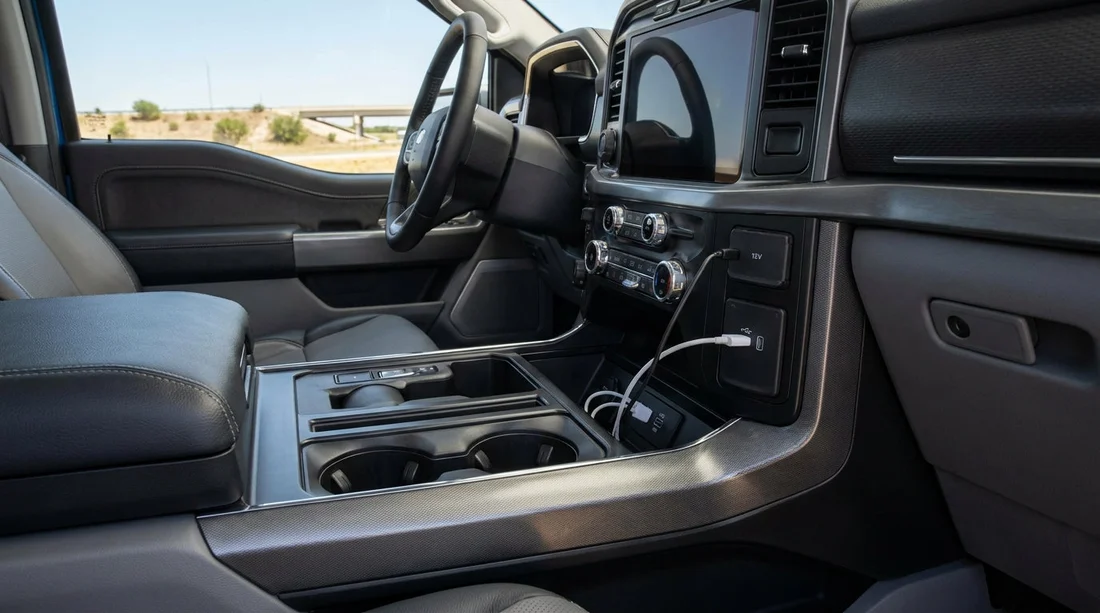
USB-A ports (most common) are still the most likely port type you will see at pick-up. Many vehicles have one or two in the front, and sometimes extra ports in the centre console or rear seats. USB-A ports are convenient, but their charging speed depends on the car. Some provide slow charging that can struggle if you are running navigation with screen brightness up.
USB-C ports (increasingly common) appear more often in newer model years. If you have a USB-C to USB-C cable for a modern Android phone or an iPhone 15/16, you can often get better charging performance, but it is not guaranteed. Many cars now mix USB-A and USB-C, for example one of each in the front, plus rear USB-C ports.
12V accessory socket (cigarette-lighter style) is a near-universal fallback. Even if USB ports are limited or slow, a good 12V car charger can provide stable power. In some cars, the 12V socket sits low in the centre stack, inside the centre console, or by the front footwell.
Wireless charging pad (present on some trims) is common in mid-range SUVs and newer sedans, but far from guaranteed in rental fleets. Pads can be picky about phone size and camera bump thickness, and they can run warm. They are best treated as a bonus, not your only plan, especially on long Texas drives where the phone is working hard for navigation.
Rear-seat charging ports (varies by vehicle type) are more likely in SUVs, minivans, and vans. If you are travelling with family or friends, rear USB ports reduce arguments about whose turn it is to plug in. Larger vehicles are also more likely to have multiple ports spread across rows.
Charging vs connectivity, do you need a data cable?
A common surprise at car hire pick-up is that not every USB port supports data. Some ports are power-only. If you want Apple CarPlay or Android Auto, you may need to plug into a specific front USB port marked with a phone icon or “data”. In some cars, only one USB port enables smartphone integration.
Wireless CarPlay or wireless Android Auto is appearing more often, but it is not consistent across rental fleets. Even when it is available, it can be less stable than a cable, and it uses more battery. Bringing a short, data-capable cable is the most dependable approach, particularly if you plan to rely on maps across long stretches between Texas cities.
If your trip includes a larger vehicle, for instance a group arrival using minivan rental in El Paso (ELP), packing an extra data cable can be useful for whoever is navigating while others charge from separate ports.
What to pack for car hire in Texas, a simple cable kit
1) Two charging cables, one USB-A and one USB-C end option. The most versatile choice is to bring a USB-C to USB-C cable (for newer cars and fast chargers) plus a USB-A to USB-C cable (for older cars). iPhone users should bring the right Lightning cable, and consider having one that is USB-A to Lightning as well as USB-C to Lightning if you own both chargers at home.
2) A quality 12V car charger. This is your insurance policy. Choose one with at least 18W per port, or higher if you want faster charging. A dual-port model lets driver and passenger charge at the same time, and avoids relying on possibly slow built-in USB ports.
3) A short data cable for CarPlay or Android Auto. Shorter cables reduce clutter and connection dropouts. Make sure it is a proper data cable, not a charge-only promotional lead.
4) Optional, a USB-C to USB-A adapter. If you mainly use USB-C cables, an adapter helps you plug into older USB-A ports. This is often smaller and lighter than packing multiple duplicate cables.
What you may see by pick-up location and vehicle type
Texas airports handle a wide mix of vehicles, from economical city cars to larger SUVs designed for highway driving and hot weather. In practice, the newest connectivity features tend to show up in newer vehicles and higher trims, rather than being guaranteed by location. Still, there are some patterns travellers notice.
City-focused picks often include compact cars and midsize sedans with at least USB-A and 12V, sometimes one USB-C. If you are collecting near central routes through Dallas and Fort Worth, your car could be from many different fleet years. If you are researching providers such as Budget car rental at Dallas (DFW) or Thrifty car rental in Fort Worth (DFW), it is sensible to assume basic ports first and treat USB-C and wireless charging as a bonus.
Family and group vehicles like minivans often have more ports, including rear USB outlets. Vans can also be generous with ports, but layouts vary. If you are arriving for a larger group trip, it can be helpful to pack one extra long cable for the back row, plus one high-output 12V charger to keep things simple.
Quick checklist before you drive off
Before leaving the lot, do a 60-second check. Locate the USB ports and test your main cable. Confirm whether your phone connects to the infotainment system through the cable you brought. Identify the 12V socket location so you can route cables safely. If you depend on navigation, make sure the phone can charge fast enough while running maps.
FAQ
Q: Will my Texas car hire definitely have USB-C ports?
A: Not definitely. USB-A is still common, while USB-C appears more often in newer models. Pack at least one USB-A compatible cable or adapter.
Q: Do rental cars usually support Apple CarPlay or Android Auto?
A: Many do, but it depends on the vehicle. Some require a cable, and only certain front USB ports may support data.
Q: Is a 12V socket still included in most US rental cars?
A: Yes. The 12V accessory socket is a reliable backup and works well with a high-quality car charger.
Q: Can I rely on wireless charging in the car?
A: Treat it as a bonus. Pads are not universal, can be case-sensitive, and may overheat phones in hot weather.
Q: What is the single most useful item to pack for charging?
A: A dual-port 12V car charger plus the correct cables for your phone covers the widest range of vehicles.

























































































