


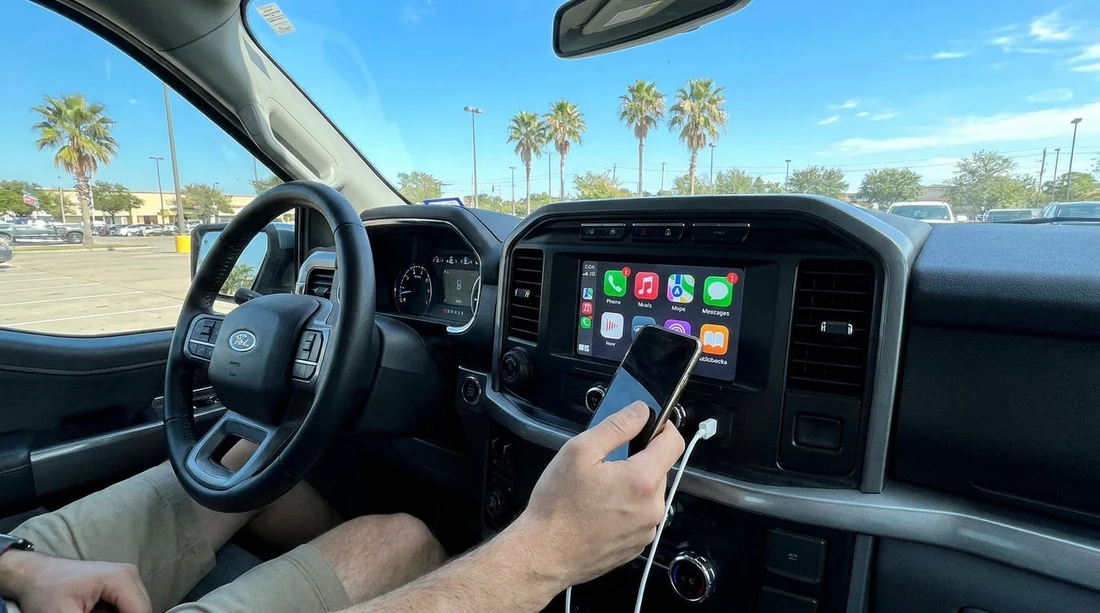
Quick Summary:
- Bring your own data-capable USB cable, many rentals do not include one.
- Check your phone port type, then pack USB-A or USB-C adapters.
- Avoid charge-only cables, CarPlay and Android Auto need data transfer.
- If wireless fails, a quality cable usually restores mirroring immediately.
If you are picking up a car hire in Texas and want Apple CarPlay or Android Auto working before you leave the car park, assume you will need your own USB cable. Some vehicles have a cable in the centre console, but many do not, and the staff at busy airport locations are unlikely to know which exact lead fits your phone. The simplest approach is to pack a reliable, data-capable cable that matches your handset, plus a couple of small adapters so you can plug into either USB-A or USB-C ports.
Modern rental cars in Texas often support phone mirroring, but the port type, the position of the port, and whether the system is wired or wireless varies by make, model, and trim level. Even within the same fleet, one vehicle may have USB-A in the front and another may have USB-C, or a mix of both. Bringing your own kit avoids the classic scenario where the phone charges but CarPlay or Android Auto never appears.
Travellers collecting near major airports such as Houston or San Antonio usually want navigation, music, and hands-free messaging straight away. If you are comparing pick-up options via Texas IAH car rental or San Antonio SAT car rental, plan on a “self-sufficient” cable setup regardless of supplier, because accessories are not consistently provided across vehicles.
Why rentals rarely guarantee a cable
Car hire companies focus on the car, not on personal accessories. A USB lead is inexpensive, easy for previous drivers to take accidentally, and can become damaged quickly. Some cars may have an OEM cable left in place, others may have a third-party cable that only charges, and many will have nothing at all. For hygiene and compatibility reasons, it is also common for staff not to leave shared cables in the cabin.
Even if the vehicle has wireless CarPlay or wireless Android Auto, you still benefit from carrying a cable. Wireless pairing can be blocked by saved profiles from previous users, can take time to set up, and can be less stable in areas with heavy wireless congestion. A wired connection is often the fastest way to get mapping and audio working while you drive out of the pick-up lanes.
What cable you actually need for CarPlay or Android Auto
The key requirement is a cable that supports data, not just charging. Many inexpensive “charging” leads deliver power but do not carry the data connection required for CarPlay or Android Auto. If your phone charges but the infotainment screen never offers to connect, the cable is the first thing to replace.
Use this quick matching guide:
iPhone with Lightning (many models up to iPhone 14 in some markets): Bring a Lightning to USB-A cable, plus a Lightning to USB-C cable or a USB-A to USB-C adapter depending on the car’s ports.
iPhone with USB-C (newer models): Bring a USB-C to USB-C cable, plus a USB-C to USB-A adapter in case the vehicle only has USB-A.
Android with USB-C (most modern Android): Bring a USB-C to USB-C cable, plus a USB-C to USB-A adapter as backup.
Android with Micro-USB (older devices): Bring a Micro-USB cable and consider a Micro-USB to USB-C adapter if you travel with newer accessories.
For best results, stick with a short to medium length cable that is sturdy and certified or from a reputable brand. Very long leads are more prone to connection drops, especially on bumpy roads.
USB-A vs USB-C in Texas rental cars
Texas fleets include everything from compact city cars to full-size SUVs and people carriers. Newer models increasingly include USB-C ports, but USB-A remains extremely common. You may see two front ports, one USB-A and one USB-C, or rear-seat ports that charge only. The port that supports CarPlay or Android Auto is typically in the front, close to the infotainment system.
When you collect the keys, take 20 seconds before you set off:
1) Locate the ports in the front cabin, not just rear charging ports.
2) Look for a small phone or “data” icon next to one port, as not every port supports mirroring.
3) Plug in your phone with your data-capable cable and unlock the handset when prompted.
If you are travelling with a larger group and choosing a bigger vehicle through a page such as minivan hire Fort Worth DFW or van hire Austin AUS, the cabin may have many ports. Do not assume the nearest socket will run CarPlay or Android Auto, as some are power-only for passengers.
Wireless CarPlay and Android Auto, still pack a cable
Wireless systems are convenient, but they can be inconsistent in a car hire environment. The head unit may try to reconnect to a previous driver’s phone, or your phone may ask for multiple permissions. On iPhone, CarPlay may require Siri enabled. On Android, Android Auto often needs permissions for notifications, location, and background activity.
A cable helps in three situations:
First connection: Some cars only enable wireless after an initial wired pairing.
Power management: Navigation and streaming can drain battery fast, particularly in Texas heat where the phone may throttle performance.
Stability: A solid wired connection can reduce audio dropouts and lag when using maps.
Adapters worth packing for a smooth pick-up
To cover most Texas rental car scenarios, pack:
USB-C to USB-A adapter: Essential if your cable is USB-C to USB-C but the car only offers USB-A.
USB-A to USB-C adapter: Useful if you have an older USB-A cable and the car only has USB-C.
12V charger with USB ports: Handy if the car’s USB ports are occupied or charge-only, though mirroring still typically needs the data port.
Keep adapters in a small pouch in your carry-on so you can connect before leaving the lot. This matters because once you start driving, it is harder and less safe to troubleshoot permissions and prompts.
Common reasons phone mirroring fails in rental cars
If you have the correct cable and it still does not work, these are the usual causes:
The port is charge-only: Try the other front USB port, or check inside the centre console.
Phone is locked: Unlock it and accept any “Trust this device” or permission prompts.
Bluetooth and Wi-Fi settings: CarPlay often uses Bluetooth and Wi-Fi behind the scenes, even with a cable. Ensure they are enabled.
Wrong USB mode on Android: Some Android phones default to “charge only”. Switch to file transfer or Android Auto when prompted.
Old paired devices: Delete previous phones from the car’s infotainment settings, then reconnect.
Low-quality cable: If it charges but never connects, swap to a known good data cable.
Texas road trips often begin at busy hubs like Houston IAH, where you may be eager to leave quickly. If you are arranging your car hire through car hire Houston IAH, it is worth planning your setup in advance so you can connect, set your destination, and depart without delays.
Practical packing list for Texas travellers
For most people, one small kit covers nearly every rental situation:
iPhone users: One Apple-certified cable in your phone’s connector type, plus one adapter to handle USB-A or USB-C.
Android users: One quality USB-C cable that supports data, plus a USB-A adapter.
Everyone: A spare cable in case one is lost or fails, especially on longer trips.
Also consider heat. A phone left in direct sun can overheat and drop connections. Use an air vent mount if you have one, and keep the handset cool while running navigation.
FAQ
Q: Do Texas rental cars usually come with a USB cable for CarPlay or Android Auto?
A:Usually not. Some vehicles may have one left behind, but car hire fleets rarely guarantee a compatible, data-capable cable.
Q: My phone charges but CarPlay or Android Auto will not start, what is wrong?
A:Most often it is a charge-only cable or a charge-only port. Try a different front USB port and a known data-capable cable.
Q: Will a USB-C cable work in a car that only has USB-A?
A:Yes, if you bring a USB-C to USB-A adapter, or use a USB-C to USB-A data cable. Ensure it supports data transfer.
Q: Is wireless CarPlay or wireless Android Auto available in most Texas rental cars?
A:It depends on the exact model and trim. Even when available, a cable is still useful for quick setup and stability.
Q: Do I need to change settings on my phone to use phone mirroring?
A:Sometimes. You may need to enable Bluetooth and Wi-Fi, allow permissions, and keep the phone unlocked during the first connection.

























































































