


Quick Summary:
- Paper plates are temporary registration tags used while permanent plates are processed.
- Check the temp tag expiry date and VIN match before driving.
- Keep the rental agreement and registration document accessible in the car.
- Query missing, damaged, or mismatched paperwork before leaving the hire desk.
Seeing a paper plate or temporary registration tag on a rental car can feel unusual, especially if you are used to metal plates being issued immediately. In the United States, temporary tags are a normal part of the registration process for some vehicles, including cars recently added to a rental fleet, replacements after plate loss, or vehicles registered in a different state. The key question for drivers in California is whether the temporary tag is valid, and what you should verify before you drive away.
This guide explains what temporary registration tags, often called paper plates or temp tags, are, why you might see them on a rental, what documents you should have in the vehicle, and the practical checks that reduce the chance of getting pulled over or delayed.
What is a temporary registration tag on a rental car?
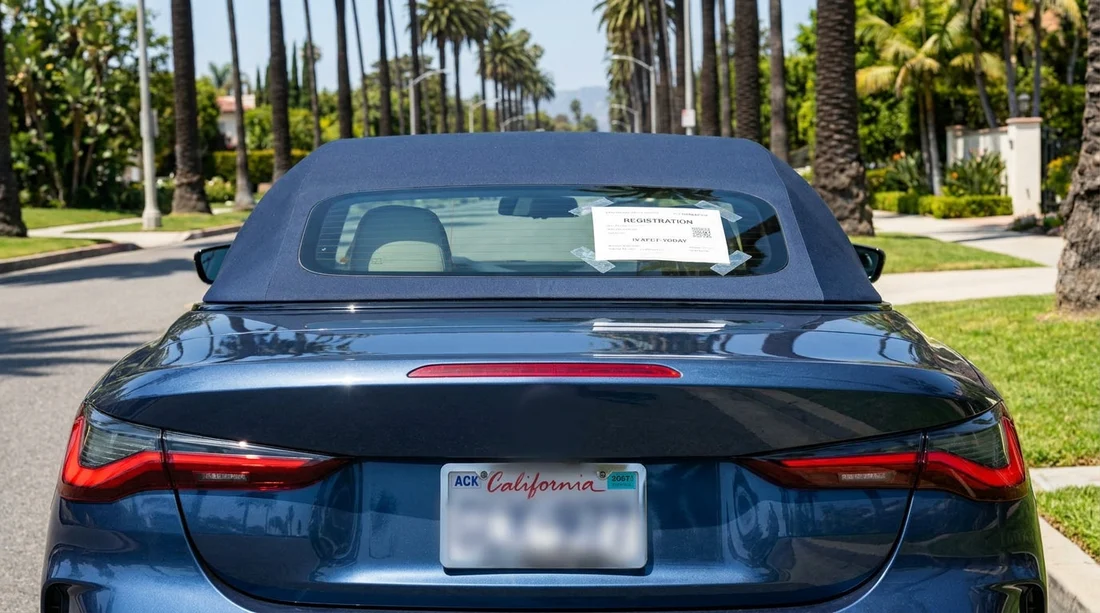
A temporary registration tag is an interim proof of registration displayed on the vehicle when permanent licence plates are not yet available or not currently attached. It is commonly a printed sheet placed in the rear window or mounted where a plate normally sits. It typically includes details such as the issuing state, an expiry date, a unique tag number, and often the vehicle identification number (VIN) or a partial VIN.
For rental fleets, temp tags can appear when a vehicle is newly purchased and is still waiting for permanent plates, when plates have been stolen, or when a vehicle is transferred between states and needs updated paperwork. It does not automatically mean anything is wrong with the car, but it does mean you should be slightly more careful about checking documents.
Are temporary tags valid in California?
Yes, a properly issued temporary registration tag is generally valid to drive with in California, provided it is current (not expired), legible, and matches the vehicle and paperwork. California recognises valid out of state registration documents, and rental companies operate across state lines. In practice, law enforcement is mainly looking for signs of fraud, an expired tag, or a tag that appears altered.
Because temp tags are easier to counterfeit than metal plates, they can attract extra attention. That does not mean you will be stopped, but it increases the importance of having matching documents ready to show.
Why a rental car may have paper plates
Rental vehicles rotate frequently, and fleet logistics can create short periods where a car is legally registered but awaiting permanent plates. Common reasons include:
New fleet vehicle: The vehicle has been registered, but the permanent plates have not been issued or installed yet.
Interstate fleet movement: The vehicle is registered in another state and is temporarily operating in California.
Plate replacement: Plates were lost or stolen, and a replacement process is underway.
Administrative processing: Some jurisdictions issue temporary tags routinely while processing final registration items.
If you are collecting your vehicle at a major airport location, high fleet turnover makes temporary tags more likely. For example, travellers picking up at Los Angeles LAX or San Diego may occasionally receive a car with paper plates during busy replacement cycles.
What to check before leaving the car hire desk
Use this as a practical checklist. It takes a minute and can prevent a longer disruption later.
1) The expiry date on the temporary tag
Find the printed expiration date and confirm it covers your rental period. If it expires during your trip, ask for a different vehicle. Driving on an expired temp tag is a red flag for any traffic stop.
2) The VIN on the vehicle matches the paperwork
The most reliable reference is the VIN, not the plate number. Check the VIN at the base of the windscreen on the driver’s side (visible from outside), and compare it with your rental agreement and any registration document provided. Even a single digit mismatch is worth fixing before you leave.
3) The tag is readable and properly displayed
Make sure the temp tag is not faded, torn, or obstructed by tint, glare, or luggage. If it is in the rear window, confirm it is facing outward and can be read from behind. If it looks damaged, request a replacement vehicle rather than trying to tape it up yourself.
4) You have the documents you may need in the car
Ask which documents must stay with the vehicle. Usually you should have (a) the rental agreement, and (b) the vehicle registration document, sometimes called a registration card. Some rental companies provide these in the glovebox. If there is a temp tag, make sure the supporting registration paperwork is present.
5) The vehicle description matches
Confirm the make, model, and colour on the agreement match what you are driving. This is a simple cross check that helps if you are questioned about the vehicle’s identity.
When collecting from business heavy airports, you may be rushed at the counter. It is still reasonable to pause, review documents, and ask for clarification. This applies whether you are organising standard car hire or a larger vehicle, such as at Santa Ana where family and group travel is common.
What paperwork should you keep with you while driving?
In California, if you are stopped, the officer will typically ask for your driving licence, and proof that the vehicle is properly registered. With a rental, your rental agreement supports your right to operate the car, and the registration document supports that the car is registered to the rental company.
Keep these items accessible:
Rental agreement: Ideally the full agreement or the key pages showing your name, rental dates, vehicle details, and the rental company.
Vehicle registration document: Often stored in the glovebox. If you cannot find it, ask before leaving.
Insurance information: This may be part of the agreement or provided separately, depending on what cover applies.
If you are travelling across regions, it can help to know where your collection point is recorded. Visitors collecting in Northern California, such as via San Francisco SFO or Sacramento SMF, may drive long distances, so keeping paperwork tidy and reachable matters.
When should you query the tag or ask for a different car?
Ask questions immediately, and request a swap, if any of the following apply:
The temp tag is expired or will expire during your rental. Do not assume you can sort it out later, because you may be far from the original branch.
The tag looks altered, smeared, or unreadable. Even if it is legitimate, it can look suspicious, and that increases your risk of delays.
The VIN does not match the agreement or registration card. This can happen through paperwork mix ups and should be corrected on the spot.
No registration document is present. Some companies can reprint or provide a replacement document. If they cannot, choose a different vehicle.
FAQ
Is it legal to drive a rental car with paper plates in California?
Yes, if the temporary tag is valid, unexpired, and properly displayed, and you have matching rental and registration documents.
Where should the temporary registration tag be displayed?
It is typically displayed in the rear window or where a rear plate mounts. It must be clearly visible and readable from behind.
What details should match between the tag and my paperwork?
Check the VIN first, then confirm the vehicle description and rental dates. The temp tag number may differ from a permanent plate number.
What if my temporary tag expires during my rental?
Ask for a different vehicle before you leave. Driving with an expired temp tag can lead to stops, citations, or delays.
Will paper plates cause problems with tolls or parking cameras?
They can sometimes be misread. Confirm how tolls are handled on your rental agreement and keep your documentation in case of billing disputes.





























































































