


Quick Summary:
- Check windscreen, centre console, or sun visor for the FasTrak tag.
- Set the switch to match occupants, usually 1, 2, or 3+.
- Confirm toll programme, daily fees, and plate billing rules at pickup.
- Use FasTrak lanes only, avoid cash booths, and keep the tag visible.
FasTrak is California’s electronic toll system, used on toll bridges, express lanes, and certain tolled roads. In a rental car, you are not usually opening your own FasTrak account, instead you are using the rental company’s toll arrangement, either with a portable transponder (toll tag) or by number plate billing. That is why the pick-up moment matters. If you locate the tag, set it correctly, and confirm the billing rules before leaving the car park, you can avoid misreads, unexpected admin charges, or accidentally using a lane you cannot pay for.
Pick-up locations across California can vary, from large multi-brand facilities to smaller counters. For reference, Hola Car Rentals publishes local pages for common collection points such as California car rental at LAX, National at San Francisco SFO, car rental at Sacramento SMF, and Payless car hire at San Jose SJC. Wherever you pick up, the checks below apply.
Where the FasTrak transponder is usually located
Rental fleets try to keep toll tags easy to find but hard to steal, so you will typically see one of these setups:
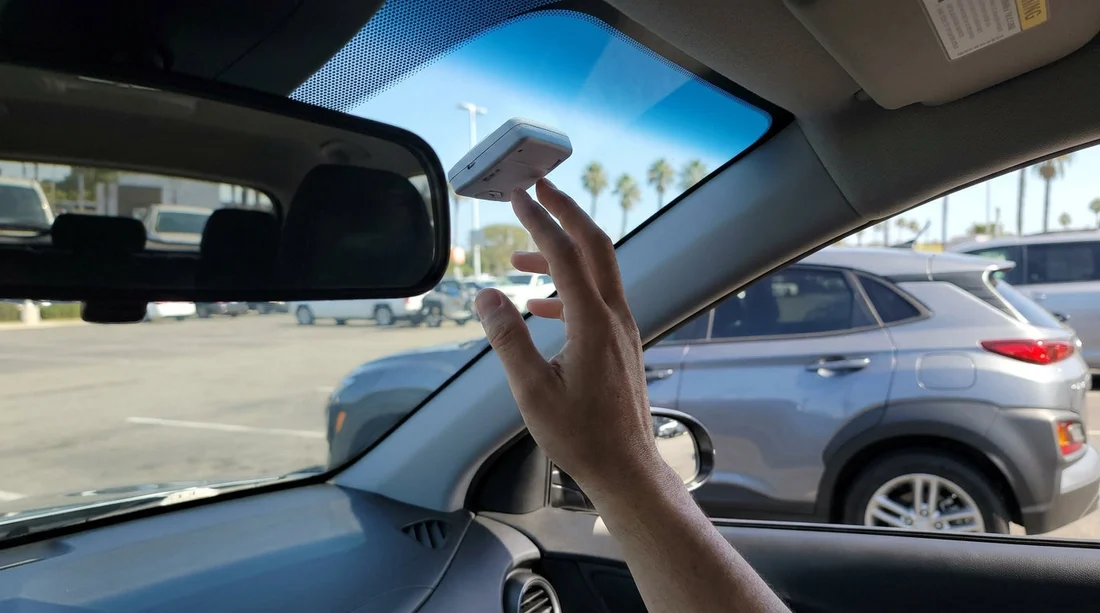
1) Mounted to the windscreen. Look behind the rear view mirror area or high on the passenger side. Some tags sit in a small plastic cradle or pouch stuck to the glass. If it is a switchable model, you should be able to read the setting without removing it.
2) Stored in the centre console or glovebox. Some providers store a portable transponder in a pouch or box, often labelled. If it is not mounted, you may need to place it on the dashboard before entering a toll facility, and keep it from sliding around.
3) Attached near the dashboard or instrument panel. You might find it clipped low on the windscreen, or attached near the driver side A-pillar. This is more common when vehicles rotate between customers frequently and staff want a consistent placement.
4) Sun visor pocket or overhead area. Less common, but worth a quick look if you cannot find it elsewhere. If it is stored here, make sure it is not covered by tinted strip areas that could affect readability.
If you cannot find a tag within a minute, do not assume the car will “just bill by plate”. Some toll lanes rely on transponders for correct pricing in express lanes, and some rental agreements treat toll usage differently depending on whether a toll device is present or activated. Go back to the booth or exit gate and ask staff to point it out.
What each switch setting means on a FasTrak tag
Not every FasTrak device has a switch, but many do, especially those used for express lanes and carpool discount eligibility. The switch is there to tell the system how many people are in the vehicle, which can change whether you pay full price, a reduced price, or in some lanes, nothing at all.
Common switch labels: 1, 2, and 3+ (sometimes shown as 1, 2, 3). Your exact lane benefits depend on the road operator and the rules for that corridor.
Setting “1”. Use this when you are driving alone. In many express lanes, solo drivers can use the lane but pay the posted toll. If you leave it on a higher setting accidentally, you could be recorded as claiming a carpool occupancy incorrectly, which may lead to a violation notice. In a rental, that can become an extra fee on top of the toll.
Setting “2”. Use this when you have two occupants. Some corridors offer reduced tolls for two-person carpools at certain times. Others treat 2 the same as 1. The key point is accuracy, set it to match the people in the car at the time you enter the lane.
Setting “3+”. Use this when you have three or more people. Some Bay Area and Southern California express lanes offer carpool discounts at this level. Again, you are responsible for setting it correctly.
If the device has no switch. Some rental toll tags are fixed. In that case, any express lane carpool discounts may not apply, even if you have passengers. Ask at the counter whether the transponder is switchable and whether it supports express lane occupancy settings.
What to confirm at the counter before you drive off
Before leaving the pick-up area, confirm three things clearly. This matters because “FasTrak” can describe different billing methods in rental fleets.
1) Is the car on a toll programme, and is it optional? Some companies automatically enrol the vehicle, and you pay a daily fee only on days you pass toll points. Others require you to opt in. Ask what applies to your agreement, and whether you can decline if you plan to avoid toll roads.
2) How are charges calculated, tolls plus what fees? Many programmes include the toll amount plus an administrative or convenience charge. Ask how the daily charge is triggered, and whether there is a cap. You are not negotiating, you are simply making sure you understand how the final bill will look.
3) What happens if a toll is captured by number plate instead of the tag? In California, toll agencies can often bill by plate. In a rental, that can mean the agency bills the rental company, then the rental company bills you with an added processing fee. Ask whether the car should be driven through FasTrak lanes only when the tag is visible and active, and what to do if you think the tag is missing or not working.
Also confirm whether any HOV-only lanes are permitted without toll, because HOV rules are separate from toll billing. Even with a FasTrak tag, you still must follow the lane’s eligibility signage.
How to use the tag correctly once you leave the lot
Keep it visible and unobstructed. If the tag is portable, place it on the dashboard according to the instructions on the device or pouch. Avoid putting it in a metalised sunglasses case or under thick objects. If it is mounted, do not cover it with phone mounts or dashcams in the same area.
Choose the correct lane type. In most toll facilities you will see dedicated FasTrak or electronic lanes. Use those lanes if your rental is set up for electronic billing. Avoid cash-only booths if they are clearly marked as cash only, because some bridges and express lanes do not take cash at all. If you are unsure, follow signage for “FasTrak” or “All electronic”.
Set occupancy before entering an express lane. Change the switch before you cross the entry point. Do not adjust it while actively merging. If your passenger count changes during the trip, update it before your next express lane segment.
Keep your paperwork. Save your rental agreement, and if you are given a pamphlet about tolls, keep it. If you later see a toll-related charge you do not recognise, you will have the details needed to match dates and locations.
Common pick-up issues and quick fixes
The tag is missing. Return to the counter immediately. If you drive away and use toll facilities, you might be billed by plate and also trigger additional processing. Staff can often swap the car, install a tag, or explain the plate-billing setup.
The tag is present but the switch is stuck. Ask for a replacement vehicle or device. A stuck switch can create incorrect occupancy declarations in express lanes.
You want to avoid tolls entirely. Use your navigation app’s “avoid tolls” option, and confirm whether your rental’s toll programme charges anything if you never pass through a toll point. This is especially useful when planning airport to hotel routes in busy areas.
FAQ
How do I know if my California rental car has a FasTrak tag? Look for a transponder on the windscreen near the mirror, or a labelled pouch in the console or glovebox. If you cannot find it quickly, confirm at the counter whether the car uses a tag or plate billing.
What should the FasTrak switch be set to in a rental car? Set it to match the number of occupants at the moment you enter an express lane or toll facility, typically 1, 2, or 3+. Do not leave it on 3+ unless you actually have three or more people.
Will I pay tolls automatically if I drive through a FasTrak lane? Usually yes, but the billing route varies. The toll may be read from the transponder, or captured by number plate and later billed to the rental company, then passed to you with any applicable fees.
What should I ask at pick-up to avoid surprise toll charges? Ask whether the toll programme is automatic or opt-in, what the daily or admin fees are, and whether plate-billed tolls incur extra processing. Get clarity before you leave the car park.





























































































