


Quick Summary:
- Contactless credit cards often work, but counter terminals and rules vary.
- Always bring the physical card, deposits may require chip verification.
- If tap fails, switch to chip-and-PIN or signature prompts.
- Hola accepts credit cards only, reducing payment changes at pick-up.
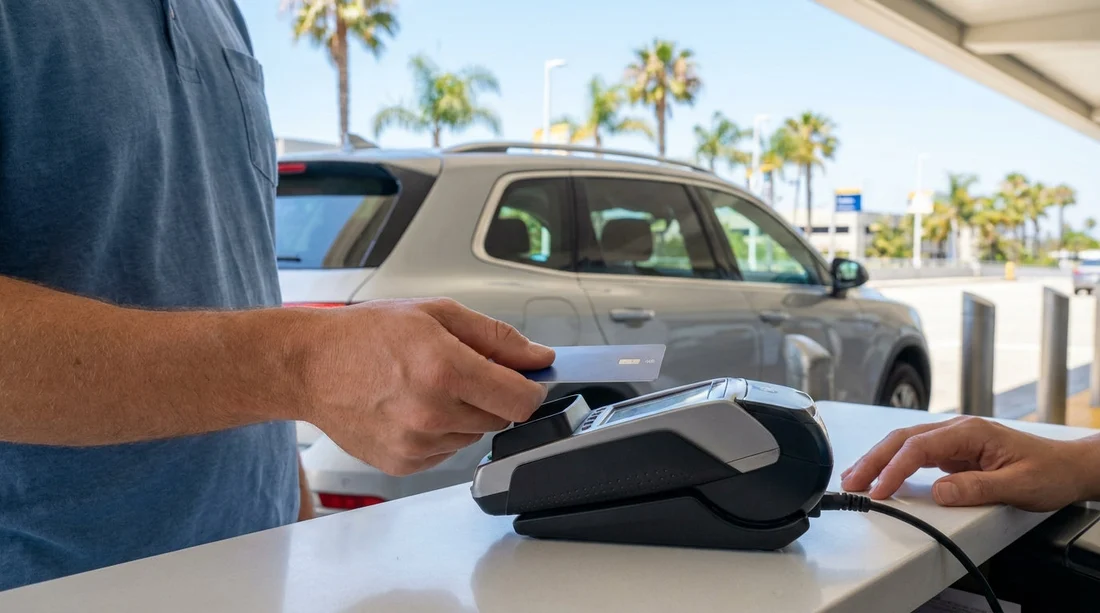
Contactless payments are common across California, especially in airports and large travel hubs, so it is natural to ask whether you can pay for Hola car hire with a contactless credit card at pick-up. In most cases, if the rental counter terminal supports tap-to-pay, your contactless-enabled credit card can be used at the desk just like in shops. However, car hire payments have a few extra checks compared with a normal retail transaction, and those checks can affect whether contactless is accepted for the full amount.
The key point for a smooth counter experience is simple, bring the physical credit card even if you plan to tap. A contactless attempt can fail for reasons that have nothing to do with your card balance, such as terminal settings, network hiccups, or the need to capture a signature or insert the card to validate the cardholder. Hola accepts credit cards only, which helps avoid time-consuming payment changes at pick-up, but it also means you should arrive prepared with a suitable credit card.
How contactless credit-card payment works at the car hire counter
Contactless is a way of presenting a card to the terminal using NFC, the short-range wireless feature in the card. At a car hire counter in California, the process usually follows the same steps as other businesses, with a few car rental specific additions:
1) The agent confirms the rental and charges are set up. Before taking payment, the counter will typically confirm your rental details, optional extras, and any local fees or taxes that apply.
2) The terminal attempts a contactless card read. You tap the card on the reader. If the terminal allows it, the transaction will be authorised.
3) A security deposit or pre-authorisation may be required. Car hire commonly uses a pre-authorisation for a deposit rather than a direct charge. Some terminals, card issuers, or counter policies may require the card to be inserted for pre-authorisations even if contactless is enabled for purchases.
4) Identity verification may change the payment method used. Depending on the transaction type and the terminal settings, you may be asked to insert the card, enter a PIN, or provide a signature. This is normal and does not mean your card is being rejected.
Because these steps can vary by location and supplier, it helps to know the practical difference between paying for the rental charges and placing the deposit. Even if contactless works for the rental amount, the deposit portion may still require chip insertion, or an alternative verification flow.
Why contactless sometimes fails at pick-up in California
If a contactless credit-card payment fails at the counter, the most common cause is not that you cannot pay, it is that the terminal needs a different method. Here are the typical reasons:
The terminal is set to require chip for pre-authorisations. Some systems treat deposits as higher risk, so they prompt for chip-and-PIN or chip-and-signature instead of tap.
Transaction value or risk rules exceed contactless limits. Contactless limits are not just about the amount, they can be driven by issuer rules, travel patterns, or security prompts. A larger total, plus a deposit, can trigger a chip requirement.
Network connectivity issues. Airport counters are busy environments. If the network momentarily drops, contactless may time out. Inserting the card can succeed because the terminal retries differently.
Card or reader positioning problems. Contactless antennas are small. A quick tap, a phone case, or a wallet between the card and reader can cause a failed read.
Issuer security checks. Your bank may want an extra step after travel, such as chip verification. This can happen if you have recently landed, changed time zones, or have not used the card in the US recently.
All of these are solvable if you have the physical card and can switch to chip. The best mindset is to treat contactless as a convenience, not the only plan.
What to do if contactless fails at the counter
If the terminal declines a tap attempt, you can usually get the payment through in under a minute by following a simple escalation path.
Step 1, try a clean second tap. Remove the card from any wallet, hold it steady for a second, and let the terminal finish. Avoid tapping too quickly.
Step 2, insert the card and follow the prompts. Chip transactions often succeed where contactless fails, especially for deposits. Be ready for PIN entry or signature.
Step 3, ask the agent to rerun the authorisation as chip. Some terminals default to contactless and need the staff member to select a different flow for a pre-authorisation.
Step 4, confirm you are using a credit card, not a debit card. Many travellers carry similar looking cards. Because Hola accepts credit cards only, presenting a debit card can cause delays and may not be accepted for the rental deposit.
Step 5, call your card issuer if the decline persists. If chip is also declined, your bank may have flagged the transaction. A quick verification call can restore approval. This is more common after international travel.
Having a backup credit card is helpful, particularly if you are arriving late at night when counter staffing is limited and any extra steps feel longer.
Why Hola accepts credit cards only, and how that helps you
Payment problems at pick-up are one of the most common reasons for long queues and missed departure times. Hola’s credit-card-only approach is designed to reduce uncertainty at the desk. Credit cards are generally better suited for the deposit process used in car hire, because they support pre-authorisations smoothly and consistently.
For you, this means fewer surprises when the counter needs to place a security deposit, and fewer scenarios where you are asked to switch payment type mid-transaction. It also makes it easier to predict what you need to bring, a valid credit card in the main driver’s name, ideally with sufficient available credit for the deposit.
Practical tips to avoid pick-up delays in California
Bring the physical credit card even if you rely on contactless elsewhere. Mobile wallets and contactless cards are great, but chip remains a common requirement for deposits.
Make sure the card is in the main driver’s name. Many counters require the payment card to match the driver on the rental agreement.
Check your available credit before travel. A deposit can reduce your available credit temporarily, even though it is not a charge.
Tell your bank you are travelling if needed. If you are visiting California from abroad, travel notifications can reduce issuer declines.
Keep an eye on add-ons that change the total. Optional cover, additional drivers, or vehicle upgrades can increase the pre-authorisation amount.
If you are collecting near major airports, these tips are even more important because queues move quickly once paperwork and payment are smooth. For location-specific information that can help you plan timing around arrival and counter processes, see Hola’s pages for car rental at San Diego Airport and Alamo car hire at San Francisco SFO.
Does the same guidance apply across California locations?
Yes, the principles are the same statewide, but the exact terminal model and counter workflow can differ between airports and city locations. Some counters are set up for quick contactless retail-style payments, while others default to chip for anything involving a deposit. That is why bringing the physical credit card remains the safest approach regardless of whether you land in Southern California or Northern California.
If you are flying into the state capital region, you can also review the local rental context on car rental at Sacramento SMF, and if you are arriving via Orange County, car rental at Santa Ana SNA may be useful for planning your pick-up routine.
FAQ
Can I pay for Hola car hire with a contactless credit card at pick-up in California? Yes, if the counter terminal supports contactless. Bring the physical card as the deposit may require chip insertion.
What if contactless works for the rental charge but not the deposit? This is common. Ask to insert the card for the pre-authorisation, then complete any PIN or signature prompt.
Will a mobile wallet contactless payment work instead of the physical card? It might for a basic payment, but many counters still require the physical credit card for verification and deposits, so do not rely on a phone alone.
Why does Hola accept credit cards only? Credit cards are typically required for deposits and pre-authorisations in car hire, helping reduce pick-up issues and delays.
How can I reduce the chance of my card being declined at pick-up? Ensure you have available credit for the deposit, use a card in the main driver’s name, and contact your bank if you are travelling internationally.





























































































