


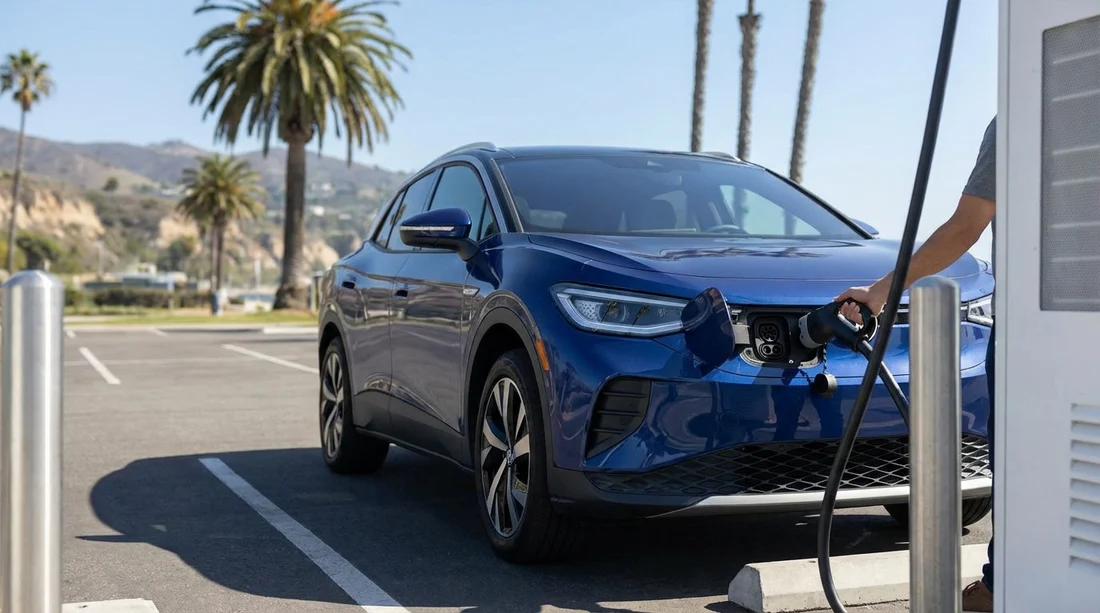
Quick Summary:
- Ask the desk to confirm CCS, NACS, or J1772 before signing.
- Check the boot for the Level 1 and Level 2 charging cables.
- Confirm whether a NACS to CCS or J1772 adapter is included.
- Photograph the charge port and cable labels, then match local charger plugs.
Electric vehicle car hire in California is straightforward once you know one thing, the connector at the car’s charge port. That single detail determines which public chargers you can use immediately, whether you will need an adapter, and whether the cables in the boot will help at hotels or rentals with socket charging. The complication is that fleets can contain different brands and model years, and California’s charging landscape is currently split between two main fast charging standards.
This guide helps travellers confirm the connector type and included cables before leaving the counter, so you do not waste time driving to the wrong charger or discovering you cannot plug in at your accommodation.
Why connector type matters for EV car hire in California
In California you will see chargers described as “Level 2” (slower AC charging, often at hotels and car parks) and “DC fast” (rapid charging on road trips). The plug your car accepts for each can differ, and the names can be confusing if you have not driven an EV in the US before.
For most current EVs, the car will have one inlet for AC and one for DC fast, but they may be integrated into a single port. Knowing whether the car is CCS or NACS for fast charging is the key road trip detail. Separately, Level 2 AC charging is usually J1772, unless the car uses NACS and you need an adapter when the post is J1772.
If you are collecting at a busy airport location, time pressure can lead to skipping checks. It is worth slowing down for two minutes. Even if you are collecting near Silicon Valley or the Bay Area, where chargers are plentiful, using the correct connector still saves you queues and detours.
If you are comparing pick-up points, Hola Car Rentals provides local pages that make it easier to review options around your route, such as car hire at San Francisco SFO and car hire at Santa Ana SNA.
The connector types you are most likely to see at pick-up
Think in terms of two situations, AC charging (typical overnight top-ups) and DC fast charging (road trip refuelling). Here are the connector names you will hear at the counter.
NACS (Tesla-style connector) is increasingly common in California because many Teslas are in rental fleets, and more non-Tesla EVs are adopting the same port. NACS is used for both Level 2 (AC) and DC fast charging via the same compact inlet. If your rental has a NACS port, you can use Tesla destination chargers and, depending on access rules, many Tesla Superchargers. For non-Tesla fast charging networks, you may need a NACS to CCS adapter, and for many Level 2 posts you may need a NACS to J1772 adapter.
CCS (Combined Charging System) is the other main fast charging standard in the US. A CCS car typically uses a J1772-shaped top section for AC charging, plus two larger DC pins beneath for fast charging. If your rental has CCS, you can use most non-Tesla DC fast chargers without an adapter. For Level 2 you usually plug in with a J1772 handle.
J1772 (AC only) is the most common Level 2 connector you will see on posts at hotels, car parks, and attractions. A car with CCS uses J1772 for AC. A car with NACS may need an adapter to use J1772 posts.
CHAdeMO is rare in newer fleets and is mainly relevant for older models. If you see it, confirm charging access carefully, since fewer new fast chargers support it.
How to identify the connector in under 30 seconds
You do not need deep EV knowledge. Use a simple physical check at handover.
1) Open the charge port and look at the shape. NACS is a small oval-like opening. CCS looks like a J1772 inlet with two additional round holes beneath. J1772 alone looks like the top half of CCS without the two lower DC pins.
2) Read the labels on the inside of the charge flap. Many vehicles state “CCS” or show a diagram. Some also show recommended charging settings and the location of the release button.
3) Check the infotainment charging screen. Most EVs show compatible plug types or recommend nearby networks. It can also reveal whether the car is set up for a specific network’s plug and charge function.
4) Ask one precise question at the counter. “Is this car NACS or CCS for DC fast charging?” That phrasing prevents a vague answer like “it works at public chargers”.
If you are collecting in Northern California and plan to drive inland, it can help to confirm before leaving the airport, particularly at car hire in Sacramento SMF where your first long stretch may be away from dense charging hubs.
Which cables are typically included with an EV rental
What is included varies by supplier, vehicle, and location. Do not assume the car comes with a bag of accessories.
Level 1 cable (three-pin household plug to the car) sometimes comes with the vehicle, sometimes not. It is slow but useful if you have a guaranteed parking space and can plug into a standard socket overnight. Many hotels do not allow extension leads across walkways, so ask about practical access rather than focusing only on the cable.
Level 2 cable (portable EVSE) is less commonly included, because most travellers use tethered public posts that have a connector handle attached. If your accommodation advertises “EV charging”, it may be a wall unit with a built-in cable, or it may be a socket. Knowing which matters more than owning a cable.
No cable at all is also possible, especially if the expectation is that you will use public charging. This is not a problem for DC fast charging, since the charger provides the cable, but it may limit easy overnight charging at a rental home or friend’s driveway.
Adapters are the biggest point of confusion. A NACS to J1772 adapter is common for Tesla drivers who want to use standard Level 2 posts. A NACS to CCS adapter is relevant if you have a NACS vehicle and want to use CCS fast chargers. Whether either is included with a rental depends on the supplier policy and the model.
What to confirm before you leave the counter
Use this checklist to avoid last-minute surprises.
Confirm the fast charging standard. Ask whether the car fast charges via CCS or NACS. If the agent is unsure, ask to see the vehicle, open the charge flap, and identify it yourself.
Confirm whether Supercharging or network activation is enabled. Some vehicles allow charging costs to be billed back to the rental agreement, while others require you to pay at the charger using your own account or card. This does not change the connector, but it changes how smoothly you can charge when you arrive.
Ask about adapters explicitly. If the car has NACS, ask whether a NACS to J1772 adapter is in the vehicle. If you expect to use non-Tesla fast chargers, ask whether a NACS to CCS adapter is provided. If the car has CCS, you usually do not need an adapter for CCS fast chargers, but you might want to confirm Level 2 access if you plan to charge at hotels.
Check the boot and document what is there. Look for a cable bag, adapter pouch, or tyre inflation kit that shares the same storage area. Photograph any included items so you can return them correctly.
Confirm the car’s charging limits. Two CCS cars can have very different maximum fast charging speeds, which affects how long stops take. This is not a connector question, but it is closely related to planning.
Matching the connector to chargers you will actually encounter
California has abundant charging, but the mix varies by region and by where you park.
Hotels and attractions. Many offer Level 2 posts with J1772 handles. If your rental has a NACS port, a J1772 adapter can be the difference between a full battery in the morning and searching for a fast charger at breakfast time.
Urban driving. In cities, you may rely on Level 2 in car parks and occasional fast charging. Here, both CCS and NACS are workable. The key is whether you can use the posts closest to where you stay.
Road trips. For long distances, DC fast charging access is the priority. CCS vehicles generally work seamlessly with many non-Tesla fast chargers. NACS vehicles may have excellent coverage via Tesla sites, and may also access other networks with the right adapter and permissions. Because rules and availability can change, the safest approach is to ask at pick-up which networks the car is expected to use and whether any adapters are supplied.
If your route includes Southern California coastal driving, you may be picking up near San Diego. Fleet mix can include both CCS and NACS, so it helps to check early, especially when collecting via Alamo car hire in San Diego.
Common misunderstandings that cause charging problems
“All EV chargers are the same.” They are not. A J1772 post cannot fast charge a CCS car, and a CCS-only fast charger cannot plug into a NACS port without the correct adapter.
“If it is a Tesla, I can always use any Tesla charger.” Destination chargers at hotels are often straightforward, but fast charging access can depend on the vehicle’s settings and how billing is handled. Confirm how charging fees are paid and whether the car is set up for the relevant network.
“The car will come with every adapter.” Many rentals include no adapters, or only one. Ask and verify.
“Level 1 cable means I can charge anywhere.” You still need a safe socket near your parking space, permission to use it, and enough time. It is a useful backup, not a universal solution.
Practical pick-up script you can use in California
If you want a simple way to cover everything without sounding overly technical, use this three-part script.
First: “For DC fast charging, is this car CCS or NACS?”
Second: “Is there a J1772 adapter or any fast charging adapter included in the vehicle?”
Third: “How are charging costs paid on this rental, through me at the charger or billed back?”
These questions keep the focus on what you need before you drive away. They also help the staff check the file notes for that specific vehicle, rather than giving a generic answer about EVs.
When comparing different collection points in the Bay Area, note that vehicle types can vary by branch. If you are landing at SFO, you can review options via Alamo car rental at San Francisco SFO alongside other suppliers, then confirm connector details at handover.
FAQ
Q: What connector will my EV rental car have at pick-up in California?
A: Most commonly it will be NACS (Tesla-style) or CCS for DC fast charging, and J1772 for Level 2 AC charging. The exact connector depends on the model you are assigned, so confirm by opening the charge port before leaving.
Q: Will my car hire include a charging cable in the boot?
A: Sometimes a Level 1 cable is included, but many rentals provide no portable cable because public chargers have tethered leads. Always check the boot storage area and confirm what must be returned.
Q: If the car has a NACS port, can I use J1772 hotel chargers?
A: Yes, but typically only with a NACS to J1772 adapter. Ask at the counter whether an adapter is supplied with the vehicle, and verify it is present before you leave.
Q: If the car has CCS, can I use Tesla Superchargers?
A: Not directly with a CCS inlet unless the location provides a compatible solution and the vehicle is supported. The simplest approach is to plan around CCS fast chargers, or confirm whether your assigned car has NACS if you want Tesla-first charging.
Q: How do I avoid arriving at the wrong charger on my first stop?
A: Photograph the charge port and note whether it is NACS or CCS. Then filter chargers by plug type in your chosen navigation or charging app, matching the plug shown to your photo.































































































