


Quick Summary:
- Prefer tap-to-pay at the pay station to avoid added app fees.
- Scan QR codes only on official signage, not loose stickers.
- Use well-known parking apps, and verify the operator name matches.
- If the barrier won’t open, use the intercom and keep receipts.
Cashless parking is now the norm in Los Angeles, especially around busy areas like Downtown, Hollywood, Santa Monica, and near major venues. If you are driving a car hire, it can feel risky the first time you face a gate that wants a tap, a QR scan, or an app payment, with no attendant in sight. The good news is that most systems are straightforward once you know what to expect and how to avoid common fee traps and scams.
This guide explains the three main ways you will pay in LA garages, how to spot dodgy QR stickers, how to minimise extra charges, and exactly what to do if the exit barrier stays down even after you have paid.
If you are collecting a vehicle at the airport and planning to park in the city the same day, it helps to set up your phone payment methods before you leave the terminal. Many travellers arrange their car hire at LAX through Hola Car Rentals information pages such as car hire airport Los Angeles LAX and then head straight into areas with cashless parking only.
How cashless garages in Los Angeles usually work
Most LA garages follow one of these patterns:
1) Ticketed entry, pay before exit. You take a paper ticket at entry. Before returning to your car, you pay at a machine using contactless card, chip and PIN, or sometimes a QR code that launches a payment page. Then you drive to the exit and insert or scan the validated ticket.
2) Ticketless entry with licence plate recognition. Cameras capture your plate on entry. The system calculates your stay, then you pay at a kiosk by typing your plate number, or you pay in an app. At the exit, the system checks your payment and lifts the barrier.
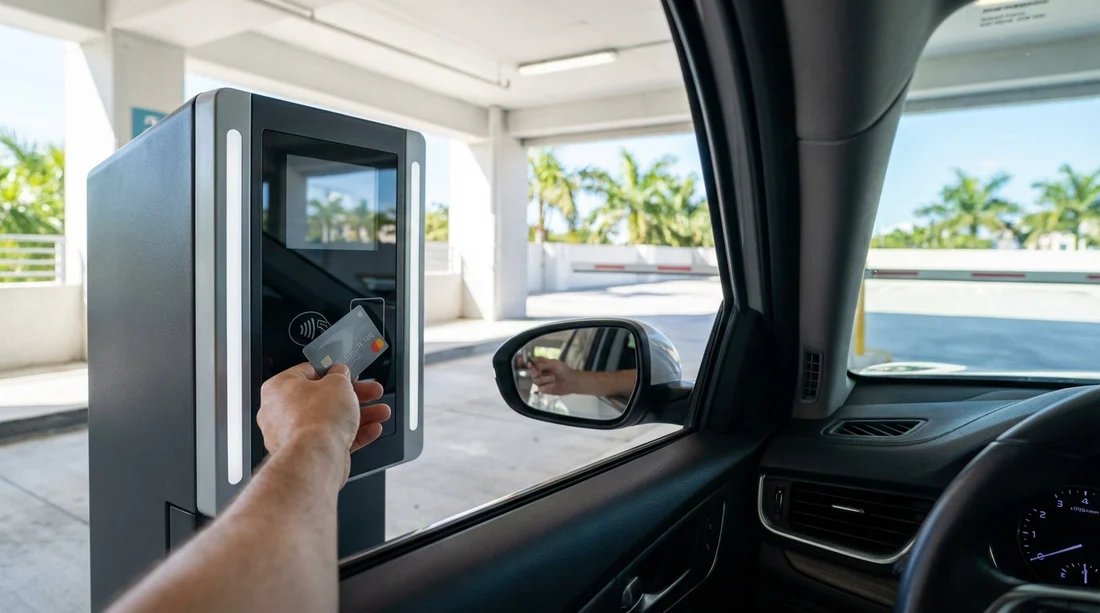
3) “Pay on exit” contactless. You drive to the barrier, the screen shows your fee, and you tap your card or phone to pay right there. This is often the simplest option, and it is generally the easiest to dispute later because your bank record matches the operator and timestamp.
For visitors, the biggest risks are not the core parking charge, but unexpected service fees from third-party payment pages, and QR scams that divert you to a fake website.
Tap-to-pay: the safest, lowest-friction option
If a garage offers contactless at a pay station or at the exit barrier, it is usually your safest choice. Tap-to-pay transactions go through established card networks, and you can verify the merchant name on your banking app shortly after payment.
To reduce fees and hassle, follow these practices:
Use the garage’s payment machine rather than “scan to pay” when both exist. Some operators offer a QR route that sends you to a web checkout with extra convenience fees, while the kiosk takes a standard card payment with no add-ons.
Check the screen for the operator name. A legitimate kiosk typically shows the garage brand, location, and help number. If the screen is blank, damaged, or covered, move to another machine or use the call button.
Avoid debit if you are worried about holds. Some ticketless systems place a temporary authorisation hold. A credit card can make those holds less disruptive to your day-to-day spending.
Keep the ticket and a photo of the payment confirmation. If a barrier fails, that proof saves time while the operator checks logs.
If you are touring beyond Los Angeles, the same habits help across Southern California. Hola Car Rentals location guides like car hire California LAX are useful when planning driving days that include multiple paid parking stops.
QR-code payments: how to use them safely and avoid fake stickers
QR payments are common in surface lots and some garages, especially where the operator wants to avoid maintaining pay machines. A legitimate QR flow typically takes you to a page where you enter your plate number, choose a duration, then pay by card or mobile wallet.
The key risk is that scammers place a sticker QR over the real one, taking you to a lookalike site that captures card details or charges a higher “parking fee” that never reaches the operator. These scams have been reported in many big cities, and LA is not immune.
How to spot a fake QR sticker in a garage or lot
Use a quick “stop, check, then scan” routine:
Inspect the QR placement. Official QRs are usually printed as part of a sign, on a rigid board, or behind a protective cover. A sticker that looks newly applied, wrinkled, misaligned, or placed on top of another code is suspicious.
Look for tampering. Edges lifting, air bubbles, scratch marks, or a second layer are red flags. If you can peel it with a fingernail, do not scan it.
Match the operator branding. The sign should clearly show the parking company name, lot ID, and a customer service number. If it just says “scan to pay” with no operator details, treat it as unsafe.
Check the web address before paying. Your camera preview or browser should show a recognisable operator domain, not a random string. If the page immediately asks for full card details without showing your location, rate, or lot identifier, stop.
Never pay through a link sent by text from a random number. Some scams begin with “parking violation” texts when you are near a tourist area. Legitimate garages do not cold-text you for payment.
If you suspect a fake QR, use a different payment method. Look for a kiosk, pay-at-exit terminal, or an app you install from the official app store. You can also use the posted help number or intercom to ask for the official way to pay, without mentioning you think it is a scam until you are speaking to a verified attendant.
App payments: convenient, but watch convenience fees and lookalike apps
Parking apps can be genuinely helpful in Los Angeles because they let you extend time remotely, manage multiple vehicles, and store receipts. They are also common in ticketless plate-recognition garages where you have no ticket to prove your stay.
However, apps are where extra charges often appear. Some operators add a service fee, and some third-party aggregators add their own. To avoid unpleasant surprises:
Download the app only from the Apple App Store or Google Play. Do not install from a QR link that prompts a download from a website.
Verify the lot ID and address inside the app. In busy LA streets, two car parks can share similar names. Make sure the address and operator match the sign you are standing next to.
Review the fee breakdown before confirming. If the app adds a “convenience” or “service” fee, decide whether paying at the machine is cheaper.
Use your mobile wallet within the app where possible. Apple Pay or Google Pay can reduce the risk of card data being stored on a questionable platform.
Save receipts. Email receipts or in-app history become critical if your plate is misread or your payment is not matched to the stay.
Drivers arriving on holiday often want the simplest setup before they start navigating. If your trip begins at LAX, information pages like car rental Los Angeles LAX can help you plan your first driving day so you are not installing apps at the barrier with cars behind you.
How to avoid extra fees in cashless garages
You cannot avoid every add-on in every facility, but you can often reduce them:
Choose on-site card payment when it exists. Kiosks and exit terminals often charge the base rate only.
Avoid “scan to pay” portals that add processing fees. Some QR portals clearly disclose a fee at checkout, and the base on-site method may not have it.
Pay promptly if the garage has “lost ticket” rules. In ticketed facilities, losing the ticket can trigger a maximum daily rate or flat penalty. Keep the ticket somewhere consistent, like the same cup holder every time.
Watch for dynamic pricing at event times. Around arenas and theatres, posted rates can change by hour and may be higher if you enter near an event. Take a photo of the rate sign at entry so you can challenge a mismatch later.
Be careful with “prepay” offers. Some third-party pages push prepaid parking that locks you into a time window and may not refund unused time.
If the exit barrier won’t open: a step-by-step checklist
Barrier failures are common enough that garages design for them. It is usually a matching problem between your payment and your plate or ticket, not something you did wrong. Here is what to do calmly and efficiently:
1) Stop safely and do not reverse unless directed. Reversing at a barrier can cause collisions, especially in tight LA garages.
2) Check for on-screen prompts. Some terminals want you to insert the ticket again, scan a QR receipt, or tap the same card used to pay.
3) Use the help or intercom button. Tell them your entry time, approximate payment time, and whether you paid by tap, app, or QR. If it is a ticketless garage, read your plate slowly. Many intercom systems are noisy, so spell letters clearly.
4) Provide proof without handing over your phone. You can hold up your receipt screen or read the transaction ID. Do not pass your phone or card to anyone through a window.
5) Ask the attendant to “force open” after verifying payment. Operators can lift the barrier remotely once they find your session in the system.
6) If you used an app, confirm the correct vehicle is selected. A common mistake is paying for a second car profile or a previous rental plate. In a car hire, it is easy to forget to update the plate number in the app.
7) If you are truly stuck, request a receipt for any extra charge. Some garages will ask you to pay again and refund later. If you do this, keep both receipts and note the time and the name or ID of the person who advised it.
For travellers in larger vehicles, tight exits can add stress when queues build. If you are driving a people carrier or larger model, it may help to plan for wider, modern structures and avoid older compact garages. Some visitors compare vehicle options on pages such as SUV hire Santa Ana SNA when considering comfort, visibility, and manoeuvrability on a Southern California road trip.
What to do if you think you have paid a scam QR site
If you scanned a QR and entered card details, and then realised the site looked wrong, act quickly:
Contact your card provider immediately. Report the transaction as suspicious, request a block on the merchant if possible, and consider replacing the card. The faster you report, the better.
Take screenshots. Capture the website address, payment page, and any confirmation or error message. This helps your bank investigate.
Pay the real operator through a safe method. You still need to cover your legitimate parking to avoid a violation or tow. Use the kiosk, tap-to-pay, or the operator’s official app from the app store.
Report the fake QR to the property. Use the intercom or posted management number so they can remove the sticker quickly. If there is a security desk, inform them in person.
Monitor your account for follow-on fraud. Scam sites sometimes test small charges, then attempt larger ones later.
Car hire specifics: matching plates, tickets, and receipts
With a car hire, two extra details matter in cashless garages:
Know your exact plate and state. California plates are easy to misread in poor light, and some systems also ask for the issuing state. Take a quick photo of the plate when you pick up the car, so you can reference it when paying in an app.
Keep documentation separate. Store parking tickets and receipts away from fuel receipts or toll notes, so you can find them quickly at the exit.
Also remember that some garages issue citations by plate if payment is not matched, even if you tried to pay. A saved receipt is your best defence.
FAQ
Is tap-to-pay safer than scanning a QR code in Los Angeles parking garages?
Usually, yes. Tap-to-pay goes through established card networks and the terminal typically shows the operator name, while QR stickers can be tampered with or replaced.
How can I tell if a parking QR code is fake?
Be cautious if it is a peelable sticker, looks layered over another code, lacks operator branding, or leads to a strange web address that does not show the lot details.
Can I pay with Apple Pay or Google Pay for cashless parking?
Many LA garages accept mobile wallets at kiosks or exit terminals, and some apps also support them. If a terminal offers tap-to-pay, your phone often works.
What should I do if the exit barrier won’t open after I have paid?
Press the intercom, provide your plate or ticket details, and show your receipt. Ask the operator to verify the payment and lift the barrier remotely.
Will a car hire cause problems with ticketless, plate-recognition garages?
It can if you enter the wrong plate in an app or the camera misreads it. Photograph the plate at pick-up and keep receipts so staff can match your payment quickly.




























































































