


Quick Summary:
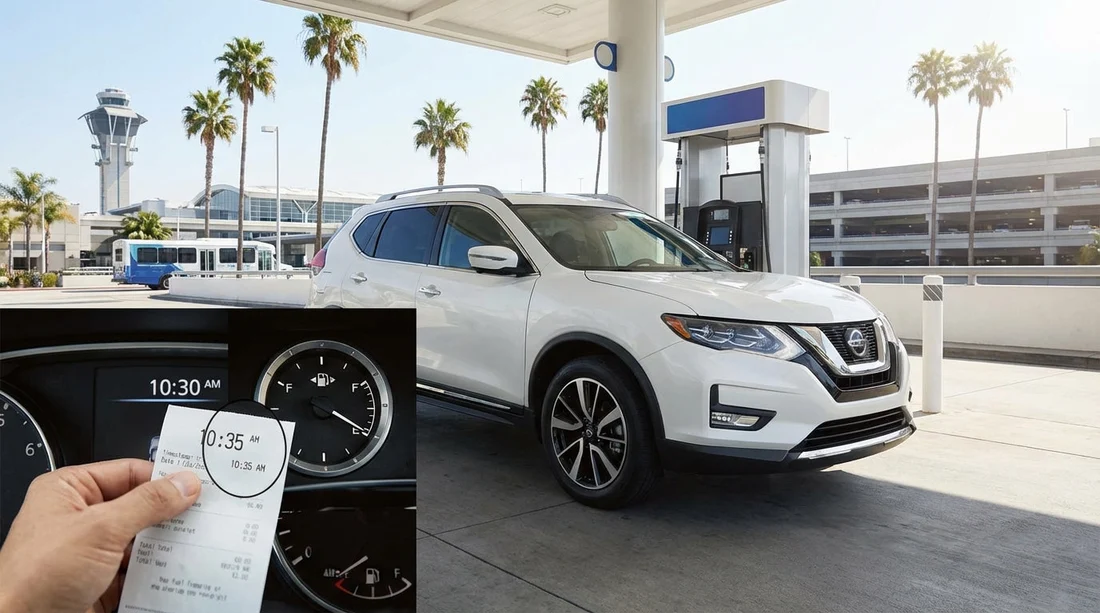
- Photograph the pump, full gauge, and receipt showing date, time, and gallons.
- Record queue delays at Orlando MCO with timestamped photos and short notes.
- Match station location to the return route, keep maps and distance evidence.
- Request fee removal with a timeline proving full-to-full and unavoidable delays.
At Orlando International Airport (MCO), it is common to top up fuel close to the terminals, then get caught in heavy traffic, a long fuel station queue, or a congested rental return. If your fuel receipt timestamp ends up after the contract return time, you can still dispute refuelling charges, and sometimes late fees, if you document what happened and show you returned the vehicle full under a full-to-full policy.
This guide gives a step-by-step checklist built for car hire returns at Orlando MCO. It focuses on collecting proof that is hard to argue with, timestamps, location evidence, and a clear timeline, so you can ask for charges to be removed with confidence.
If you are planning an Orlando airport pickup and return, these pages provide useful context on locations and suppliers: Orlando MCO car rental overview, car hire at Orlando MCO, Hertz at Orlando MCO, and Enterprise at Orlando MCO.
Why the receipt time can be later than your return time
Most disputes come down to how the return time is recorded. Many rental systems use the moment the vehicle is checked in, not when you arrived at the facility. In practice, you might join a line to enter the returns lanes, wait for an agent, or use a key drop. That means the “return time” on the contract can be earlier or later than what you experienced on the ground.
A fuel receipt timestamp after the contract return time can happen in a few real-world scenarios:
1) The contract return time is the scheduled time, not the actual check-in. Some contracts show the due time prominently, and the “in” time is elsewhere on the final invoice. If you only see the due time, do not assume it is the recorded check-in time.
2) Time zone or clock mismatches. Your phone, the pump, and the rental system can be out of sync by minutes, occasionally more. A five to ten minute difference can flip the sequence.
3) The station prints the receipt after payment is authorised. If the forecourt was busy, the receipt might print when the cashier finalises the sale, not when you finished pumping.
4) You refuelled after entering the airport area. You might have driven past the return entrance to find a closer station, then returned. The rental system can still log the check-in time based on the first scan or check-in point you passed.
The key is not arguing theory, but building a clean evidence set that shows you fuelled immediately before returning and the car was full when handed back.
Step-by-step checklist: build a timeline that survives review
Use this checklist in order. It is designed for speed when you are under pressure, and it creates a consistent record you can send to customer service or a billing disputes team.
Step 1: Before you refuel, capture the dashboard time and fuel level
While parked safely, take a clear photo of the dashboard showing the fuel gauge and, if visible, the vehicle’s clock. If your phone can show a timestamp overlay in the photo info, even better. Do not use filters or edits that could make the image look altered.
Also photograph the odometer. The mileage helps connect the refuelling location to the return site, and it can support the argument that you did not drive far after filling.
Step 2: At the pump, document pump number, station name, and full-to-full proof
When you pull in, take one photo that includes the pump number and the station branding. After filling, take another showing the pump display with total gallons and total cost, and then photograph the printed receipt. The receipt should show date, time, and location.
If the receipt only shows a transaction number and not the address, take a photo of the station address sign or a wide shot that includes a street sign nearby. This small step is often what makes a dispute easy to resolve.
Tip: If you are asked to pay inside and the queue is long, take a quick photo of the line. The photo metadata time supports why your receipt time could be later than the actual pumping.
Step 3: Capture your map route and distance immediately after leaving the station
Open your maps app and screenshot the route from the station to “MCO Rental Car Return”. Make sure the screenshot shows the time. A second screenshot showing the station pin and address is helpful.
This matters because refuelling charges are often applied when the rental company believes the fuel purchase was not close enough to the return location, or was too small to refill the tank. A route screenshot plus odometer photo helps show you did not travel far.
Step 4: If there is traffic or queuing, document it with timestamps
If you hit congestion on airport roads, or a queue to enter the rental return lanes, take brief, safe documentation. If you are driving, do not handle your phone. If you have a passenger, ask them to take photos. If you are alone, pull over legally and safely before capturing anything.
Useful queue evidence includes:
Photo of the line of vehicles with a recognisable sign, lane markers, or the rental return entrance in view.
Short note on your phone stating “Joined return queue at [time]”, then “Reached agent at [time]”. Notes are not as strong as photos, but they help create a coherent narrative.
Screenshot of live traffic conditions in your maps app showing delays and time, ideally with the route to the return area visible.
Step 5: At the return bay, photograph the final fuel gauge and return condition
Before you exit the vehicle, take a second dashboard photo showing the fuel gauge still on full. If the engine needs to be on for the gauge to display accurately, do so briefly in a safe manner. Then take photos of the car’s exterior from multiple angles.
If an attendant provides a checkout slip, photograph it. If they tell you the fuel is fine, note their name if visible on a badge. These small details can help when an automated refuelling charge appears later.
Step 6: If you use a key drop, record proof of drop-off time
Key drops can cause confusion because the vehicle may be checked in later. Take a photo of the key drop slot signage and the area around it, then take a quick timestamped photo right after you drop the keys. If there is a queue for key drop, photograph it as well.
Also keep your parking payment record if you had to pay any fee to enter or exit a garage area. It can corroborate your arrival time.
How to compare timestamps and spot what is actually being charged
When you receive a charge, separate it into one of these categories, because the evidence you provide should match the issue:
Refuelling charge (fuel service). This is usually applied when the vehicle is recorded as not full, or the rental company decides the refill was insufficient. Your goal is to show a full gauge at return and a near-airport fuel purchase immediately beforehand.
Late return fee. This is based on the recorded check-in time versus the due time. Your goal is to show you arrived on time but were delayed by queues, or that the check-in time is inconsistent with key drop and airport timestamps.
Both fuel and late charges. This happens when the vehicle is processed later, and staff assume it was driven longer and returned low. A strong timeline can get both reviewed.
Look closely at the final invoice for “Return time”, “Check-in time”, “Time in”, “Fuel level”, and “Fuel charge reason”. Some invoices show fuel in bars rather than percentage. If the invoice claims a fuel level below full but your return photo shows full, that mismatch is powerful evidence.
What to write when requesting removal of charges
Keep your request polite, specific, and supported by attachments. A clear structure helps the agent resolve it quickly. Use this format:
1) State what you are disputing. Example: “I am disputing the refuelling charge and any related fuel service fees on my final invoice.”
2) Provide a timeline with times in local Orlando time. List: time at pump, time leaving station, time joining return queue, time at return bay, time of key drop or checkout slip.
3) Attach proof. Include photos of the full gauge at return, pump receipt, pump display, station location, route screenshot, and any queue photos.
4) Make the request. Ask for the fuel charge to be removed due to evidence of full-to-full compliance. If a late fee is involved, ask for review based on documented queues and return facility delays.
5) Ask them to confirm the recorded check-in time. Request the system’s check-in timestamp and location scan time. This often reveals whether the wrong time was used.
Common pitfalls that weaken a fuel dispute
Topping up too far from MCO. A receipt from far away can look unrelated. If you must refuel earlier, add extra evidence: odometer, route screenshot, and full gauge at return.
Very small purchase amount. If you only add a tiny amount, it may not look like a true refill. If the tank was already nearly full, a photo of the gauge before and after helps show why the purchase was small.
Not keeping the receipt. A bank transaction alone usually lacks location details. Always get the printed receipt or a digital receipt that shows address and time.
Relying on memory. A dispute is stronger when it reads like a report, not a story. Timestamps and images do the work.
If the receipt time is after the contract time, what should you argue?
Do not argue that the receipt “proves” you refuelled before returning if the order looks reversed. Instead, argue that the receipt time reflects transaction completion and queues, and that your other evidence shows the vehicle was returned full. The fuel gauge at return is often the strongest single proof for refuelling charges, while queue documentation supports any timing discrepancy.
A practical approach is to say: the vehicle was returned with a full tank as shown in the return-bay photo, the fuel was purchased at a nearby station as shown by the receipt and location photo, and any timing mismatch is explained by documented lines at the station or at the return facility.
Preventing the issue next time at Orlando MCO
Allow extra buffer time for refuelling and returns, especially during school holidays and late afternoons. Consider choosing a fuel station that is clearly on your direct route to the rental car return, so your route screenshots match the most logical path.
Before you drive into the return lanes, check you have captured the essentials: receipt, pump photo, full gauge at return, and at least one photo showing the station identity. This takes under two minutes and can save hours later.
FAQ
Does a fuel receipt after my return time automatically mean I will be charged? No. Charges depend on what fuel level is recorded and what proof you can provide. A later receipt can still be consistent with queues, cashier delays, or clock differences.
What is the single best piece of evidence to remove a refuelling charge? A clear, timestamped photo of the dashboard showing a full tank at the return bay. Pair it with the receipt and station location photo for a stronger case.
Can I dispute a late fee if I arrived on time but the queue was long? Yes. Provide photos or notes showing when you joined the queue and when you reached an agent or key drop, then ask for the check-in timestamp to be reviewed.
What if the receipt does not show the station address? Add a photo of the station frontage and any visible address sign, plus a maps screenshot showing the station pin and route to MCO return.
How quickly should I raise a dispute about fuel or late charges? As soon as you notice the charge, ideally within a few days. The sooner you send your timeline and images, the easier it is for the rental company to verify records.




























































































